
Title Morph Chrome 插件, crx 扩展下载
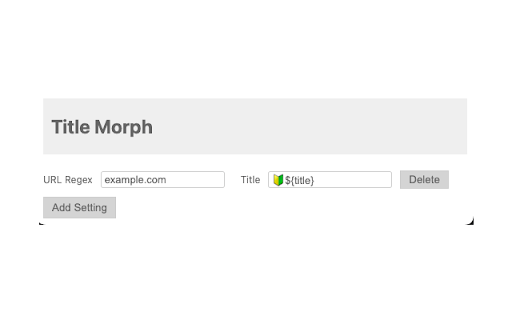
Change the title based on the URL
This is a simple Chrome extension designed to change your tab title based on the URL.
If your deployment environment includes a title, this extension allows you to automatically switch the tab title to match the name of the environment.
It's perfect for keeping track of multiple deployment environments.
In the extension's options, you can set the URL regex and the title you'd like to change to.
Feel free to use the following variables to create dynamic titles:
- ${title}: The default tab title
- ${url}: The current URL
- ${hostname}: The current hostname
- ${pathname}: The current pathname
- ${search}: The current search query
These variables allow you to tailor the tab titles to your specific needs.
| 分类 | 💻开发者工具 |
| 插件标识 | ajlggpkmjdilpiamlofcmjckeabiecea |
| 平台 | Chrome |
| 评分 |
★★★☆☆
3.5
|
| 评分人数 | 66 |
| 插件主页 | https://chromewebstore.google.com/detail/title-morph/ajlggpkmjdilpiamlofcmjckeabiecea |
| 版本号 | 1.0 |
| 大小 | 25.56KiB |
| 官网下载次数 | 38 |
| 下载地址 | |
| 更新时间 | 2023-08-31 00:00:00 |
CRX扩展文件安装方法
第1步: 打开Chrome浏览器的扩展程序
第2步:
在地址栏输入: chrome://extensions/
第3步: 开启右上角的【开发者模式】
第4步: 重启Chrome浏览器 (重要操作)
第5步: 重新打开扩展程序管理界面
第6步: 将下载的crx文件直接拖入页面完成安装
注意:请确保使用最新版本的Chrome浏览器
同类插件推荐

Icon Changer
Change and customize icons for any webpage or enti

Camelot DJ
Filter Beatport track lists by key.An extension fo
Title Morph
Change the title based on the URLThis is a simple

Morphs.io chrome extension
Morphic was developed as a research tool to to hel

Button Stealer
Steals buttons from the websites you visit. Do you

URL Changer v2
URL CHANGER V2Allows you to change and detect the

Site Effects
Add awesome filters to websites.Site affects is a

Tab ReTitle
Change tab titles easily!Simply click on the icon

Rename Tab Title
Renames the Tab TitleRenames the Tab Title (Firefo

YouTube Zoomer
Easily zoom on YouTube videos, with a simple scrol

URL in title
Reformats the title of each tab according to its U

Header Changer
Change title and icon displayed on tabThis is a pr
Simple Tab Renamer
A simple chrome tab renamer extensionLets you rena