
Tab Split Chrome 插件, crx 扩展下载
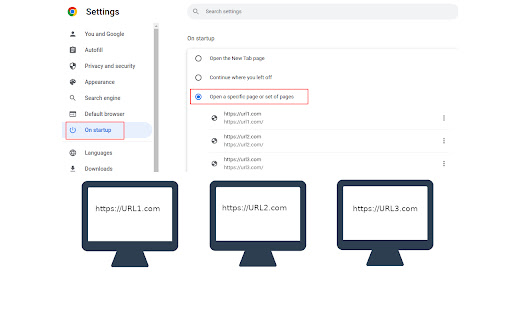
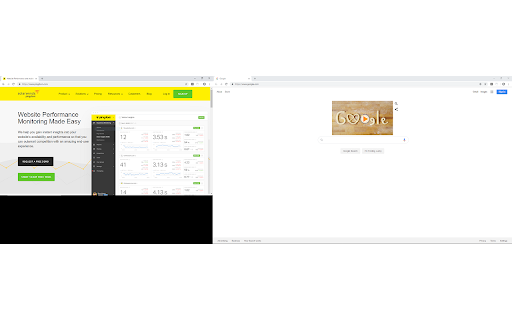
Forces each browser start page to open in a new browser window across multiple monitors.
Tab Split 1.1.3
Author: Jonathan "Acetolyne" Langlois
@cetolyne
OVERVIEW
Tab Split is a Chrome extension that makes your homepage tabs open in different windows and across multiple screens.
How it is different from other extensions is that you are not required to click a button, instead this extension runs when the browser is started which helps with automated startups for monitoring through websites.
SHOULD YOU USE THIS EXTENSION
If you are not setting up dashboards for monitoring then this extension is probably not for you!
PREREQUISITES
Before Tab Split will work you must first setup some websites to open when you start Chrome browser. To do this go to settings, choose the "On Startup" tab on the left, the choose "Open a specific page or set of pages". Add a new page for each page you would like to open when Chrome starts.
These are the websites that will be spread out across your screens as Chrome windows when Chrome first starts.
NOTE: pressing the reload button in the extensions section will not make Tab Split trigger, it will only trigger when the browser is first opened, to test please close all your browser windows and reopen the browser.
OPERATION
When Chrome Browser opens it will cause each startup tab to move to a new window. Each window is moved to the next display.
This is useful for setting up automated monitoring in multi-headed environments.
It will trigger each time Chrome is opened. This allows you to keep the ability to open new tabs without them being moved to a new window when you open them if you need to open tabs temporarily.
FEATURES
The extension now has the ability to choose between maximized screen and fullscreen, simply click the extension icon and choose which you would like and choose save. This will be your new default, change the option anytime you want.
LIMITATIONS:
The extension opens windows horizontally and will not open in a vertical manner, meaning monitors must be setup in a horizontal fashion to display correctly. It will work with monitors of different sizes though.
SUPPORT:
For best support please raise issues or questions on the Github page at https://github.com/Acetolyne/TabSplit/issues Chrome store will not send an email when you raise an issue or question on the Chrome Webstore so I may not see your issue or questions right away if you post there.
ADDITIONAL INFO:
The extension will open as many windows as you have tabs on startup. This setting is found under Chrome settings >> On Startup.
Choose "open specific pages when Chrome starts" then specify the pages you want to open automatically when Chrome browser is started.
For typical dashboard setups you can then set Chrome to start with the computer, Chrome will open and the websites defined in the "On Startup"
section of the settings page will then be spread across your multiple monitors.
To change which screen the tab opens on, change the order of homepages on the Chrome settings page.
If you have more tabs set to open than you have screens then the extra tabs will open on the last monitor all in the same window.
If you use this extension I would appreciate if you would take a minute to leave a review on the Chrome Webstore so other users can have valid feedback.
| 分类 | 📝工作流程与规划 |
| 插件标识 | anijodnfcgfofmacdpgonkncimndaeba |
| 平台 | Chrome |
| 评分 |
★★★★☆
4.3
|
| 评分人数 | 15 |
| 插件主页 | https://chromewebstore.google.com/detail/tab-split/anijodnfcgfofmacdpgonkncimndaeba |
| 版本号 | 1.1.3 |
| 大小 | 143KiB |
| 官网下载次数 | 3000 |
| 下载地址 | |
| 更新时间 | 2022-06-30 00:00:00 |
CRX扩展文件安装方法
第1步: 打开Chrome浏览器的扩展程序
第2步:
在地址栏输入: chrome://extensions/
第3步: 开启右上角的【开发者模式】
第4步: 重启Chrome浏览器 (重要操作)
第5步: 重新打开扩展程序管理界面
第6步: 将下载的crx文件直接拖入页面完成安装
注意:请确保使用最新版本的Chrome浏览器
同类插件推荐

Janus Workspace
Janus Workspace creates a page into a workspace wi
Tab Split
Forces each browser start page to open in a new br
Tab Resize - split screen layouts
The ORIGINAL Tab Resize. Split Screen made easy. R

Repo Split
Browse code in a comfortable wayRepo Split lets yo

EdScreen
Make multiple webpages visible on the same screen.

Multi-Screen Visualizer
A multi-screen visualizer for websiteThis is a wor

Double Read
This extension will allow you to read in two diffe

Tile Tabs WE
Take tabs from parent windows and arrange them in

Split Tab
Split tabs, supercharge productivity with multitas

Sideview Plus: Multitask w/o Second Monitor
Super charge multitasking on a single screenv.2.0.

Efficiency Split Screen
Split screen to improve search efficiency. Click s

Enhanced Tab Splitter
Split the active tab and all tabs to it's righ

Split Screen for Google Chrome
You can easily split and separate tabs, split inte