
StratusLINK Chrome 插件, crx 扩展下载
StratusLINK
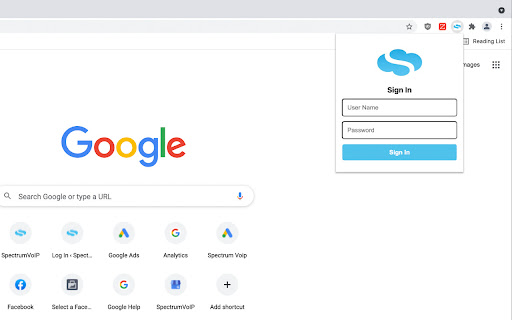
The StratusLINK extension allows for direct integration of your web browser and your SpectrumVoIP Phone service.
Features include:
Click To Call
- Initiate a call by clicking on the number through your Chrome Browser.
- A friendly icon appears next to clickable numbers on websites!
- Little to no interference to website functionalities!
- Ability to be turned on and off at any time with a click!
Call Recording Pause
- Only allow recording when YOU WANT to be recorded!
- Simple to use!
- If the selected URL is open on your browser, your call will not be recorded.
- Close the selected URL and your call will resume recording right away.
CRM Popups
- Inbound calls automatically open a URL with a caller ID search
- Customizable for your web based CRM
- Works with Salesforce, Zendesk, and many more!
Send Faxes
SpectrumVoIP Stratus account required to use this product.
For information about SpectrumVoIP: https://www.spectrumvoip.com/
For more information on this product visit our support site: https://support.spectrumvoip.com/hc/en-us/articles/4403064112659-StratusLINK-User-Guide
Version: 2.11.1
-Corrects bug in click to call limit scan
Version: 2.11.2
-Improved click to call number scanning
Version: 2.11.4
-Improved reconnect to web socket after lost/change of internet
-Remove Click to call scanning in SpectrumVoIP Softphone
Version: 2.11.5
-Added fix for Click to call detection on Salesforce Lightning.
Version: 3.0.0
-Corrected Store listing error
-Added new v2 support of Salesforce and Freshdesk
Version: 3.0.1
-Added v2 support for Hubspot
Version: 3.0.2
-Outbound call pop-out support on Hubspot
-Better Click to call number detection on Hubspot
Version: 3.0.3
-added UI config support for v2 popup UUID
Version: 3.0.4
-added improved support for call popout with SIP registration
Version: 3.0.5
-Improved Number matching for Hubspot
| 分类 | 📝工作流程与规划 |
| 插件标识 | aojgcjojneegldjkimenjdmdhnhkkdki |
| 平台 | Chrome |
| 评分 |
☆☆☆☆☆
0
|
| 评分人数 | 1 |
| 插件主页 | https://chromewebstore.google.com/detail/stratuslink/aojgcjojneegldjkimenjdmdhnhkkdki |
| 版本号 | 3.0.5 |
| 大小 | 238KiB |
| 官网下载次数 | 1000 |
| 下载地址 | |
| 更新时间 | 2025-02-10 00:00:00 |
CRX扩展文件安装方法
第1步: 打开Chrome浏览器的扩展程序
第2步:
在地址栏输入: chrome://extensions/
第3步: 开启右上角的【开发者模式】
第4步: 重启Chrome浏览器 (重要操作)
第5步: 重新打开扩展程序管理界面
第6步: 将下载的crx文件直接拖入页面完成安装
注意:请确保使用最新版本的Chrome浏览器
同类插件推荐

VoiceMpower 'Click to Call' Extension
Converts phone numbers in any web page into 'c

OctoTicket
Add asana ticket numbers on Ctrl-SpaceThis extensi

X-Tab
Close all other tabs except the current one.This C

GitHub compare helper
Adds UI to GitHub commits pages to easier create G
StratusLINK
StratusLINKThe StratusLINK extension allows for di

SpectrumVoIP Click2Call
Place phone calls from any web pageSpectrumVoIP Cl

Spectrum VoIP
CRM Integration Powered by Spectrum VoIPThe Spectr

Kurrant.ai
Get access to Kurrant AI’s private and public comp

TrainingPeaks Weekly Progress
Shows current weekly progress relative to planned

Amazing Tab Search
Replaces default search with Amazing Tab search en

All Find Seek
Extension adding All Find Seek search engine to br