
Requestly Intercept Modifier Chrome 插件, crx 扩展下载
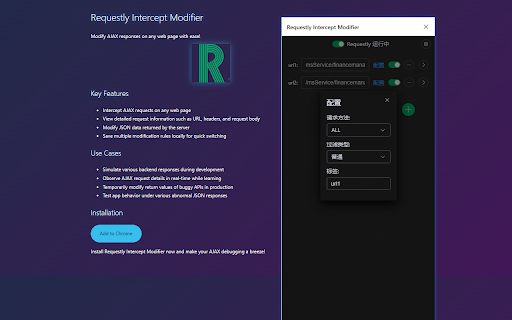
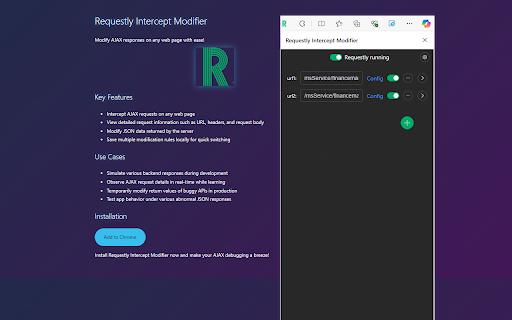

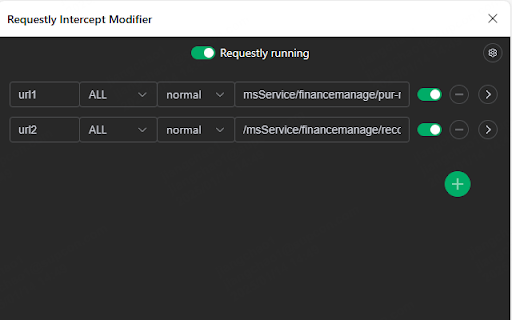
To modify ajax responses on any page
Modify the response text of Ajax requests
An extension plugin for Chrome that modifies the response of AJAX requests.
Main features:
1. Supports intercepting and modifying the response of XMLHttpRequest and fetch requests, including requests with 404 status.
2. Supports matching requests based on regular expressions and HTTP request methods.
3. Supports editing response data in JSON or JavaScript format.
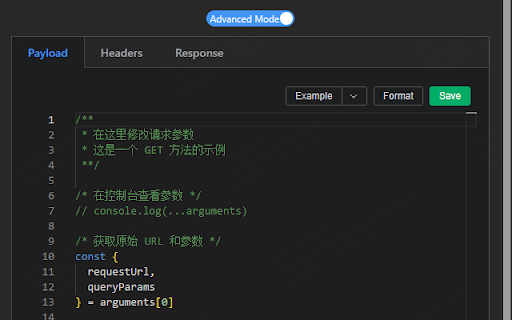
4. Allows easy creation of mock scenarios by accessing the original request information from the `arguments` parameter in JavaScript.
5. Adds a U-Network panel in DevTools for quickly intercepting requests and modifying response results.
6. Supports modifying request URLs, headers, and body.
主要功能:
1、 支持拦截并修改XMLHttpRequest和fetch请求的响应结果,包括404状态的请求
2、支持基于正则表达式和HTTP请求方法匹配请求
3、支持以JSON或JavaScript格式编辑响应结果
4、支持在JavaScript编程中从arguments参数获取原始请求信息,轻松创建mock场景
5、在DevTools中新增U-Network面板,快速实现请求拦截和响应结果修改
6、支持更改请求的URL、请求头和请求体
| 分类 | 💻开发者工具 |
| 插件标识 | aokolndineldbajhlldikhgaaolgmnnn |
| 平台 | Chrome |
| 评分 |
☆☆☆☆☆
0
|
| 评分人数 | 12 |
| 插件主页 | https://chromewebstore.google.com/detail/requestly-intercept-modif/aokolndineldbajhlldikhgaaolgmnnn |
| 版本号 | 0.1 |
| 大小 | 4.77MiB |
| 官网下载次数 | 36 |
| 下载地址 | |
| 更新时间 | 2025-01-24 00:00:00 |
CRX扩展文件安装方法
第1步: 打开Chrome浏览器的扩展程序
第2步:
在地址栏输入: chrome://extensions/
第3步: 开启右上角的【开发者模式】
第4步: 重启Chrome浏览器 (重要操作)
第5步: 重新打开扩展程序管理界面
第6步: 将下载的crx文件直接拖入页面完成安装
注意:请确保使用最新版本的Chrome浏览器
同类插件推荐

Blync: 链接预览、选择搜索 & AI侧边栏和弹出窗口
链接预览、选择搜索和快速搜索,无需离开标签页,在弹出窗口和侧边栏使用AI(ChatGPT,Gemin

ModifyAjaxResponse
Modify response text of ajax requestsThis extensio

Requestly Intercept Modifier
To modify ajax responses on any pageModify the res

Relay – Intercept, Modify & Run HTTP Requests in Your Browser
Intercept, edit, and run HTTP requests directly in

Request Interceptor
Request Interceptor extension for Chrome. This ext

Ajax Interceptor Tools
Modify the response text of Ajax requestsAn extens

Ajax Modifier
To modify ajax responses on any page1. It is recom

XHR Request Interceptor
Redirect XHR requests and change their headersRedi

xhr-devtool
xhr-devtool替换response结果

Request Interceptor
Request Interceptor Extension for Chrome.Request I

ModResponse - Mock and replay API
Mock, modify, and replay API. Easy setup. No proxy

Netify
Debugging proxy that will allow you to intercept a

Tamper Dev
Intercept and edit HTTP/HTTPS requests and respons