
Webpage Image Downloader Chrome 插件, crx 扩展下载


Extract images from websites
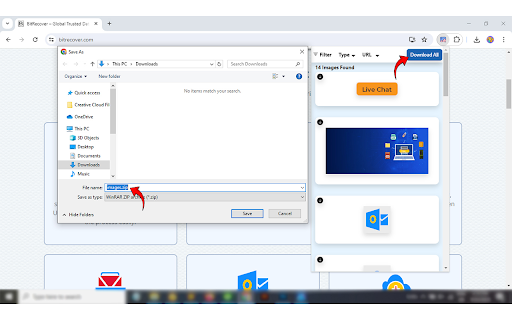
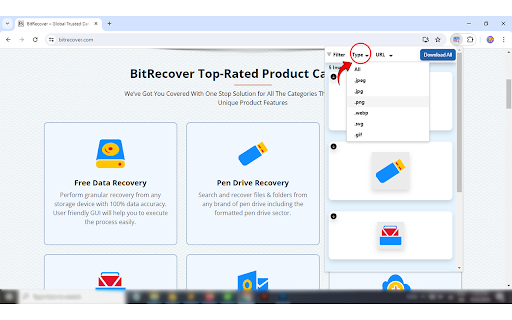
The Webpage Image Downloader is used for extracting images from websites or web pages, and you can also download multiple photos together in a zip file. This picture downloader provides multiple filters that help users extract the image as required using file extensions.
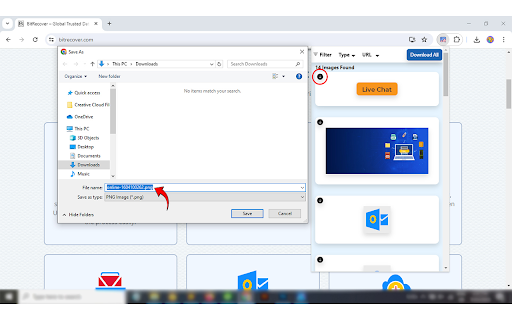
These filters help to download a particular image by choosing any image extension and downloading a particular picture, such as JPEG, PNG, SVG, GIF, etc. It is difficult to download images manually, as it is a time-consuming process to download each image. This tool helps users extract images shown on the current webpage that can be used in multiple ways.
This tool provides some advantages, such as allowing students to use the webpage image extractor to download multiple images for their projects and presentations. Use a website images downloader to obtain and download pics such as graphs and figures. It is also used to manage graphic content by downloading photos from the website or social media platforms for a variety and arrangement of the content and collecting different images to manage the content.
It also extracts images from different e-commerce websites for analysis and competitive research. Webpage Image extractors assist forensics and legal investigations by extracting pictures from social media platforms and other websites and presenting those images in legal arguments. This tool helps in creative and design work by collecting and extracting new ideas and inspirational images for creative thinking and designing.
With this tool, you can download photos by copying their image address and then using the URL download option to download the photos to your system. Other features of this tool are mentioned below.
Some advanced features of the website image downloader
● Batch processing: Download the image in bulk; you can easily download the photos automatically.
● Advanced filters: This tool helps us download a particular image as per your requirements by using a filter that helps in downloading pictures in a particular format such as JPEG, GIF, PNG, etc.
● One-click downloading: This tool automatically extracts all the images that are shown on the webpage and saves them to your system in a zip file.
● Large-scale data collection: The picture downloader helps in obtaining the photos on a large scale.
● Accuracy: This tool helps ensure uniformity and accuracy while collecting the images from the web pages.
| 分类 | 🛠️工具 |
| 插件标识 | baodjjkndoljmfjlgfmebagngpgkaknp |
| 平台 | Chrome |
| 评分 |
★★★★☆
4.5
|
| 评分人数 | 55 |
| 插件主页 | https://chromewebstore.google.com/detail/webpage-image-downloader/baodjjkndoljmfjlgfmebagngpgkaknp |
| 版本号 | 1.1 |
| 大小 | 148KiB |
| 官网下载次数 | 153 |
| 下载地址 | |
| 更新时间 | 2024-07-31 00:00:00 |
CRX扩展文件安装方法
第1步: 打开Chrome浏览器的扩展程序
第2步:
在地址栏输入: chrome://extensions/
第3步: 开启右上角的【开发者模式】
第4步: 重启Chrome浏览器 (重要操作)
第5步: 重新打开扩展程序管理界面
第6步: 将下载的crx文件直接拖入页面完成安装
注意:请确保使用最新版本的Chrome浏览器
同类插件推荐
Webpage Image Downloader
Extract images from websitesThe Webpage Image Down

图片下载器 - 保存所有图片
快速从网页批量查找和下载图片您可以根据图像特征过滤图像。 您可以选择下载哪张图片,也可以下载所有通过

批量图片下载器 - Imageye
一款用于嗅探、分析网页图片并提供批量下载等功能的浏览器扩展程序。使用批量图片下载器在网页上查找并下载

Image Downloader
Using image downloader, locate and download all of