
Extension Manager with Profiles Chrome 插件, crx 扩展下载
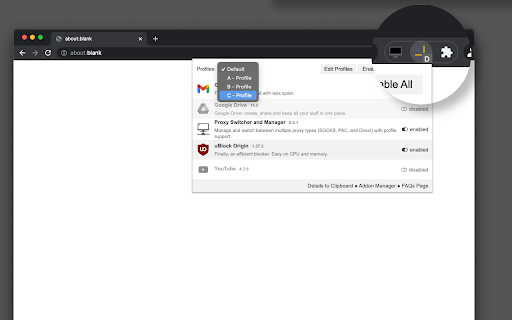
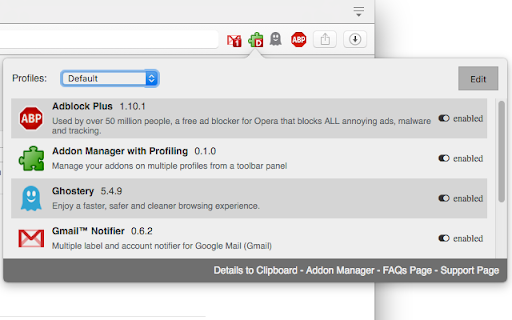
根据不同的配置文件禁用未使用的扩展程序,以释放其资源占用,并改善你的隐私。
Extension manager with profiles enables you to have access to all your add-ons from a toolbar panel. You can define multiple profiles to disable and enable add-ons in bulk to either free up space in the toolbar area or reduce background usage of the Chrome browser.
Features:
1. Enable all extensions at once
2. Disable all extensions at once
3. Enable a set of extensions with just a single click (profile)
4. have as many profiles as you would like to
5. Copy extensions information into the clipboard
This extension can be used to browser, for instance, unsecured pages. In this case, popup blockers and adblocker extensions can be enabled. For normal web browsing that you are sure that the websites are safe, these extensions can be turned off to improve the browser's speed. Note that each extension especially those dealing with adblocking, uses at least on network observer and by nature network observation makes your web browsing experience a bit slow.
| 分类 | 🔒隐私 |
| 插件标识 | bikkpoofeknkgfojdcpkohpjbpiokcce |
| 平台 | Chrome |
| 评分 |
★★★★☆
4.6
|
| 评分人数 | 67 |
| 插件主页 | https://chromewebstore.google.com/detail/extension-manager-with-pr/bikkpoofeknkgfojdcpkohpjbpiokcce |
| 版本号 | 0.2.3 |
| 大小 | 41.9KiB |
| 官网下载次数 | 2000 |
| 下载地址 | |
| 更新时间 | 2024-11-20 00:00:00 |
CRX扩展文件安装方法
第1步: 打开Chrome浏览器的扩展程序
第2步:
在地址栏输入: chrome://extensions/
第3步: 开启右上角的【开发者模式】
第4步: 重启Chrome浏览器 (重要操作)
第5步: 重新打开扩展程序管理界面
第6步: 将下载的crx文件直接拖入页面完成安装
注意:请确保使用最新版本的Chrome浏览器
同类插件推荐

Extension Manager
Manage and control your browser extensions more ea
TabStacks: tab and history search
View and search through open tabs and browser hist

Vaux Tab
Vaux Tab Manager and Window OrganizerVaux is an in

Extensions switcher
Menu for quick extensions controlSimple extension

Ultra Button
控制一切的按钮!您现在能够在一个按钮中,使用大多数浏览器的功能 包含: 书签,扩充功能,下载管理,历

ManExt
Manage - and group - your installed extensionsMana

The Great Grouper
Flooded with tabs? Store them easily into groups,

Extension List
Extension ListManaging installed browser extension

扩展管家
扩展管家,快速的启用、禁用扩展主要功能: 1. 启用/禁用扩展 2. 禁用全部扩展 3. 恢复已禁扩

Extension Manager with Profiles
根据不同的配置文件禁用未使用的扩展程序,以释放其资源占用,并改善你的隐私。Extension man

Extension Control
Elementary extension manager. Compact design, no s

Extension Manager
Extension that manages other extensionsIf you have

Extentie - 扩展程序管理器
漂亮而简单的扩展程序管理工具漂亮而又简单的弹出式 Chrome 扩展管理工具。 最近更新: - 现