
Download Google Home For PC - Best For Windows, Mac Chrome 插件, crx 扩展下载
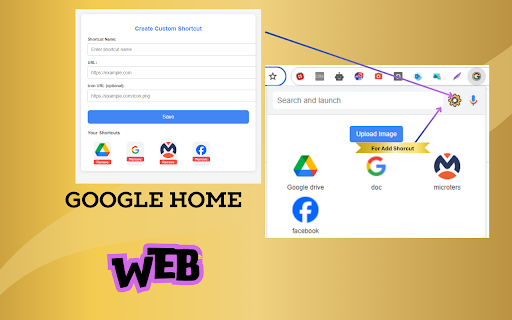
Create and manage custom shortcuts for your favorite sites.
Download Google Home For PC - Best For Windows, Mac, is an intuitive browser extension designed to enhance your web experience by allowing you to create and manage custom shortcuts for your favourite websites. It provides a seamless way to search, launch, and manage web resources directly from your browser, making your online activities more efficient and personalized.
? Extension Features:
✔ Custom Shortcuts: Easily create and manage shortcuts to your favourite websites. Add a name, URL, and optional icon for each shortcut.
✔ Voice Search: Use voice commands to initiate searches and launch sites. Simply click the voice search icon to start speaking.
✔ Image Upload: Upload and manage custom images to enhance your shortcuts or for other personal use.
✔ Settings Management: Access and modify extension settings effortlessly through the settings icon.
✔ Custom Actions: Additional context menu options, including Google Lens Detector and custom search actions, enhance your browsing experience.
✔ Cross-Browser Compatibility: Works seamlessly across all major platforms, including PC, Mac, and Windows.
? Why Use This Extension:
Google Home Web is designed to significantly enhance your browsing efficiency and personal enjoyment. By allowing you to quickly access frequently visited websites and services, the extension eliminates the need to manually type URLs or sift through bookmarks. It offers a high level of personalization, enabling you to create custom shortcuts with unique names and icons that align with your preferences. This customization not only makes your browser more intuitive but also visually appealing. Additionally, the extension incorporates voice activation, which means you can initiate searches and launch sites simply by speaking, making your online experience hands-free and more convenient. For those who enjoy adding a personal touch, the image integration feature lets you upload and use custom images, further enhancing the aesthetic of your shortcuts.
? How to Use This Extension:
Using Google Home Web is straightforward and user-friendly. To start, open the options page (options.html) from the extension menu to create new shortcuts. Here, you can input the name, URL, and an optional icon URL for each shortcut you wish to add. After filling out these details, simply click "Save" to add the shortcut to your collection. When you need to perform a search or launch a site, use the search bar in the popup (popup.html). For hands-free operation, click the voice search icon to activate voice commands. If you want to personalize your shortcuts further, use the "Upload Image" button to choose and upload images from your device. These images can enhance the visual appeal of your shortcuts. Finally, manage your extension settings by clicking the settings icon in the popup, where you can adjust preferences and manage various functionalities to suit your needs.
? Disclaimer:
This extension requires access to your browser storage and microphone to provide its full range of features, including custom shortcuts and voice search. All data is handled in accordance with our privacy policy and only used for enhancing your browsing experience. Please ensure you review the permissions and understand their implications before using the extension.
| 分类 | 📝工作流程与规划 |
| 插件标识 | bjfjmmeajgoieampnnopjdikmbiebone |
| 平台 | Chrome |
| 评分 |
★★★★☆
4.5
|
| 评分人数 | 36 |
| 插件主页 | https://chromewebstore.google.com/detail/download-google-home-for/bjfjmmeajgoieampnnopjdikmbiebone |
| 版本号 | 1.1 |
| 大小 | 81.64KiB |
| 官网下载次数 | 6000 |
| 下载地址 | |
| 更新时间 | 2024-09-12 00:00:00 |
CRX扩展文件安装方法
第1步: 打开Chrome浏览器的扩展程序
第2步:
在地址栏输入: chrome://extensions/
第3步: 开启右上角的【开发者模式】
第4步: 重启Chrome浏览器 (重要操作)
第5步: 重新打开扩展程序管理界面
第6步: 将下载的crx文件直接拖入页面完成安装
注意:请确保使用最新版本的Chrome浏览器
同类插件推荐
Mi Home For PC, Windows, Mac - Free Download
Mi Home For PC, Windows, Mac - Free DownloadMi Hom
Download Google Home For PC - Best For Windows, Mac
Create and manage custom shortcuts for your favori

Google Meet <=> Home Assistant
Updates a Home Assistant entity state with the sta

Browser Cast - Phone remote 4 your PC browser
Cast any webpage from your mobile phone to a Chrom

YouTube No Cast
Removing YouTube cast button.It just removes YouTu

PlayTo for Chromecast™
Allows you to send any internet videos to Chromeca

SplitCast
Split your screen and stream multiple tabs at once
Home Assistant
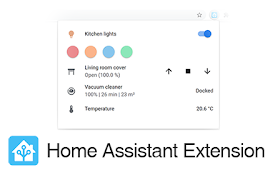
A quick shortcut to your Home AssistantUnofficial

Cast with MkChromecast
Casts videos in pages like youtube via MkChromecas

Quick Home Button
Go to home page on current website quickly

PC Monitor
A chrome extension for monitoring PC Stats, includ

Music Mode for YouTube™
屏蔽视频,只保留YouTube和YouTube Music的音频。Due to some recen
VLC在线-多媒体播放器
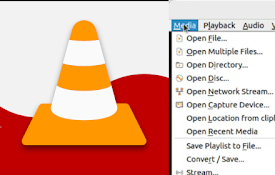
使用此在线分发的 VLC 播放大多数多媒体文件和各种流媒体协议。VLCOnline 是一款旨在增强您