
Microsoft Defender Browser Protection Chrome 插件, crx 扩展下载
Protect yourself against online threats, like phishing and malicious websites, with real-time protection from Microsoft.
Currently supported region(s): United States
The Microsoft Defender Browser Protection extension helps protect you against online threats, such as links in phishing emails and websites designed to trick you into downloading and installing malicious software that can harm your computer.
If you click a malicious link in an email or navigate to a site designed to trick you into disclosing financial, personal or other sensitive information, or a website that hosts malware, Microsoft Defender Browser Protection will check it against a constantly updated list of malicious URLs known to Microsoft.
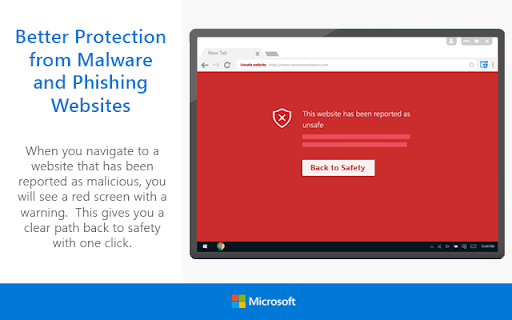
If the malicious link matches one on the list, Microsoft Defender Browser Protection will show a red warning screen letting you know that the web page you are about to visit is known to be harmful, giving you a clear path back to safety with one click.
Privacy statement: https://privacy.microsoft.com/en-us/privacystatement
• Continuously updated list of reported harmful sites
• Protects against phishing sites and socially engineered malware sites
• Real-time indicator of harmful sites and website status
• V1.62 – Initial Release
• V1.63 – Fixed Chromebook issue
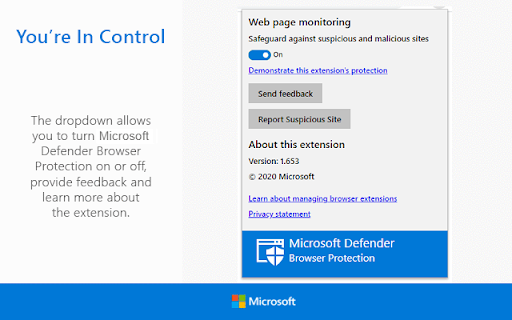
• V1.65 – Added “Report Suspicious Site” feature, and ability to
demonstrate the extension’s protection
• V1.66 – Improve protection and performance. Add Group Policy
controls.
| 分类 | 📝工作流程与规划 |
| 插件标识 | bkbeeeffjjeopflfhgeknacdieedcoml |
| 平台 | Chrome |
| 评分 |
★★★☆☆
3.7
|
| 评分人数 | 147 |
| 插件主页 | https://chromewebstore.google.com/detail/microsoft-defender-browse/bkbeeeffjjeopflfhgeknacdieedcoml |
| 版本号 | 1.664 |
| 大小 | 240KiB |
| 官网下载次数 | 2000000 |
| 下载地址 | |
| 更新时间 | 2025-02-16 00:00:00 |
CRX扩展文件安装方法
第1步: 打开Chrome浏览器的扩展程序
第2步:
在地址栏输入: chrome://extensions/
第3步: 开启右上角的【开发者模式】
第4步: 重启Chrome浏览器 (重要操作)
第5步: 重新打开扩展程序管理界面
第6步: 将下载的crx文件直接拖入页面完成安装
注意:请确保使用最新版本的Chrome浏览器
同类插件推荐

Douga Getter
拡張機能のアイコンをクリックするだけで、さまざまな動画サイトから簡単に動画をダウンロードできます。動

マイナポータル
様々なオンライン行政サービスで、マイナンバーカードを利用するためのアプリケーションです。■注意事項

楽天ウェブ検索
検索するだけで、毎日楽天スーパーポイントが貯まります!検索するだけ!毎日簡単に楽天ポイントが貯まりま

Emsisoft Browser Security
Blocks dangerous websites that distribute malware

TrafficLight
Bitdefender TrafficLight adds a strong and non-int

AutoPagerize
A browser Extension for auto loading paginated web
密码防护警示
密码防护警示功能有助于防范网上诱骗攻击。如果您在 accounts.google.com 以外的任何

Online Security Pro
针对恶意软件,网络钓鱼和恶意网站的在线安全性。通过Comodo的实时保护,保护您自己,您的家人和您的
Microsoft Defender Browser Protection
Protect yourself against online threats, like phis

Malwarebytes Browser Guard
The fastest and safest web browsing experience.Mal

VT4Browsers
VirusTotal Browser Extension.Avoid infections and