
Override Chrome's New Tab Policy Chrome 插件, crx 扩展下载
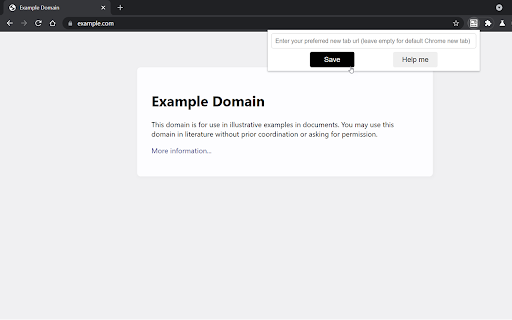
A workaround for bypassing or replacing the default Chrome new tab policy set by your organization.
This extension allows you to bypass the mandatory new tab page set by your organization or admin.
You can leave the url input field empty to go to the default Chrome new tab.
You can set a custom url to go to whenever you open a new tab.
You can also point the new tab to any local file on your computer.
And if you want to go to any new tab set by another extension, just get the url of the page opened by that extension and add it in the url field.
Supported urls start with:
"https://"
"http://"
"file://"
"ftp"
"urn"
"chrome-extension://"
"chrome://"
| 分类 | 📝工作流程与规划 |
| 插件标识 | blipilanfdpkfifjekjokjahpjnngifa |
| 平台 | Chrome |
| 评分 |
★★★★★
5
|
| 评分人数 | 5 |
| 插件主页 | https://chromewebstore.google.com/detail/override-chromes-new-tab/blipilanfdpkfifjekjokjahpjnngifa |
| 版本号 | 1.2 |
| 大小 | 19.18KiB |
| 官网下载次数 | 1000 |
| 下载地址 | |
| 更新时间 | 2021-09-14 00:00:00 |
CRX扩展文件安装方法
第1步: 打开Chrome浏览器的扩展程序
第2步:
在地址栏输入: chrome://extensions/
第3步: 开启右上角的【开发者模式】
第4步: 重启Chrome浏览器 (重要操作)
第5步: 重新打开扩展程序管理界面
第6步: 将下载的crx文件直接拖入页面完成安装
注意:请确保使用最新版本的Chrome浏览器
同类插件推荐

New Tab Redirect
Redirects your 'new tab' to an external we

Minimal New Tab
newtabMinimal New Tab - Remove Google Doodles whil
Passwd: Team Password Manager
Passwd remembers all your team's passwords for

Override Homepage
Take control of your browser's startup pages.

New Tab
⚡ A high-performance new tab page that gets you wh
Override Chrome's New Tab Policy
A workaround for bypassing or replacing the defaul
Custom New Tab
自定义新标签页 URL。将新标签页更改为指向您想要的任何 URL 或本地文件。Chrome does

New Tab Override
Load a custom URL when opening a new tab.Most exte

Custom New Tab URL
Customize the new tab URL.Chrome doesn't allow

New Tab URL
Use a custom URL as the New Tab page without losin

Simple New Tab URL
Simply set the URL you want new tabs to load and i

Replace NewTab
An extension to configure new tabs.By setting a UR