
New Tab Override Chrome 插件, crx 扩展下载
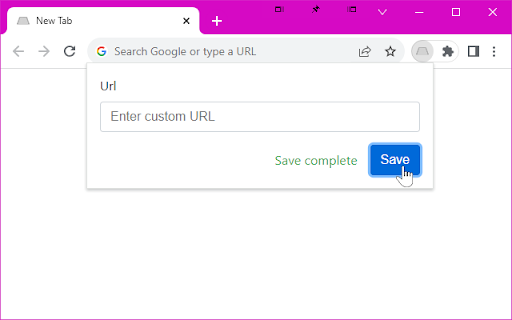
Load a custom URL when opening a new tab.
Most extensions that allow a custom URL for the new tab page do so by redirecting to the URL then attempting to focus on the address bar.
The second step of focusing on the address bar when using the redirect method was broken in Chrome 61.
This extension fixes the second step by using a new method, rather than redirecting it loads the URL in the background then injects its content into a empty new tab page.
This means there is no redirect, and therefore the address bar never actually loses focus in the first place.
Permissions:
* Read and change all your data on the websites that you visit - Used only to load the URL in the background, none of your data or websites you visit are ever read or changed.
* Replace the page that you see when opening a new tab - Duh!
| 分类 | ⚙️功能性 |
| 插件标识 | fjcmlondipcnnpmbcollgifldmajfonf |
| 平台 | Chrome |
| 评分 |
★★★★★
5
|
| 评分人数 | 15 |
| 插件主页 | https://chromewebstore.google.com/detail/new-tab-override/fjcmlondipcnnpmbcollgifldmajfonf |
| 版本号 | 1.2.0 |
| 大小 | 11.06KiB |
| 官网下载次数 | 2000 |
| 下载地址 | |
| 更新时间 | 2023-12-05 00:00:00 |
CRX扩展文件安装方法
第1步: 打开Chrome浏览器的扩展程序
第2步:
在地址栏输入: chrome://extensions/
第3步: 开启右上角的【开发者模式】
第4步: 重启Chrome浏览器 (重要操作)
第5步: 重新打开扩展程序管理界面
第6步: 将下载的crx文件直接拖入页面完成安装
注意:请确保使用最新版本的Chrome浏览器
同类插件推荐
Pimp your 'New Tab'
Pimp your 'New Tab' - open any website or

Tab Activate
New tabs open immediately instead of in the backgr

Fast New Tab Redirect Reborn
Change the redirect page to something a little mor
New Tab Changer
Load a custom web page or url in a new tab. Fast,

Override Chrome's New Tab Policy
A workaround for bypassing or replacing the defaul

Fast New Tab Redirect
Redirect the New Tab page to your favoriteIt's
Change New Tab
Allows you to change New Tab page to your specific

New Tab Redirect
Allows a user to provide the URL of the page that
New Tab Override
Load a custom URL when opening a new tab.Most exte

Custom New Tab URL
Customize the new tab URL.Chrome doesn't allow

New Tab URL
Use a custom URL as the New Tab page without losin

Simple New Tab URL
Simply set the URL you want new tabs to load and i