
X Search Assistant Chrome 插件, crx 扩展下载
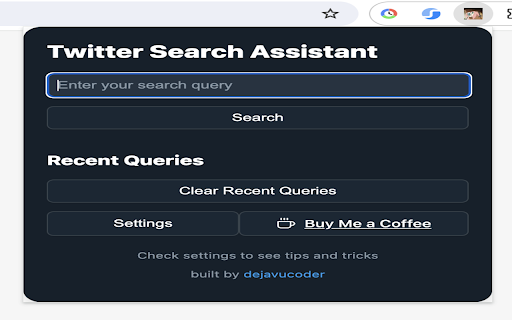

LLM powered X (formerly Twitter) search assistant
Unlock the full power of X search with help of LLMs
X Search Assistant is your AI-powered companion for crafting advanced Twitter searches effortlessly. Simply type what you're looking for in plain English and let the LLM figure out the search query. This query will be run on Twitter web itself on a new tab. You can choose pretty much LLM.
Requirements:
1. Any one of OpenAI API key, Anthropic Key or Openrouter API key
2. You need to be logged on from any account to search on X/Twitter
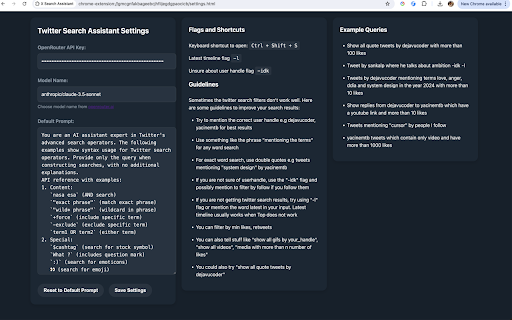
Keyboard shortcut: Ctrl + Shift + S
Latest timeline flag: -l
Unsure about user handle flag: -idk
Example Queries:
I use Claude Sonnet 3.5 for below ones but the results are good with smaller models like Claude Haiku and Gemini Flash too thanks to the elaborate system prompt.
1.
Your query -> "Tweets by dejavucoder mentioning terms like system design in the year 2024 with more than 10 likes"
X search assistant query -> from:dejavucoder (system design OR architecture OR scalability OR microservices OR distributed systems) since:2024-01-01 until:2024-12-31
2.
Your query -> "Find replies from @user1 to @user2 with YouTube links and 10+ likes"
Crafted query -> from:user1 to:user2 filter:replies url:youtube.com min_faves:10
Key Features:
Natural Language Search: No need to memorize complex search operators. Just describe what you want to find.
AI-Powered: Leverages LLMs for text to twitter search query
Customizable LLM: You can change to any LLM supported by Openrouter API
Recent Queries: Quick access to your recent english-input / query pairs
Time-Saving Shortcuts: Use flags like "-l" for latest results or "-idk" when unsure about usernames.
Prompt Provided: Default prompt is visible and editable for transparency.
Supercharge your Twitter research and discover content you never knew existed. Download Twitter Search Assistant today and transform the way you search.
| 分类 | 🛠️工具 |
| 插件标识 | blmkdoenmankjplhaabnedoemdbchicf |
| 平台 | Chrome |
| 评分 |
★★★★☆
4
|
| 评分人数 | 64 |
| 插件主页 | https://chromewebstore.google.com/detail/x-search-assistant/blmkdoenmankjplhaabnedoemdbchicf |
| 版本号 | 1.1 |
| 大小 | 56.29KiB |
| 官网下载次数 | 39 |
| 下载地址 | |
| 更新时间 | 2024-09-09 00:00:00 |
CRX扩展文件安装方法
第1步: 打开Chrome浏览器的扩展程序
第2步:
在地址栏输入: chrome://extensions/
第3步: 开启右上角的【开发者模式】
第4步: 重启Chrome浏览器 (重要操作)
第5步: 重新打开扩展程序管理界面
第6步: 将下载的crx文件直接拖入页面完成安装
注意:请确保使用最新版本的Chrome浏览器
同类插件推荐

AutoLatex
LLM powered text2latex for math equations, image2l

Dead Simple Twitter/X Search
Simple and powerful search tool for Twitter/XThis
Better Twitter/X Search
Had enough about X's advanced search? We are b

Advanced Search Quickly for Twitter
A Chrome extension for quickly searching Twitter.A

ClaudeSave
A Chrome extension that saves conversations with C
X Search Assistant
LLM powered X (formerly Twitter) search assistantU

Zapier Agents
Take personalized AI agents anywhere you go in you

BookmarkX - The place for all your x.com bookmarks.
Take control of your x.com bookmarks with tags, co

Modern for Hacker News
A redesigned web interface for Hacker News.Enhance

Xearch - Twitter Likes Search
Effortlessly search, filter, and organize your Twi

TweetSearcher Search Twitter Likes & Bookmark
The easiest way to search your Twitter Likes and B

X(Twitter) Addons
Advanced Search Queries: Easily construct detailed

Tweet Hunter X: Sidebar for Twitter
Stop doomscrolling and start exploring. A browser