
AutoLatex Chrome 插件, crx 扩展下载
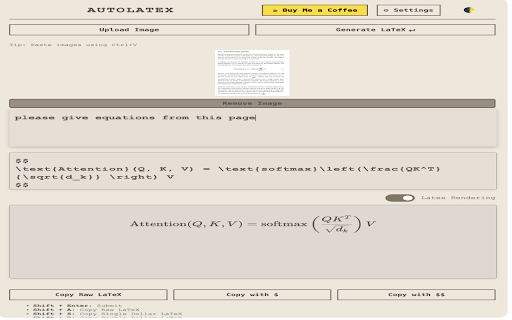

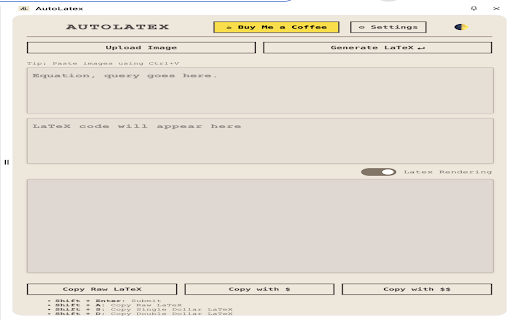
LLM powered text2latex for math equations, image2latex converter with live markdown and latex rendering, standalone chat mode
Update 29/12/24: Allow empty default and image prompt
Update 10/10/24: Improved UI
Update : Now supports OpenAI api key along with OpenRouter
Why use AutoLatex
AutoLatex is a browser extension that simplifies LaTeX equation generation for researchers and students. It uses LLMs to convert natural language and images into markdown and LaTeX, with instant rendering so you can edit on the spot. The tool offers customizable settings, keyboard shortcuts, and privacy control through user-managed API keys. By streamlining the process of incorporating complex equations into documents, AutoLatex enhances productivity in academic and research workflows, especially in deep learning fields.
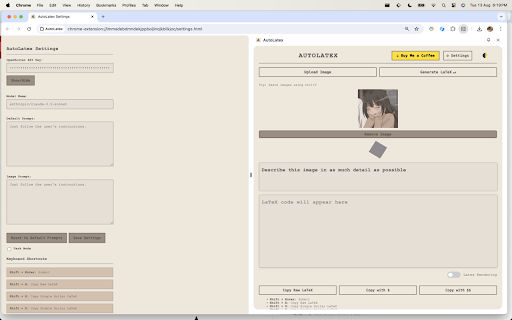
You can also use it just as an LLM companion in the sidebar by switching off the latex renderer.
• Main Features:
- Converts natural language or image input into LaTeX equations and markdown
- Renders LaTeX equations and markdown in real-time
- Allows copying of generated text with or without delimiters ($, $$)
- Standalone chat mode available by switching off LaTeX rendering
- Integrates with OpenRouter API to access various language models
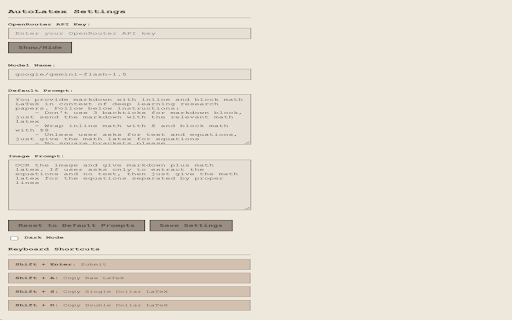
- Customizable system prompt and image prompt
- Dark mode support
• LLM Integration:
- Uses OpenRouter API to access language models (default: google/gemini-flash-1.5)
- Sends user input (text or image) along with a system prompt to the chosen model
- Receives generated LaTeX and markdown from the model
- Supports OCR for images containing equations
• User Interface:
- Input area for entering natural language or pasting images
- Render area to display generated LaTeX and markdown
- Buttons for submitting queries, copying results, and accessing settings
- Image preview with drag-and-drop support
- Toggle for showing/hiding the render area
• LaTeX and Markdown Handling:
- Renders LaTeX equations using KaTeX library
- Supports both inline ($...$) and block ($$...$$) LaTeX syntax
- Uses marked library for rendering markdown
• Customization Options:
- API key management for OpenRouter
- Model selection
- Customizable prompts for text and image inputs
- Dark mode toggle
• Keyboard Shortcuts:
- Shift + Enter: Submit query
- Shift + A: Copy raw LaTeX
- Shift + S: Copy LaTeX with single dollar signs
- Shift + D: Copy LaTeX with double dollar signs
| 分类 | 📚教育 |
| 插件标识 | fmjogafcialngfcopflagalflkcnlebk |
| 平台 | Chrome |
| 评分 |
★★★★★
5
|
| 评分人数 | 3 |
| 插件主页 | https://chromewebstore.google.com/detail/autolatex/fmjogafcialngfcopflagalflkcnlebk |
| 版本号 | 1.6 |
| 大小 | 1.38MiB |
| 官网下载次数 | 706 |
| 下载地址 | |
| 更新时间 | 2024-12-29 00:00:00 |
CRX扩展文件安装方法
第1步: 打开Chrome浏览器的扩展程序
第2步:
在地址栏输入: chrome://extensions/
第3步: 开启右上角的【开发者模式】
第4步: 重启Chrome浏览器 (重要操作)
第5步: 重新打开扩展程序管理界面
第6步: 将下载的crx文件直接拖入页面完成安装
注意:请确保使用最新版本的Chrome浏览器
同类插件推荐

LaTeXGPT: Compile LaTeX from ChatGPT and More
Get an instant PDF/HTML output without leaving you
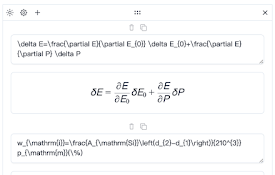
LaTex Math Equations Viewer
LaTex math equations viewerConveniently render LaT

KaTeX Formula Handler
Copy and export KaTeX formulas.Allows you to copy
AutoLatex
LLM powered text2latex for math equations, image2l

X Search Assistant
LLM powered X (formerly Twitter) search assistantU

ChatGPT Equation Renderer
Display equations in ChatGPT using Latex notationT
Math Equations Anywhere
Add equations to your math page--Features Support

LaTeX Editor
A lite, free & flexible LaTeX editor app for y
Math Embed: From LaTeX to embeddable link
Make your LaTeX math embeddable for articles, webs

Latex Math
a simple tool to generate math images from Latexa

MATH Keys - 方程和公式编辑器
免费的在线方程式编辑器,允许用户在线书写数学方程式、公式和符号MATH Keys是一个完全免费的在线

适用于Google Chrome™的Latex数学公式
您可以编辑,然后将其另存为Google云端硬盘。您是否需要在计算机上完成一些数学方程式/在线数学作业

TeX Math Here
Use the TeX markup language to take math here, the