
FPL Tools Chrome 插件, crx 扩展下载
Tools to help fantasy premier league manager
FPL Tools:
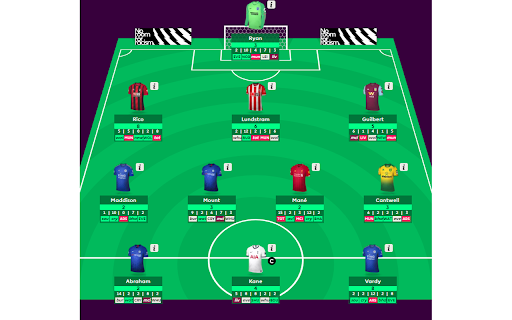
1. Fixture difficulty
-In page fixture difficulty in team and transfer list.
-Home and away indicator with uppercase indicate home and lowercase indicate away.
-Default green -> red color indicate lower to higher fixture difficulty.
-Color scheme options to change color to blue -> red for fixture difficulty.
2. Last 5 GW Points
-Last 5 Game week points in page
-Hover to see opponent details
3.Net Transfers
-Net transfers in transfer page in pitch view and transfer list.
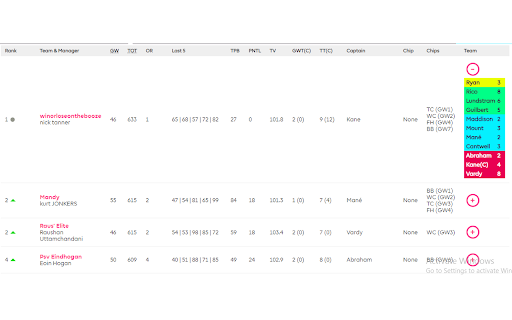
4.Extended League Tables
-Added more information about teams in league tables like last 5 gw points, total transfer, hits, team value, captain, cheap used, total cheap used and playing xi.
5. Expected Points
-Shows expected points for next GW for playing 11 and bench in my team page
6. Quick Transfer
-Add player without popup from transfer list
7. Compare Players
-Compare players within fpl dialog
-How to compare players?
* open any player information dialog
* select player to compare with
* max 3 players can be compared
| 分类 | 🎬娱乐 |
| 插件标识 | bplgdnfjlmbnjpibjogpoabahffibepk |
| 平台 | Chrome |
| 评分 |
★★★★☆
4.2
|
| 评分人数 | 17 |
| 插件主页 | https://chromewebstore.google.com/detail/fpl-tools/bplgdnfjlmbnjpibjogpoabahffibepk |
| 版本号 | 5.1.0 |
| 大小 | 69.09KiB |
| 官网下载次数 | 20000 |
| 下载地址 | |
| 更新时间 | 2024-08-17 00:00:00 |
CRX扩展文件安装方法
第1步: 打开Chrome浏览器的扩展程序
第2步:
在地址栏输入: chrome://extensions/
第3步: 开启右上角的【开发者模式】
第4步: 重启Chrome浏览器 (重要操作)
第5步: 重新打开扩展程序管理界面
第6步: 将下载的crx文件直接拖入页面完成安装
注意:请确保使用最新版本的Chrome浏览器
同类插件推荐
FPL Analytics and Optimization
A tool to help with decision making for FPL - usin

FPL Away Kits
A tool to access other shirts on FPL - if a player

FPL Wildcard Kits
New custom Kits for fantasy.premierleague.com FPL

Draftnik for FPL
Save team drafts you create on Fantasy Premier Lea
FPL Geek
Fantasy Premier League AssistantData represents a
FPL 360
Complete FPL chrome extensionFPL 360 : The Complet

FPL Insights
A better way to get the latest statistics on all t

FPL Genius
Advanced statistical analysis and Artificial Intel

FPL Upcoming Fixtures
View your team selection in future gameweeks, dire
FPL Tools
Tools to help fantasy premier league managerFPL To
FPL Plus by fantasyfootballfix.com
Supercharge Fantasy Premier League with the most a

FPL Mini-League Stats Calculator
Calculates insightful statistics for your Fantasy
Better FPL
Master Fantasy Premier League with the Better FPL