
DoFollow Link Highlighter Chrome 插件, crx 扩展下载
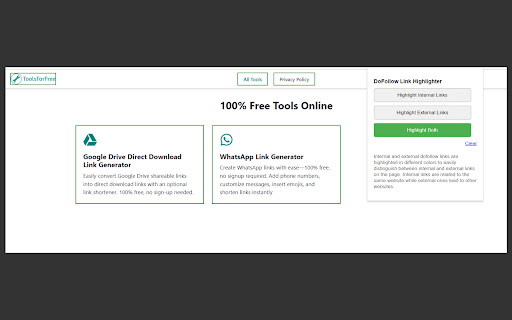
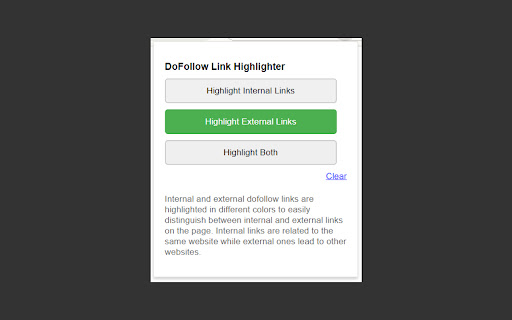
Highlight internal and external dofollow links on a webpage with different colors.
DoFollow Link Highlighter is a simple yet powerful Chrome extension designed to help you visually identify "dofollow" links on any webpage. Whether you are an SEO specialist, content creator, or web developer, this extension makes it easy to distinguish between internal and external dofollow links by highlighting them with different colored borders. You can also clear the highlighting anytime with a single click using the "Clear" button.
✨ Features:
- Highlight Internal Links: Quickly identify all internal dofollow links on a webpage. Internal links (those that point to pages within the same domain) are highlighted with a green border.
- Highlight External Links: Easily spot external dofollow links, which lead to websites outside the current domain. External links are shown with a blue border.
- Highlight Both Internal and External Links: Choose to highlight both internal and external dofollow links simultaneously, with internal links in green and external links in blue.
- Clear Highlighting: The extension includes a "Clear" button, allowing you to remove all link borders with one click. This helps you quickly reset the page to its original state.
- Modern, User-Friendly Interface: The extension features a clean, modern interface with button-like controls for selecting highlighting options. The "Clear" button is easily accessible for quick resets.
- SEO-Friendly: This tool helps SEO specialists and webmasters quickly analyze the link structure of any webpage by showing dofollow links and identifying whether they are internal or external.
? Why Use DoFollow Link Highlighter?
1. Enhance Your SEO Strategy: Dofollow links pass authority (link juice) between pages. This extension allows you to immediately see which links are dofollow and whether they are internal (helping on-site SEO) or external (impacting off-site SEO).
2. Optimize Content and Backlinking: Easily verify which links contribute to SEO, making it simpler to manage internal linking structures or audit backlinking strategies.
3. Clear and Reset Anytime: The "Clear" button lets you reset the page and remove all highlighting without needing to refresh the page.
⚙️ How It Works:
1. Internal Links: Internal links within the same domain are highlighted with a green border.
2. External Links: External links leading to other websites are highlighted with a blue border.
3. Clear Highlighting: Click the "Clear" button to instantly remove all borders from links and reset the page to its original state.
? Perfect for SEO Analysis:
- Webmasters: Audit your website and optimize your internal linking structure for better SEO performance.
- SEO Analysts: Evaluate how internal and external links are distributed across webpages.
- Marketers: Understand link structures in content and ensure links are following correct dofollow or nofollow attributes.
- Content Creators: Quickly verify the status of links within your content to ensure you’re passing link juice appropriately.
? Key Benefits:
- Fast & Lightweight: The extension is lightweight and doesn’t slow down your browser. It only activates when you click the extension icon.
- Works on Any Page: Whether you're on your own website or analyzing an external site, this extension works on any webpage.
- No Setup Required: Install the extension and start using it immediately. No complex settings or configurations needed.
- Clear Highlighting Anytime: Easily reset the highlighting on a webpage with the "Clear" button, without refreshing the page.
- No Data Collection: The extension does not track, collect, or store any personal data, ensuring your privacy is protected.
? How to Get Started:
1. Install the Extension: Download and install DoFollow Link Highlighter from the Chrome Web Store.
2. Click the Extension Icon: Click on the extension icon in your Chrome toolbar whenever you're on a webpage where you want to analyze dofollow links.
3. Select Highlighting Option: Choose whether to highlight internal links, external links, or both. The selected links will be instantly highlighted on the current webpage.
4. Clear Highlighting: If needed, click the "Clear" button to remove all highlighting and return the page to its original state.
| 分类 | 💻开发者工具 |
| 插件标识 | cdikgkcfkbkkhhmmjeopjgjkjnbfcfgb |
| 平台 | Chrome |
| 评分 |
★★★★☆
4.9
|
| 评分人数 | 2093 |
| 插件主页 | https://chromewebstore.google.com/detail/dofollow-link-highlighter/cdikgkcfkbkkhhmmjeopjgjkjnbfcfgb |
| 版本号 | 1.3 |
| 大小 | 72.02KiB |
| 官网下载次数 | 375 |
| 下载地址 | |
| 更新时间 | 2024-09-26 00:00:00 |
CRX扩展文件安装方法
第1步: 打开Chrome浏览器的扩展程序
第2步:
在地址栏输入: chrome://extensions/
第3步: 开启右上角的【开发者模式】
第4步: 重启Chrome浏览器 (重要操作)
第5步: 重新打开扩展程序管理界面
第6步: 将下载的crx文件直接拖入页面完成安装
注意:请确保使用最新版本的Chrome浏览器
同类插件推荐

Highlight Broken Links, Alts, and UX Changes for SEO | Webloom
Take control of your website's SEO with Webloo

Dofollow Links for SEO
Highlight dofollow links as you browse the web.Hig
DoFollow Link Highlighter
Highlight internal and external dofollow links on

Nofollow Link Checker
Highlights nofollow, dofollow, UGC, sponsored, and

Free Do Follow / No Follow Backlink Checking
Comprehensive analysis of links on webpages with a

Nofollow SEO Link Highlighter
Highlight follow and nofollow linksNofollow SEO Li

Bulk URL Opener Extension
Open multiple URLs at onceBulk URL Opener Extensio

Email Finder & Email Hunter
帮助您自动获取电子邮件数据,节省时间并专注于工作。During your web browsing,

Automatic Backlink Checker
This extension is the best way to find dofollow, n

Email Hunter
Email Extractor tool that save time and efforts. F

SEOquake
SEOquake is a free plugin that provides you with k
Ahrefs SEO Toolbar: On-Page and SERP Tools
On-page SEO report, broken link checker, redirect

Detailed SEO Extension
Get SEO insights at the click of a button to any w