
fERP Chrome 插件, crx 扩展下载
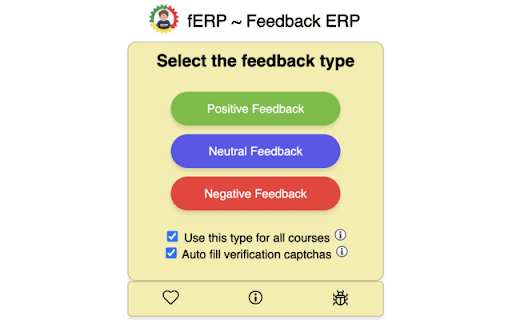

Automates the process of filling up feedback form in ERP for IIT KGP students
fERP, stands for Feedback-ERP, is an automation extension that streamlines the process of providing feedback on the IIT Kharagpur ERP system to courses and professors.
- Source Code (Github) : https://github.com/proffapt/fERP
- Mozilla Add-On Store : https://addons.mozilla.org/en-US/firefox/addon/ferp/
It offers three feedback types - positive, neutral & neutral - and two convenient modes to suit your preferences:
Cascading Mode (Default):
- Utilize the same feedback type, you chose, across all forms
- Automatically fill and submit the next form after previous form is submitted
- Skip any forms you've already submitted, focusing only on the remaining ones
Selective Mode:
- Customize the feedback type for each individual form
- Fill the captcha and submit the form (auto/manual) at your own pace
- Choose the order in which you want to complete the forms
Other subtle features:
- The extension also has following subtle features, which are more likely to be ignored, but are tightly integrated into the extension with a lot of efforts.
- Fills the captcha, submits the feedback form (in case of cascade mode - repeats, until all forms are submitted)
- Automatically downloads the admit card after all the forms are submitted using cascade mode
- Form can be submitted by pressing Enter key after typing captcha in manual mode
- Re-fills the form with previously given feedback type, if wrong captcha was filled
- Bypass confirmation pop-ups, which appear everytime a form is submitted
- Invoking a feedback type randomises the choice of available options
Simplify the tedious task of providing feedback on ERP just to get your end-sem admit card - with fERP. Its intuitive modes and time-saving features make it an indispensable tool for IIT Kharagpur students.
| 分类 | 📝工作流程与规划 |
| 插件标识 | cdmjkgfdjjebpjejjnckkgljdmijjnom |
| 平台 | Chrome |
| 评分 |
★★★★☆
4.8
|
| 评分人数 | 20 |
| 插件主页 | https://chromewebstore.google.com/detail/ferp/cdmjkgfdjjebpjejjnckkgljdmijjnom |
| 版本号 | 1.9.0 |
| 大小 | 343KiB |
| 官网下载次数 | 1000 |
| 下载地址 | |
| 更新时间 | 2024-04-17 00:00:00 |
CRX扩展文件安装方法
第1步: 打开Chrome浏览器的扩展程序
第2步:
在地址栏输入: chrome://extensions/
第3步: 开启右上角的【开发者模式】
第4步: 重启Chrome浏览器 (重要操作)
第5步: 重新打开扩展程序管理界面
第6步: 将下载的crx文件直接拖入页面完成安装
注意:请确保使用最新版本的Chrome浏览器
同类插件推荐

ERP Auto Login - IITKGP
Auto Login to erp.iitkgp.ac.in for IITKGPians by I

CDC (CV) Deadline Status - IIT KGP
Track CV submission deadlines with color indicator
fERP
Automates the process of filling up feedback form

Codeforces Practice Tracker
Track your practice progress on Codeforces.Codefor

Carrot
Rating predictor for CodeforcesCarrot enhances Cod

CF-Predictor
This extension predicts rating changes for Codefor

Codeforces Enhancer
Makes Codeforces better: multiple ratings graph, c

Competitive Companion
Parses competitive programming problems and sends

CF Analytics
Analyse Codeforces profilesCF Analytics Chrome ext

Email Finder by ContactOut – Email Lookup Tool
Find emails for 75% of Linkedin or ANY website. Sa

Skrapp.io - Email Finder
Skrapp.io | Instant business emails.If your sales