
ERP Auto Login - IITKGP Chrome 插件, crx 扩展下载
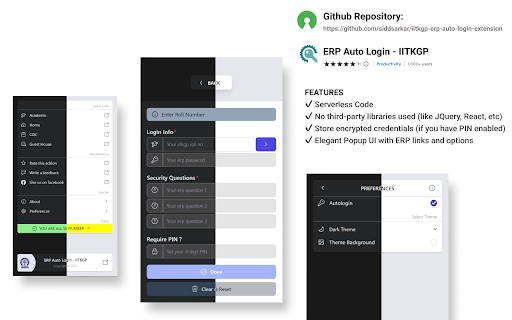
Auto Login to erp.iitkgp.ac.in for IITKGPians by IITKGPian
**NOW SUPPORTS OTP
PURPOSE
- Sign you in to https://erp.iitkgp.ac.in website automatically as we all know how we log in.
NEW
- Use 4 digit PIN to encrypt your credentials(if you donot wish to set pin your credentials will be stored as plain text), you will be asked for PIN on every login.
Note: if you donot set a pin you will be logged in automatically everytime.
FEATURES
✔ Serverless Code
✔ No third-party libraries used (like JQuery, React, etc)
✔ Store encrypted credentials (if you have PIN enabled)
✔ Elegant Popup UI with ERP links and options
IS IT SAFE?
- Its Open Source check out source code here: https://github.com/siddsarkar/iitkgp-erp-auto-login-extension feel free to contribute or create an issue
NOTE
- This extension is server less and never uses your personal data. It stays safe in your browser itself.
- This add-on stores your data using the storage.local API from chrome.
HOW TO USE
- Click on Add to Chrome
- Open the extension popup by clicking the extension icon on the toolbar.
- Set your preferences of auto login: open popup > preferences > autologin
- Open the https://erp.iitkgp.ac.in website and you'll be logged in automatically if you are not already logged in or else you'll directly be redirected to your ERP.
For IITKGP'ian by IITKGP'ian. ❤️
UPDATES
[9.1.2]
- Prefill data (manually send OTP now)
[9.1.1]
- Update extension to prompt for otp
[ 9.1.0 ]
- added alternate pin dialog (hides while typing)
- minor fixes and improvements
[ 9.0.0 ]
- added support to set default landing page after login (beta)
| 分类 | 📝工作流程与规划 |
| 插件标识 | hianmedhblomknonbbmalncjjffdligl |
| 平台 | Chrome |
| 评分 |
★★★★☆
4.2
|
| 评分人数 | 64 |
| 插件主页 | https://chromewebstore.google.com/detail/erp-auto-login-iitkgp/hianmedhblomknonbbmalncjjffdligl |
| 版本号 | 9.1.2 |
| 大小 | 352KiB |
| 官网下载次数 | 2000 |
| 下载地址 | |
| 更新时间 | 2023-07-16 00:00:00 |
CRX扩展文件安装方法
第1步: 打开Chrome浏览器的扩展程序
第2步:
在地址栏输入: chrome://extensions/
第3步: 开启右上角的【开发者模式】
第4步: 重启Chrome浏览器 (重要操作)
第5步: 重新打开扩展程序管理界面
第6步: 将下载的crx文件直接拖入页面完成安装
注意:请确保使用最新版本的Chrome浏览器
同类插件推荐

Auto Login
Automatically login to your favourite websites wi
ERP Auto Login - IITKGP
Auto Login to erp.iitkgp.ac.in for IITKGPians by I

CDC (CV) Deadline Status - IIT KGP
Track CV submission deadlines with color indicator
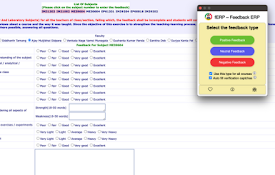
fERP
Automates the process of filling up feedback form

Glider Screen
This chrome extension allows you to share full scr

Glider Proctoring
This chrome extension allows you to share full scr

Codeforces Practice Tracker
Track your practice progress on Codeforces.Codefor

Carrot
Rating predictor for CodeforcesCarrot enhances Cod

Codeforces Enhancer
Makes Codeforces better: multiple ratings graph, c