
Seadvisor.io - NFT rarity and notifications Chrome 插件, crx 扩展下载
The official extension for Chrome.
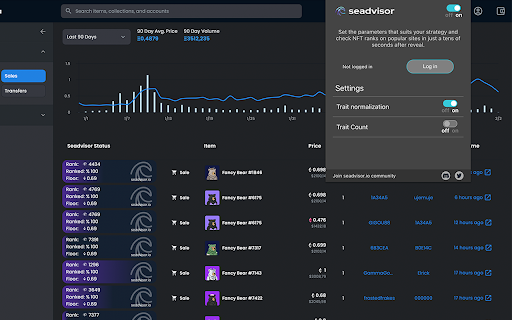
Forget about switching tabs to find out the rarity! By installing this plug-in, you will extend…
The official extension for Chrome.
Forget about switching tabs to find out the rarity! By installing this plug-in, you will extend the possibilities of your browser to check the rarity ranks directly on OpenSea. The most necessary data will be available next to each item of the collection.
Extension features:
Recalculated ranks available in just 30 seconds!
As soon as new reveals come out, we download raw data, manipulate it, and share with you our calculations such as individual NFTs’ scores and their ranks in less than 30 seconds.
Our bots are spread out all over the world to provide you with the fastest data as soon as possible. We transfer the data to one place and compute it. This gives us great results, even if NFT’s creator’s API isn’t fast enough. This allows you to identify NFTs with the best rarity to price ratio, long before others will.
AutoBuy function
You can also go one step further by setting up the autobuy function. You can set your preferences, such as bargain prices, rankings, or floor differences, individually for each of the collections. If the assets that match your criteria appear after the reveal, we will try to buy them automatically for you.
Notification system
Automate your strategy! After subscribing you will receive notifications about the best deals in as little as 5 seconds after they are published. This means no more waiting in front of the computer and constantly refreshing the pages hoping for a lucky strike. Leave this part to us and simply receive notifications about events of your interest.
If someone makes a purchase or puts up for sale an NFT of the ranking, price, and even the floor difference chosen by you, you will be immediately informed about it.
Remember! This tool shouldn’t be regarded as professional, financial advice.
| 分类 | 📝工作流程与规划 |
| 插件标识 | cjedamchepeeoafefdjnpbchhldolghc |
| 平台 | Chrome |
| 评分 |
★★★★☆
4.4
|
| 评分人数 | 13 |
| 插件主页 | https://chromewebstore.google.com/detail/seadvisorio-nft-rarity-an/cjedamchepeeoafefdjnpbchhldolghc |
| 版本号 | 1.3.0 |
| 大小 | 1.28MiB |
| 官网下载次数 | 69 |
| 下载地址 | |
| 更新时间 | 2022-03-10 00:00:00 |
CRX扩展文件安装方法
第1步: 打开Chrome浏览器的扩展程序
第2步:
在地址栏输入: chrome://extensions/
第3步: 开启右上角的【开发者模式】
第4步: 重启Chrome浏览器 (重要操作)
第5步: 重新打开扩展程序管理界面
第6步: 将下载的crx文件直接拖入页面完成安装
注意:请确保使用最新版本的Chrome浏览器
同类插件推荐

Access Key Rarity Tool
The only tool you will need to accurately trade NF

NFT Rank
List NFT RankA tool that can see the current NFT r

Mintedz - Extension for NFTs on OpenSea
Boost your OpenSea. Save time and money.This free

Apexgo
Check all your favorite NFTs rarity and their scor

Rarity.Garden - NFT rarity rankings
Free extension that displays rankings, floors and

NFT Unmasked
NFT Unmasked allows you to snipe undervalued NFTs
MintSafe - NFT Mint Scam Detection
MintSafe detect's NFT minting Scams. It scans
Seadvisor.io - NFT rarity and notifications
The official extension for Chrome. Forget about s

NFT Rarity Rankings
NFT Rarity Ranking extensionThe extension allows y
OCDB - Open Collectible Database
Discover, like & comment on curated NFT artwor

RarityRanks
An extension that shows the rarity rank and rarity

NFTEye
Boost your OpenSea experience with rarity ranks an

TraitSniper
Fastest rarity revealing for NFT collections, snip