
duoleavemealone for Duolingo Chrome 插件, crx 扩展下载
Makes Duolingo more user-friendly
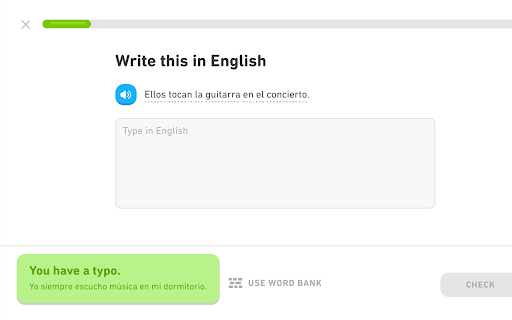
This extension makes the Duolingo.com language-learning site faster to use by automatically clicking through interstitial screens displayed after entering correct answers or finishing lessons. These screens' messages are displayed briefly onscreen instead.
Duo's motivational messages are also skipped, because everyone already knows that you are great! :-D (Note that Duolingo now provides a setting for disabling motivational messages, which is more reliable than this extension's detection logic.)
Since this extension interacts the Duolingo site, it's unfortunately likely to stop working if (or when) the site's interface is updated.
**This extension is not affiliated with Duolingo.**
---
Changes:
0.34: Skip streak end screens and legendary start/end screens.
0.33: Fix correct answer messages not getting skipped in "personalized practice" lessons.
0.32: Fix story support and improve bubble colors when dark mode is enabled.
0.31: Support Duolingo's dark mode setting, mostly (end-of-lesson messages don't seem to be displayed). Also skip the "perfect" screen after completing a message without any mistakes.
0.30: Handle /lesson URLs, apparently introduced by Duolingo's tree redesign (https://blog.duolingo.com/new-duolingo-home-screen-design/). Also make the options page a bit less ugly.
0.29: Update to Manifest V3 (hopefully an invisible change). Also fix discussion-link-loading and remove a debug console.log call.
0.28: Click through correct-answer screens for alphabet/character exercises.
0.27: Click through some additional end-of-story screens.
0.26: Add a browser action button that can be clicked to temporarily toggle the extension off or on.
0.25: Click through most of the screens related to "legendary" (crown) lessons for gilded skills, and avoid a bug where the extension got stuck clicking a button at the end of a legendary lesson. Also add click rate-limiting to try to avoid future bugs like this.
0.24: Handle new ways that button colors are set in regular skills and stories.
0.23: Handle /progress-quiz/ URLs for Duolingo Plus.
0.22: Second attempt at handling changes to "correct" message background color.
0.21: Handle changed "correct" message background color.
0.20: Add on-by-default option for controlling whether correct-answer messages are skipped or not.
0.19: Click blue "Continue" button that's now show after completing a story.
0.18: Fix discuss links again (broken by another Duolingo change).
0.17: Fix discuss links (which look like they were broken by a Duolingo change).
0.16: Display completion messages after stories. Fix a bug where the next button was clicked prematurely when answering text-entry questions in stories.
0.15: Add support for placement tests (available before creating a profile).
0.14: Make correct-answer messages yellow instead of green when they contain extra information, e.g. typo/accent corrections or translations.
0.13: Improve support for Stories and enable by default.
0.12: Add an option to enable experimental support for clicking the next button in Stories. (Options are available by right-clicking on the extension's toolbar icon.)
0.11: Fix incorrect clicks at beginning of skill tests. Fix discuss links when loading URLs directly instead of navigating from main page. Add spacing between typo messages and discuss links.
0.10: Add experimental support for displaying discuss links. (Not released on Chrome Web Store.)
0.9: Skip start screen when testing out of the current level of a skill (i.e. URLs ending in /test).
0.8: Add options to control message timeouts and center messages horizontally. Also handle checkpoints (i.e. /checkpoint/ URLs) in addition to tests (/bigtest/).
0.7: Add an option page and provide support for automatically starting timed or non-timed practice. (I had to add the "storage" permission to be able to save the option's value.) Also automatically click the next button during checkpoints that are being used to test out of a set of skills.
0.6: Also automatically click the "Next" button on https://www.duolingo.com/practice. Note that motivational messages sometimes (always?) aren't skipped here. Duolingo makes it really hard to consistently detect them. :-(
| 分类 | 📚教育 |
| 插件标识 | clipadhhddnpnocanhnbonnhppdibnpf |
| 平台 | Chrome |
| 评分 |
★★★☆☆
3.4
|
| 评分人数 | 11 |
| 插件主页 | https://chromewebstore.google.com/detail/duoleavemealone-for-duoli/clipadhhddnpnocanhnbonnhppdibnpf |
| 版本号 | 0.34 |
| 大小 | 25.83KiB |
| 官网下载次数 | 1000 |
| 下载地址 | |
| 更新时间 | 2024-10-16 00:00:00 |
CRX扩展文件安装方法
第1步: 打开Chrome浏览器的扩展程序
第2步:
在地址栏输入: chrome://extensions/
第3步: 开启右上角的【开发者模式】
第4步: 重启Chrome浏览器 (重要操作)
第5步: 重新打开扩展程序管理界面
第6步: 将下载的crx文件直接拖入页面完成安装
注意:请确保使用最新版本的Chrome浏览器
同类插件推荐

Duolingo Word Bank Dnd
Enables the drag'n'drop of words in the wo

Duolingo Binge
Automatically click 'Next' in DuolingoA ch

Remove Duolingo cartoons
Remove Duolingo cartoons.Automatically remove cart

DuoKB
Changes input for Duolingo without need of switchi
duoleavemealone for Duolingo
Makes Duolingo more user-friendlyThis extension ma

Duolingo Practice Button
Restore the Duolingo practice buttonDuolingo used

Duolingo Memo
Remembers and auto-fills your answers on Duolingo.

Duo Strength
Adds individual skill strengths back into the duol

Duolingo Spaced Repetition
A Chrome Browser Extension to Add Spaced Repetitio

Duolingo Text Editor
Simplifies the formatting of comments and posts. P

DuoListen
An extension that removes the hint sentence from a

Duolingo TTS Controls
Provides playback controls for some of the challen

Duolingo Boost
Duolingo Boost enhances Duolingo website for even