
Duolingo Memo Chrome 插件, crx 扩展下载
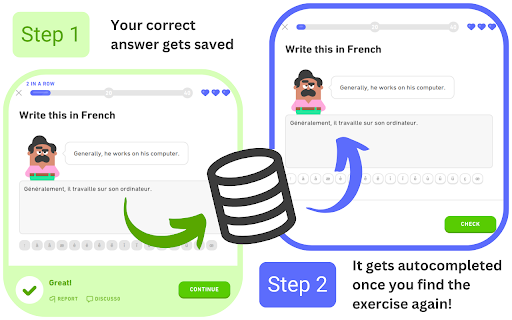
Remembers and auto-fills your answers on Duolingo.
This extension was originally conceived with the intention of addressing the tediousness of some Legendary Challenges. For each Legendary Challenge (and inside a same unit), the exercise pool is quite reduced, and you're only allowed two mistakes. This makes retrying a Legendary Challenge specially annoying, since you'll most likely have to retype the same answers over and over again. This extension aims to solve that problem by remembering your correct answers and automatically filling the input with the remembered answer.
Legendary challenges contain almost exclusively exercises of type "Translate", that is, those where you must translate the proposed sentence by typing the answer in the input. Nevertheless, the extension has been expanded to support other types of exercises and it will continue to be expanded in the future.
| 分类 | 📝工作流程与规划 |
| 插件标识 | oibokknlhjginjokcocnilfibocideol |
| 平台 | Chrome |
| 评分 |
★★★★☆
4.4
|
| 评分人数 | 15 |
| 插件主页 | https://chromewebstore.google.com/detail/duolingo-memo/oibokknlhjginjokcocnilfibocideol |
| 版本号 | 0.0.1 |
| 大小 | 129KiB |
| 官网下载次数 | 262 |
| 下载地址 | |
| 更新时间 | 2023-07-17 00:00:00 |
CRX扩展文件安装方法
第1步: 打开Chrome浏览器的扩展程序
第2步:
在地址栏输入: chrome://extensions/
第3步: 开启右上角的【开发者模式】
第4步: 重启Chrome浏览器 (重要操作)
第5步: 重新打开扩展程序管理界面
第6步: 将下载的crx文件直接拖入页面完成安装
注意:请确保使用最新版本的Chrome浏览器
同类插件推荐

duoleavemealone for Duolingo
Makes Duolingo more user-friendlyThis extension ma

Duolingo Practice Button
Restore the Duolingo practice buttonDuolingo used

Duolingo Memo
Remembers and auto-fills your answers on Duolingo.

Duolingo Annoyance Blocker
Remove annoying stuff from Duolingo such as pop-up

Duolingo Spaced Repetition
A Chrome Browser Extension to Add Spaced Repetitio

Duolingo Everywhere
The little green bird will follow you anywhere as

Duolingo Solution Viewer
Provides access to the lists of solutions for Duol

Duolingo Fast Mode
Save time while learning more with less stressFeat

Duolingo Discord
Add flags and other visual cues to Duolingo Discor

PT QA HELPER
Very useful QA tool for copying test results and v

Will Save: Duolingo Powered Site Blocker
Blocks time wasting sites until Duolingo reviews a

Duolingo TTS Controls
Provides playback controls for some of the challen

Duolingo Boost
Duolingo Boost enhances Duolingo website for even