
Duolingo Discord Chrome 插件, crx 扩展下载

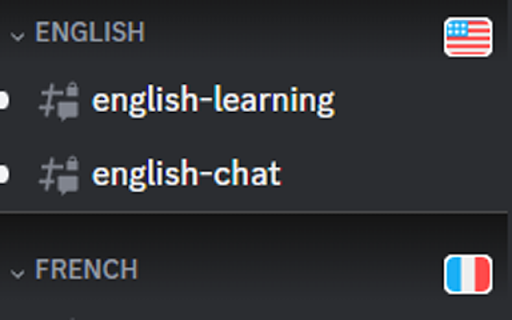
Add flags and other visual cues to Duolingo Discord navigation sidebar.
Having trouble navigating the many channels of the Duolingo Discord server? Here's a tool that can help.
It adds visual styling to the navigation sidebar to assist in quickly finding the channel you're looking for. Sections are emphasized with a thin border and drop-shadow.
Language categories are marked with that language's flag, matching Duolingo's style. Non-language categories are marked with other Duo-related icons.
| 分类 | ♿无障碍访问 |
| 插件标识 | ommhjeaaakbcfaiemndjacdhpkjaehgl |
| 平台 | Chrome |
| 评分 |
★★★★★
5
|
| 评分人数 | 28 |
| 插件主页 | https://chromewebstore.google.com/detail/duolingo-discord/ommhjeaaakbcfaiemndjacdhpkjaehgl |
| 版本号 | 1.0 |
| 大小 | 108KiB |
| 官网下载次数 | 40 |
| 下载地址 | |
| 更新时间 | 2023-04-14 00:00:00 |
CRX扩展文件安装方法
第1步: 打开Chrome浏览器的扩展程序
第2步:
在地址栏输入: chrome://extensions/
第3步: 开启右上角的【开发者模式】
第4步: 重启Chrome浏览器 (重要操作)
第5步: 重新打开扩展程序管理界面
第6步: 将下载的crx文件直接拖入页面完成安装
注意:请确保使用最新版本的Chrome浏览器
同类插件推荐

AccountingPod Learning Companion
AccountingPod – Learning CompanionAdd an Accountin

TypeLingo
Duolingo typing restored! Get back the ability to

Dark Duolingo
Darken Duolingo's UI to play without burning y

Duolingo Image Hider
When practicing languages at Duolingo, the website

Duolingo Practice Button
Restore the Duolingo practice buttonDuolingo used

Duolingo Annoyance Blocker
Remove annoying stuff from Duolingo such as pop-up

Extension for Duolingo
Extension for Duolingo to support some features li

Duolingo Everywhere
The little green bird will follow you anywhere as
Duolingo Discord
Add flags and other visual cues to Duolingo Discor

Friendzy
Browse friendzy directly from twitter!Find your fa

LeadhuntAI - Chrome Extension
This extension will allow you to easily retrieve s

Open tabs in order
This is an extension that updates tabs in order wh

GoldDust
Ask a question about a company or a person. If the