
Duolingo Solution Viewer Chrome 插件, crx 扩展下载
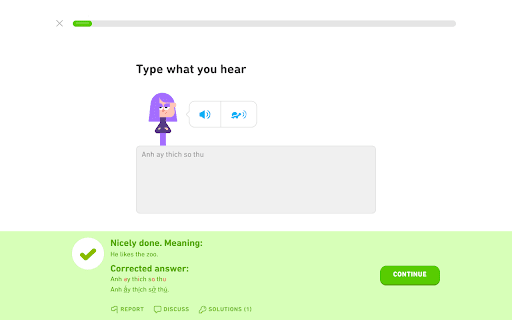
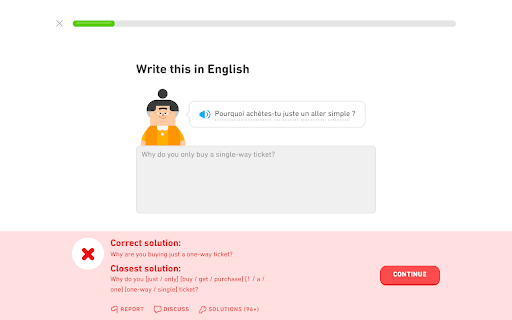
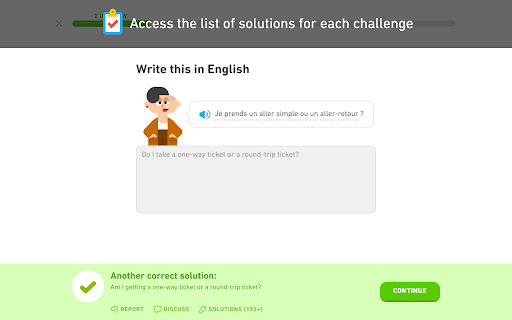
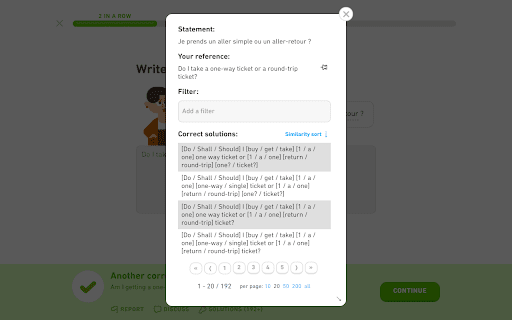
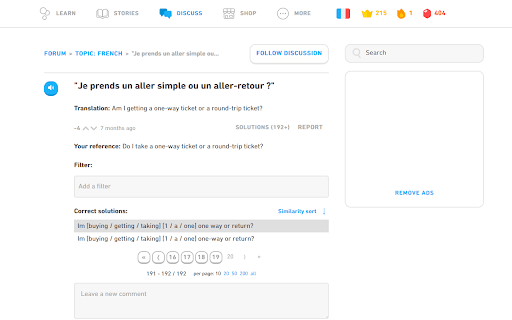
Provides access to the lists of solutions for Duolingo's translation / listening challenges, and restores the correction of typos.
For more detailed information, screenshots, or if you have any support request, visit the
development page of the extension here.. :
https://github.com/blmage/duolingo-solution-viewer
.. or the (new) Discord server:
https://discord.gg/ZCTB5BPctK
[Features]
- Provides a link to the list of solutions of the current challenge, once you have submitted your answer.
- By default, the solutions are sorted by their similarity with your answer, but you can also switch to an alphabetical sort.
- Click on your answer to edit it. The similarity scores of the solutions will be refreshed accordingly.
- Click on the thumbtack button to pin your reference answer, and easily compare it with all the solutions.
- Filter the solutions by entering one or more words in the filter input (click on the icons on the left of a filter to refine it).
- Select a word (or just a part of it) in any solution to quickly add a new filter.
- Remembers the lists of solutions of each challenge, to also make them available from the corresponding forum discussions.
- Displays the closest solution when the answer you submitted is incorrect.
- Outlines typos in answers to listening challenges.
- Strives to blend seamlessly in Duolingo's UI, and to be compatible with custom themes such as Darklingo++.
[Keyboard shortcuts]
After having submitted an answer to a challenge, use:
- [ s ] to open the solution window, and [ Esc ] to close it,
- [ r ] to open the report window,
- [ d ] to open the forum discussion in a new tab.
When a list of solutions is available, use:
- [ f ] to focus the filter input, and [ Esc ] to leave it,
- [ ↑ ] / [ ↓ ] to scroll up / down the list,
- [ ← ] / [ → ] to navigate through the pages one by one,
- [ Ctrl ] + [ ← ] / [ → ] to go directly to the first / last page.
When the filter input is focused:
- enter a word then use [ Enter ] to add a filter (see the filter shortcuts below),
- use [ Backspace ] to remove the last added filter,
- .. and suggestions are available:
- use [ ↑ ] / [ ↓ ] to select a suggestion,
- use [ Enter ] to add a filter based on the selected suggestion (shortcuts will be preserved).
[Filter shortcuts]
For most languages, enter:
- " word " for solutions that include the exact word,
- " *example " for solutions that include a word ending with "example",
- " example* " for solutions that include a word beginning with "example",
- " *example* " for solutions that include a word containing "example",
- " -word " for solutions that do not include the exact word (wildcard variants above are also available).
For languages that do not use space-separated words (such as Japanese), enter:
- " word " for solutions that include the word anywhere,
- " *example " for solutions ending with "example",
- " example* " for solutions beginning with "example",
- " =example " for exact solutions,
- " -word " for solutions that do not include the word (again, all variants above are available).
[Limitations]
- The lists of solutions are built by flattening the original solution graphs, which are not optimized against redundancies. This can lead to lists of solutions containing lots of very similar sentences.
- "Fill in the blank" challenges are based on "normal" translation challenges. The lists of solutions provided for them may therefore include sentences that do not match the blanks.
[License]
MIT (see https://github.com/blmage/duolingo-solution-viewer/blob/master/LICENSE)
Duolingo is a registered trademark of Duolingo, Inc. This extension is not affiliated with Duolingo in any way.
| 分类 | 🎉趣味休闲 |
| 插件标识 | idffaipgnlkhfhibgnodeiogpgojcmfm |
| 平台 | Chrome |
| 评分 |
☆☆☆☆☆
0
|
| 评分人数 | 9 |
| 插件主页 | https://chromewebstore.google.com/detail/duolingo-solution-viewer/idffaipgnlkhfhibgnodeiogpgojcmfm |
| 版本号 | 4.19.2 |
| 大小 | 155KiB |
| 官网下载次数 | 4000 |
| 下载地址 | |
| 更新时间 | 2024-10-23 00:00:00 |
CRX扩展文件安装方法
第1步: 打开Chrome浏览器的扩展程序
第2步:
在地址栏输入: chrome://extensions/
第3步: 开启右上角的【开发者模式】
第4步: 重启Chrome浏览器 (重要操作)
第5步: 重新打开扩展程序管理界面
第6步: 将下载的crx文件直接拖入页面完成安装
注意:请确保使用最新版本的Chrome浏览器
同类插件推荐

Duolingo2Anki
Exports and syncs Duolingo dictionary to Anki Deck

Duolingo Unicode Normalizer
Automatically normalizes Duolingo answers.Duolingo

Duolingo Word Bank Dnd
Enables the drag'n'drop of words in the wo

DuoKB
Changes input for Duolingo without need of switchi

Duolingo Image Hider
When practicing languages at Duolingo, the website

duoleavemealone for Duolingo
Makes Duolingo more user-friendlyThis extension ma

Duolingo Memo
Remembers and auto-fills your answers on Duolingo.

Duo Strength
Adds individual skill strengths back into the duol
Duolingo Solution Viewer
Provides access to the lists of solutions for Duol

Duolingo Fast Mode
Save time while learning more with less stressFeat

Duolingo Text Editor
Simplifies the formatting of comments and posts. P

Duolingo TTS Controls
Provides playback controls for some of the challen

Duolingo Boost
Duolingo Boost enhances Duolingo website for even