
Leadgenius Extension Chrome 插件, crx 扩展下载


Your Go-To-Market Workflow Automation Assistant
Your Go-To-Market Workflow Automation Assistant
Use the LeadGenius extension to Find
• Direct dials & emails
• New contacts inside existing accounts
• Contact & Account insights data via the Leadgenius platform
Spend more time on meaningful conversations and meet your goals faster by automating the time-consuming and repetitive Sales, Marketing, and Customer Success tasks that stifle productivity.
Who It’s For
• Go-to-Market reps looking to improve pipeline creation by eliminating manual work and refocus on what’s important — selling
• Marketers looking to fill pipeline gaps by arming their teams with realtime account qualification and contact sourcing capabilities
• Customer success teams looking to build custom automation script capable of identifying events and triggers that signal churns or new selling opportunities
How the LeadGenius extension works
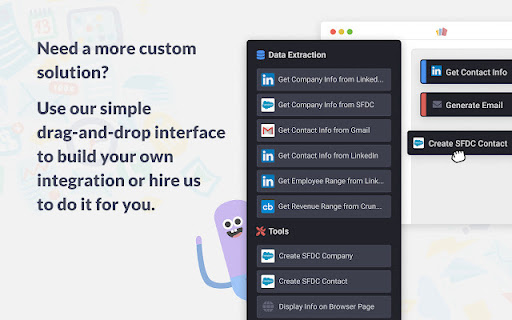
LeadGenius uses a real-time browser based automation engine to do your day-to-day tasks so you don’t have to. Everything that LeadGenius extension does happens the moment you click the button in your browser.
The extension can also be used to send data to the Leadgenius where records can be enriched and reviewed then sent to your CRM of choice.
Features
• Source new contacts from data vendors you trust
• Enrich contacts and accounts with real time data and insights
• Work, track and get updates on your accounts and contacts within the Leadgenius platform.
About LeadGenius
Over 80% of B2B data remains undiscovered or underutilized. LeadGenius is an Intelligent Data Service vendor that can uncover hard to find B2B data and personalize it to a specific business. LeadGenius sources vertical or international data at scale using a proprietary blend of technology automation and human experts.
| 分类 | 📝工作流程与规划 |
| 插件标识 | cpmkbhhgnoehojjojlkndjoepmnipkin |
| 平台 | Chrome |
| 评分 |
★★★★☆
4.4
|
| 评分人数 | 1752 |
| 插件主页 | https://chromewebstore.google.com/detail/leadgenius-extension/cpmkbhhgnoehojjojlkndjoepmnipkin |
| 版本号 | 2.5.18 |
| 大小 | 3.51MiB |
| 官网下载次数 | 1000 |
| 下载地址 | |
| 更新时间 | 2024-06-18 00:00:00 |
CRX扩展文件安装方法
第1步: 打开Chrome浏览器的扩展程序
第2步:
在地址栏输入: chrome://extensions/
第3步: 开启右上角的【开发者模式】
第4步: 重启Chrome浏览器 (重要操作)
第5步: 重新打开扩展程序管理界面
第6步: 将下载的crx文件直接拖入页面完成安装
注意:请确保使用最新版本的Chrome浏览器
同类插件推荐
Leadgenius Extension
Your Go-To-Market Workflow Automation AssistantYou

Datanyze Chrome Extension
Access contact and company data directly from Link

6sense SI Extension for Chrome
Find company and prospect data via ANY website or

SimilarTech Prospecting
Discover prospecting information on any website yo

LeadIQ: Contact Data in One Click
LeadIQ helps customers build pipeline through smar

Outreach Everywhere
Maximize your sales potential, anywhere you go!The

ZoomInfo Chrome Extension
Access ZoomInfo's best-in-class contact and co

Seamless.AI
Find perfect emails, phone numbers and insights fo

Lavender
Easily write more thoughtful and effective e-mails

Wiza - Phone Number & Email Finder
Find anyone's email and phone numberFind real-

Apollo.io: Free B2B Phone Number & Email Finder
Apollo enables users to find contact info, connect

Clearbit Connect: Free, Verified B2B Emails
Instantly find emails for the right contacts at th

Adapt - Find Emails On Websites
Find Emails On Social Networks and WebsitesAdapt P