
Text Encryption Tool Chrome 插件, crx 扩展下载
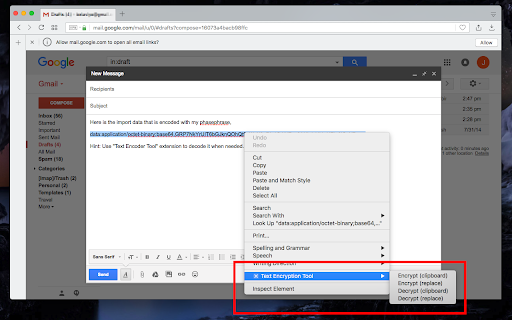
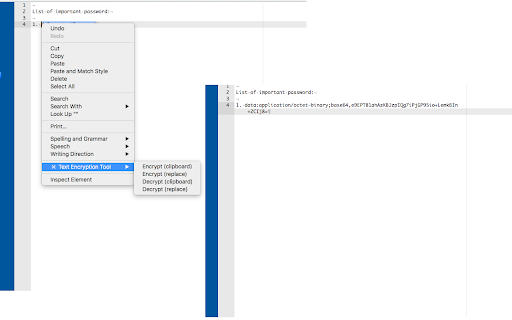
使用SHA-256哈希算法对文本数据进行加密、解密、存储和同步。
使用密码保护您的内容(转换为 SHA-256 私钥)。
选项:
加密内容并将它们存储在剪贴板或同步存储中
解密内容并将其粘贴到页面中或将其保存到剪贴板
用例:
1. 发送电子邮件时加密您的密码
2. 安全存档一些私人数据
3. 将密码等私人数据安全地发送到另一台机器
--
Protect your content with a passphrase (converts to SHA-256 private key).
Options:
Encrypt content and store them in the clipboard or synced storage
Decrypt content and paste them into the page or save it to the clipboard
Use cases:
1. Encrypt your passwords while sending an email
2. Archive some private data securely
3. Send private data such as passwords to another machine securely
| 分类 | 📝工作流程与规划 |
| 插件标识 | dbamnickgaplfmadnoegnbpjlojmjpge |
| 平台 | Chrome |
| 评分 |
★★★★★
5
|
| 评分人数 | 2 |
| 插件主页 | https://chromewebstore.google.com/detail/text-encryption-tool/dbamnickgaplfmadnoegnbpjlojmjpge |
| 版本号 | 0.2.7 |
| 大小 | 43.17KiB |
| 官网下载次数 | 1000 |
| 下载地址 | |
| 更新时间 | 2025-01-28 00:00:00 |
CRX扩展文件安装方法
第1步: 打开Chrome浏览器的扩展程序
第2步:
在地址栏输入: chrome://extensions/
第3步: 开启右上角的【开发者模式】
第4步: 重启Chrome浏览器 (重要操作)
第5步: 重新打开扩展程序管理界面
第6步: 将下载的crx文件直接拖入页面完成安装
注意:请确保使用最新版本的Chrome浏览器
同类插件推荐

Hidden Message
Handy tool to have hidden conversation with your f

vSecure
This browser extension provides a simple and effic

Secure Hash Generator
Generate a secure hash code (i.e. SHA-256) from an

nCode
nCode enables easy encoding / decoding: *Base-64

Scripter debugger extension
This extension debugs the scripter blocks and load

Inline PGP
Automatically detects and decrypts PGP messages on

AnyCrypt
This extension enables automatic encrypting and de

EnshieldMe
Encrypt any webpage editable field with your passp

Local PGP - Browser Encryption and Decryption
Easy to use PGP encryption and decryption.Local PG

popupCrypt
popupCrypt is a small extension to encrypt text fa

DOM-JSON Tree Matcher
The tool matches DOM-JSONs detecting available and

OpenSSL Decryptor
Decrypts `openssl aes-256-cbc -pbdkf2 -iter -a` en

Text Encryption Tool
使用SHA-256哈希算法对文本数据进行加密、解密、存储和同步。使用密码保护您的内容(转换为 SHA