
Signal Flare Chrome 插件, crx 扩展下载

Shared Annotations in All Your Analytics
?????? ????? A??? C?????? T? Y??? A????????.
If you're a Marketer playing the long game, then let your analytics tell your story. Your marketing annotations form a historical log book to help you spot trends and optimize your marketing strategies.
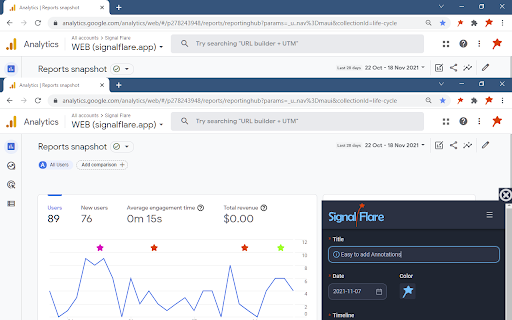
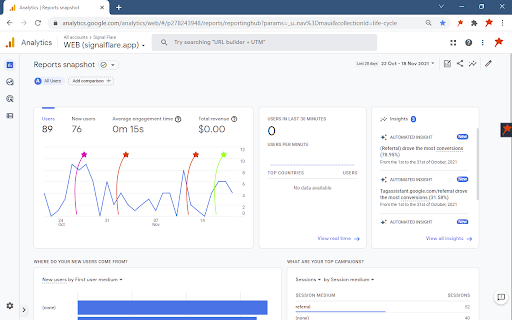
Signal Flare keeps track of your marketing activities so that you can see what is working and what is not. We annotate your charts to show you the context behind the trends. Easily explain the spikes and dips in your analytics and make planning your future better.
✨ ? ?????? ??????? ?????. ✨
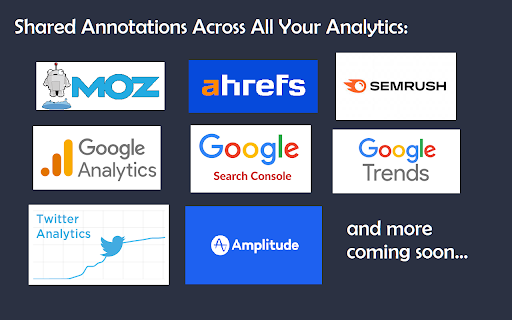
All your annotations added to your charts, even when you switch tools. Signal Flare supports Google Analytics, Amplitude, ahrefs, Semrush, Search Console, Google Trends and more. Your marketing context travels with you to coordinate analysis between your tools.
✨ ? ?????? ??????? ??????. ✨
Share your notes with your team and then everyone has the same information. Signal Flare puts your notes in front of the people who need them most. When everyone has the same understanding, a consensus is easier to achieve.
✨ ? ?????? ?? ??? ??????. ✨
The best time to start a marketing log book was last year. The next best time is today. You will thank yourself for keeping track of everything you've been doing in Signal Flare. Spot trends and learn lessons from the past.
It's all possible when you keep your annotations in Signal Flare.
????????:
~~~~~~~~~~~~~~~
✅ Shared context across all your tools with portable annotations
✅ Shared context for all team members with simple sharing
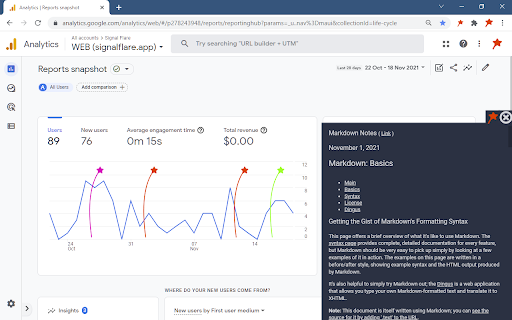
✅ Interactive Annotations: click to see details, hover to compare notes
✅ Easily organize and filter your annotations to simplify analysis of your analytics
✅ Rich Note details via Markdown syntax
✅ Live updates makes remote collaboration a joy
✅ Unlimited Notes, Timelines, and Projects
✅ Unlimited number of Invites for sharing your notes
Built In Integrations:
~~~~~~~~~~~~~~~
✅ Google Analytics (UA and GA4)
✅ Google Search Console
✅ Google Trends
✅ Amplitude
✅ ahrefs
✅ Semrush
✅ Moz
✅ Twitter Analytics
(more tools coming soon)
Installation and Use:
~~~~~~~~~~~~~~~
1. Click "Add to Chrome" to install the extension
2. Click the Manage Extensions (the Puzzle Piece in your toolbar) and then Pin the Signal Flare extension to make it easy to reach on your toolbar.
3. Press "Ctrl-Shift-F" hotkey sequence all at the same time to pop open the Signal Flare extension window. First time users should click "Create an Account" to begin using Signal Flare. Accounts are free, we won't ask for your credit card. Returning users may login with their existing account.
4. Go to your favorite Analytics Dashboard or SEO tool and begin adding your own annotations to your charts. You'll find Signal Flare is ready and waiting for you on all your tools.
5. Invite your teammates to your Signal Flare project and collaborate with shared annotations.
Use Case #1:
~~~~~~~~~~~~~~~
Are you a Solo Founder, or Solo Marketer? You've got the weight of the business riding on your shoulders. You alone manage all aspects of the marketing strategy.
It's vitally important to keep track of all the changes you make to the website, email campaigns, and paid advertising. You're playing the long game and running many experiments. Signal Flare lets you track of all the moving pieces so you can spot what is working or not working. It's all done right there on your analytics dashboard. Make simple note of your actions and see how they help over the next week, month, or year.
Use Case #2:
~~~~~~~~~~~~~~~
Are you the leader of a large marketing department? Do you have separate teams for Paid Advertising, Social, Email, and Brand? Using Signal Flare across all your teams means you can see everyone's actions and they can see each others.
Collaborating on the context of your marketing makes it easier to attribute cause and effects to your teams and debug your complex marketing analytics. Notice when a spike in traffic aligns with an Email Campaign or the Bounce Rate changed right after a major Website update. Signal Flare makes it easy to know what to do next when you understand what you've already done.
Use Case #3:
~~~~~~~~~~~~~~~
Are you the leader of a marketing agency? Do you have many customers and multiple long term initiatives?
Keeping your clients instantly and automatically informed of all the activities on their account will reduce their anxiety. All in an effort to reduce client churn.
Organize your projects and mark the major milestones as annotations on their analytics dashboard. Your weekly or monthly status report is now always visible on their charts. The client will already know just how big an impact your effort is making.
Simply share your Signal Flare project with the client and keep them informed in real time.
Change Log:
~~~~~~~~~~~~~~~
# v3.0.0 #
- Enhanced built in privacy protections
- Performance improvements and reduced resource usage
- Now adheres to the MV3 chrome extension standard
Supported Sites:
- Semrush
- Moz
- ahrefs
- Google Trends
- Google Analytics (Both UA and GA4)
- Google Search Console
- Amplitude
- Twitter Analytics
# v2.0.3 #
- Removed security permission request "Active Tab" from plugin.
Supported Sites:
- Semrush
- Moz
- ahrefs
- Google Trends
- Google Analytics (Both UA and GA4)
- Google Search Console
- Amplitude
- Twitter Analytics
# v2.0.2 #
- Improved onboarding experience with an immediate prompt to create your account
Supported Sites:
- Semrush
- Moz
- ahrefs
- Google Trends
- Google Analytics (Both UA and GA4)
- Google Search Console
- Amplitude
- Twitter Analytics
# v2.0.1 #
- BUG FIX: Removed horizontal scrollbars in the side tray
Supported Sites:
- Semrush
- Moz
- ahrefs
- Google Trends
- Google Analytics (Both UA and GA4)
- Google Search Console
- Amplitude
- Twitter Analytics
# v2.0.0 #
- COLORS: Assign default color for a timeline and if needed each note can have an independent color override
- SIDE TRAY: Clickable Notes and Improved Hover effects to get details for each flare
- Universal Instant Login: Signal Flare credentials are shared from website to the extension and vice versa.
- Markdown supported in note details, and now a note can have a dedicated link associated with it.
- Many new dashboards added to the integrations list.
- BUG FIX: UI "Recent Notes" now shows all notes visible on the charts to allow editing older notes.
Supported Sites:
- Semrush
- Moz
- ahrefs
- Google Trends
- Google Analytics (Both UA and GA4)
- Google Search Console
- Amplitude
- Twitter Analytics
# v1.0.1 #
- Bug Fix: No more flickering flares on some charts.
Supported Sites:
- Google Analytics (Both UA and GA4)
- Google Search Console
# v1.0.0 #
- Collaboration via Sharing your timelines with your team
- Improved UX and performance enhancements when syncing data with the cloud
- Major UI Overhaul making common actions easier to find and use
Supported Sites:
- Google Analytics (Both UA and GA4)
- Google Search Console
# v0.9.7 #
- BETA Private Preview
- Cloud Sync and Push Updates
Supported Sites
- Google Analytics (Both UA and GA4)
- Google Search Console
# v0.9.6 #
- ALPHA Private Preview
- Complete Proof of Concept
Supported Sites
- Google Analytics (Only UA)
# v0.9.5 #
- Proof of Concept Demonstrator
Supported Sites
- Google Analytics (Only UA)
| 分类 | 📝工作流程与规划 |
| 插件标识 | dflichognjbaodjcjjpfkmmhmamjaeid |
| 平台 | Chrome |
| 评分 |
★★★☆☆
3.6
|
| 评分人数 | 8 |
| 插件主页 | https://chromewebstore.google.com/detail/signal-flare/dflichognjbaodjcjjpfkmmhmamjaeid |
| 版本号 | 3.0.0 |
| 大小 | 2.8MiB |
| 官网下载次数 | 98 |
| 下载地址 | |
| 更新时间 | 2022-08-09 00:00:00 |
CRX扩展文件安装方法
第1步: 打开Chrome浏览器的扩展程序
第2步:
在地址栏输入: chrome://extensions/
第3步: 开启右上角的【开发者模式】
第4步: 重启Chrome浏览器 (重要操作)
第5步: 重新打开扩展程序管理界面
第6步: 将下载的crx文件直接拖入页面完成安装
注意:请确保使用最新版本的Chrome浏览器
同类插件推荐
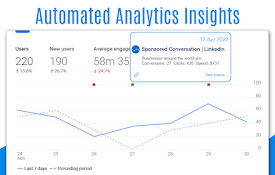
Crystal Ball - Automated Annotations and Insights
Automated Google Analytics Annotations directly fr

Signal Flare
Shared Annotations in All Your Analytics?????? ???
Google Analytics Annotations – ed.Context
Easily add permanent annotations to Google Analyti

Wishfinity for Chrome
Save everything you want into a single centralized

Nugget by automix.ai
Quick access to any productivity tools for every d

WIREFOX SEO TOOLKIT - SEO ANALYSIS TOOL
SEO TOOLKIT, SEO ANALYSIS TOOLThe Wirefox SEO Tool

Alternative Hunt
Learn about great alternative products as you brow

SEMRush Enhancer
Enhances SEMrush Keyword Magic Tool by revealing a

Page Auditor for Technical SEO
PageAuditor for Technical SEO is a project created

Vaazo
Vaazo.com chrome extensionWe know how small online

Ext Manager Pro:您的扩展控制中心
使用 Extensions Manager Pro 彻底改变扩展控制!快速管理、启用/禁用插件。立即
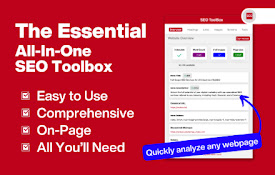
SEO ToolBox
Transform your Chrome browser into a powerful SEO

Telescope: AI-powered Web Clipper
AI-powered Knowledge Base that transcribes videos,