
BazQux Reader: open links in background tab Chrome 插件, crx 扩展下载
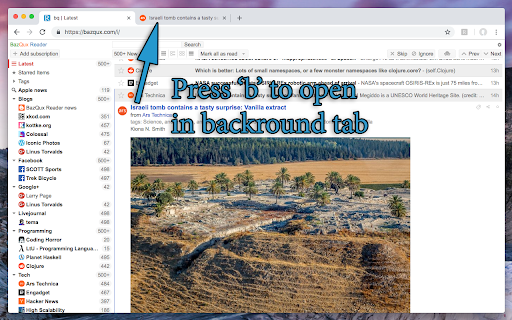
Enables the 'b' keyboard shortcut to open links in the background tab in BazQux Reader
Chrome no longer allows websites to open links in background tabs. Websites could only open links in a new tab with an immediate focus switch (and a popup blocker could block even that). So this extension is necessary for BazQux Reader to open the current article link in the background tab when you press the 'b' key.
| 分类 | 📰新闻与天气 |
| 插件标识 | dfoegpibjpjpchgmjnmomelfnclbijnm |
| 平台 | Chrome |
| 评分 |
★★★★★
5
|
| 评分人数 | 1 |
| 插件主页 | https://chromewebstore.google.com/detail/bazqux-reader-open-links/dfoegpibjpjpchgmjnmomelfnclbijnm |
| 版本号 | 1.0.10 |
| 大小 | 6.47KiB |
| 官网下载次数 | 193 |
| 下载地址 | |
| 更新时间 | 2021-12-04 00:00:00 |
CRX扩展文件安装方法
第1步: 打开Chrome浏览器的扩展程序
第2步:
在地址栏输入: chrome://extensions/
第3步: 开启右上角的【开发者模式】
第4步: 重启Chrome浏览器 (重要操作)
第5步: 重新打开扩展程序管理界面
第6步: 将下载的crx文件直接拖入页面完成安装
注意:请确保使用最新版本的Chrome浏览器
同类插件推荐

Open link in background
Open target link in background and notify userOpen

InoReader Enhancements
Fixes a few UI elements for easy reading with InoR

Tiny Tiny RSS Open in Background Tab
Open Tiny Tiny RSS links in a background tab using

BazQux Notifier
Displays the number of unread items from BazQux.co

Feedbin Notifier
Provides a basic notification service for the RSS

Feedly Background Tab
Open Feedly Links in Background Tab using shortcut
BazQux Reader: open links in background tab
Enables the 'b' keyboard shortcut to open

Open Links In New Tab
Opens all links in a new tab?️ Open all links on c

Open Links in New Tab
Modern Web Extension to Open Links in New Tabs for

Pinput for Pinboard
Light-weight chrome extension for Pinboard.Pinput
Open Tabs In Foreground
Open Tabs In ForegroundOpen Tabs In Foreground ===

Force Background Tab
Force New Tab Running In BackgroundForce New Tab R

Pinboard Plus
A better extension for Pinboard (http://pinboard.i