
Salesforce Session Chrome 插件, crx 扩展下载
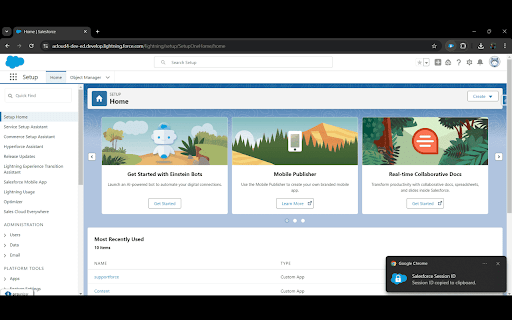

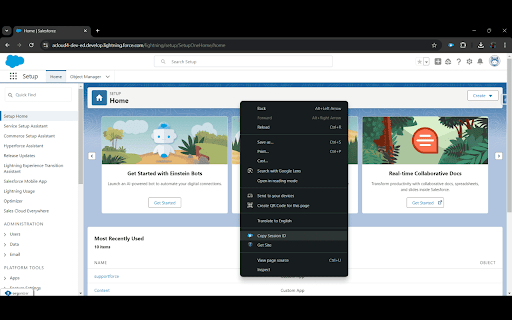
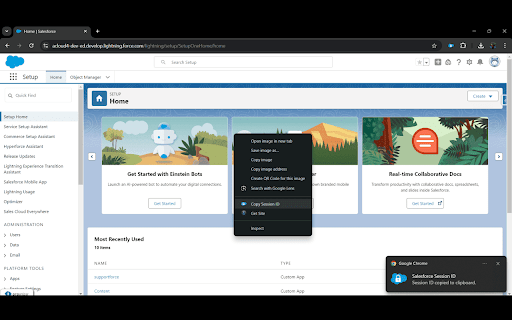
Easily copy your session ID from any Salesforce Org
Easily manage your Salesforce sessions with the Salesforce Session Chrome extension. This handy tool allows you to quickly copy your Salesforce session ID with just a click.
Key Features:
Right-Click to Copy: Simply right-click anywhere on a Salesforce page to copy your session ID effortlessly.
One-Click Copy: Click on the extension icon to instantly copy your session ID to your clipboard.
Fast and Convenient: Streamline your workflow by eliminating the need to navigate through Salesforce settings to retrieve your session ID.
Usage:
Install the extension from the Chrome Web Store.
Navigate to your Salesforce account.
Right-click on any part of the page or click the extension icon to copy your session ID.
Get started today and enhance your Salesforce experience!
| 分类 | 💻开发者工具 |
| 插件标识 | dinmpaleoejbkmpbgccjnkidhehaacpb |
| 平台 | Chrome |
| 评分 |
★★★★☆
4.9
|
| 评分人数 | 13 |
| 插件主页 | https://chromewebstore.google.com/detail/salesforce-session/dinmpaleoejbkmpbgccjnkidhehaacpb |
| 版本号 | 1.1 |
| 大小 | 7.79KiB |
| 官网下载次数 | 88 |
| 下载地址 | |
| 更新时间 | 2025-02-20 00:00:00 |
CRX扩展文件安装方法
第1步: 打开Chrome浏览器的扩展程序
第2步:
在地址栏输入: chrome://extensions/
第3步: 开启右上角的【开发者模式】
第4步: 重启Chrome浏览器 (重要操作)
第5步: 重新打开扩展程序管理界面
第6步: 将下载的crx文件直接拖入页面完成安装
注意:请确保使用最新版本的Chrome浏览器
同类插件推荐
Salesforce Devsforce
Powerful Salesforce development tools utilized for

Salesforce Session Id Extractor
Tool to salesforce session id url.This extension h

Ranorex Automation
Ranorex automation support.Requires installation o

kinka.js
kinka.js chrome extensionウェブブラウザ内を自由に飛びまわる8bit風の か

Salesforce User Login
Quick Login as admin: Simplifying Troubleshooting

Salesforce Code Coverage Navigator
Adds a class name filter to Salesforce's test
Salesforce Session
Easily copy your session ID from any Salesforce Or

Salesforce Revamp
Boost productivity with Flow and Apex Test Search,

Salesforce Assistant
Salesforce Admin and Dev Assistant who help to Qui

Lightning Studio
Build Salesforce LWC development easy and fastest.

Salesforce Inspector Advanced
Productivity tools for Salesforce administrators a

Salesforce™ Dev One
Enhance Salesforce's Developer Console with fe

YouTube Latest Default
Sets 'Latest' as the default sorting optio