
Salesforce User Login Chrome 插件, crx 扩展下载
Quick Login as admin: Simplifying Troubleshooting and Resolution and Empowering Administrators!
Makes it easier for admins to login to the Salesforce org as another user. ???
? How to use:
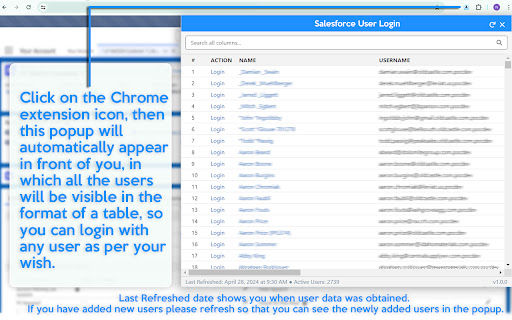
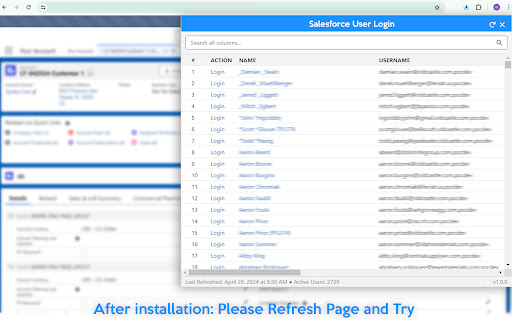
?After installation, Login to Salesforce org (OR) Refresh the Page, and Click on the extension icon. (wait for a while).
?If you have more than 2K active users in your organization the popup may take some time to appear the first time.
?Last Refreshed date shows you when user data was obtained. If you have added new users please refresh so that you can see the newly added users in the popup.
⛔️This tool provides you Login Link but may not allow some users to login due to salesforce minimum permission or some restriction.
?Highlights:
?Supports Classic and Lightning.
?Displays all active users with search feature.
?When a user is selected, it logs you in as that user and keeps you on the page you were viewing.
?When you log out, it will take you back to the page you were originally on when you logged in as the other user.
?Only active users and excluded portal users will be displayed,
-
Thank You. Please Support
| 分类 | 💻开发者工具 |
| 插件标识 | hjmcdlnohlfebdibegkcdhjifjfphjgb |
| 平台 | Chrome |
| 评分 |
★★★★☆
4.6
|
| 评分人数 | 184 |
| 插件主页 | https://chromewebstore.google.com/detail/salesforce-user-login/hjmcdlnohlfebdibegkcdhjifjfphjgb |
| 版本号 | 1.0.2 |
| 大小 | 79.26KiB |
| 官网下载次数 | 705 |
| 下载地址 | |
| 更新时间 | 2024-09-06 00:00:00 |
CRX扩展文件安装方法
第1步: 打开Chrome浏览器的扩展程序
第2步:
在地址栏输入: chrome://extensions/
第3步: 开启右上角的【开发者模式】
第4步: 重启Chrome浏览器 (重要操作)
第5步: 重新打开扩展程序管理界面
第6步: 将下载的crx文件直接拖入页面完成安装
注意:请确保使用最新版本的Chrome浏览器
同类插件推荐
Salesforce User Login
Quick Login as admin: Simplifying Troubleshooting

Salesforce Assistant
Salesforce Admin and Dev Assistant who help to Qui

Lightning Studio
Build Salesforce LWC development easy and fastest.

Salesforce.com Quick Login As
Makes it easy to login as another user. Maintains

Salesforce Show Api Name
Display Field & Object API Names on Detail Pag

Salesforce DevTools
Powerful Salesforce developer tools, loved by over

Salesforce Change Set Helper
Enhances the Salesforce change set. Adds last chan

Apex Debugger
Debug Salesforce apex code with easeApex debugging

ORGanizer for Salesforce
ORGanizer - The best Salesforce Extension everThe

Salesforce Colored Favicons
Updates the standard favicon on Salesforce tabs wi

Salesforce advanced Code searcher
By using the advanced quick find you can get your

Salesforce Lightning Inspector
For inspecting Lightning appsThe Salesforce Lightn

Salesforce Inspector Reloaded
Productivity tools for Salesforce administrators a