
GRUGRU Image Fullscreen Version Chrome 插件, crx 扩展下载
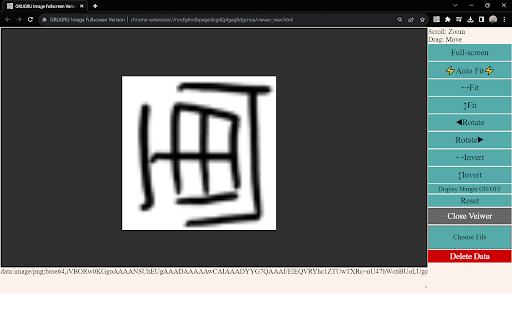
Full-screen viewer that allows you to rotate, flip, zoom, and position images
This full-screen viewer allows you to rotate, scale, and adjust the position of images.
Images on a website can be manipulated and displayed in full screen within the same tab.
It can also load local files.
==============================================================
? How to use
Right-click on an image on a website → "GRUGRU Image View".
to open the image viewer.
The viewer will be superimposed on the currently viewed page.
Click the icon on the browser to open and close the viewer,
You can view the last viewed image again.
Pages other than websites
(such as the browser options page or a new tab)
icon on a page other than a website (such as a browser options page or a new tab),
the viewer will open in a new tab.
==============================================================
? Viewer Screen Descriptions
⭐️Canvas
The image is displayed.
The canvas initially shows the full screen size.
Scroll to zoom in/out and drag to move the image.
⭐️"Full-screen" button
Displays the canvas in full screen.
Press ESC to exit.
⭐️"Auto Fit" button
Rotate, scale, and manipulate the image so that it fills the full screen to its full size.
Rotate and scale the image so that it fills the full screen.
Example: An image is portrait and the monitor is landscape:
The image is rotated 90 degrees and scaled.
Press twice to reverse the rotation direction.
⭐️"↔ Fit" and "↕ Fit" buttons
"↔ Fit" and "↕ Fit" buttons fit the image width and height to the full screen size.
The aspect ratio remains the same.
⭐️ "◀Rotate" and "Rotate ▶" buttons
"◀Rotate" and "Rotate ▶" buttons Rotate the image 90 degrees counterclockwise or clockwise.
⭐️"↔ Flip" and "↕ Flip" buttons
Flip the image left/right or up/down.
⭐️"Display Margin ON/OFF" button
For easier image manipulation, the canvas size can be set to
The canvas size will be expanded to the full screen size plus the margins for easy image manipulation.
Margins are fixed at 300px.
⭐️"Reset" button
Resets the image display.
⭐️"Close Viewer" button
Closes the viewer and returns to the currently viewed page.
⭐️"Select File" button
Clicking this button starts the file explorer,
Select the image you wish to view.
You can also load images by dragging and dropping files.
⭐️"Delete Data" button
When an image is displayed, the image data or URL is stored in the local storage of the browser.
The image data or URL will be saved to the browser's local storage,
When you reopen the browser, the image data or URL will be stored in the browser's local storage and the previous image will be displayed,
You can delete both by clicking the "Clear Data" button.
⭐️Message display section (below the canvas)
The URL or file name of the currently displayed image is displayed.
| 分类 | 🛠️工具 |
| 插件标识 | dmikofabgijadmfihajllfehfpkljjab |
| 平台 | Chrome |
| 评分 |
★★★☆☆
3
|
| 评分人数 | 3 |
| 插件主页 | https://chromewebstore.google.com/detail/grugru-image-fullscreen-v/dmikofabgijadmfihajllfehfpkljjab |
| 版本号 | 0.3.6 |
| 大小 | 17.1KiB |
| 官网下载次数 | 122 |
| 下载地址 | |
| 更新时间 | 2023-12-10 00:00:00 |
CRX扩展文件安装方法
第1步: 打开Chrome浏览器的扩展程序
第2步:
在地址栏输入: chrome://extensions/
第3步: 开启右上角的【开发者模式】
第4步: 重启Chrome浏览器 (重要操作)
第5步: 重新打开扩展程序管理界面
第6步: 将下载的crx文件直接拖入页面完成安装
注意:请确保使用最新版本的Chrome浏览器
同类插件推荐
GRUGRU Image Fullscreen Version
Full-screen viewer that allows you to rotate, flip

Rotate image online
Online service for rotating and flipping images wi

易看图-图片放大镜
看大图无需再点,只需将鼠标放在上面,就能在任何网站上缩放图像易看图(Photo Zoom)是一款帮助
Simple Image Viewer
Default image viewer with advanced functionality:

Image Transformer
Easily mirror or rotate images on a webpageEasily

Flip Screen 180
Flip the screen 180 degrees or return it back to n

Rotato - Rotate Images in Chrome
Rotate any image in Chrome with ease!Rotato allows

Fullscreen Image
View any image in fullscreen mode by right-clickin

Image Viewer
更多功能、更方便的图像浏览Image Viewer is a Chrome extension fo

エガマワール
画像を手軽に反転・回転できる拡張です。ブラウザ右上のアイコンから使用できます。ブラウザ上に表示されて
视频变压器
使用热键缩放、拉伸、重新定位、旋转和翻转视频和图像。此扩展是一种视频处理工具,可以通过热键对大多数流
Image Rotate Context
Allows you to rotate an image with the right click

增强图片查看器
在 Chrome 中获得更好的图片查看体验功能特点: ✓ 将图片置于中心或左上角 ✓ 设置自定义背景