
Base64 URL Decoder & Opener Chrome 插件, crx 扩展下载
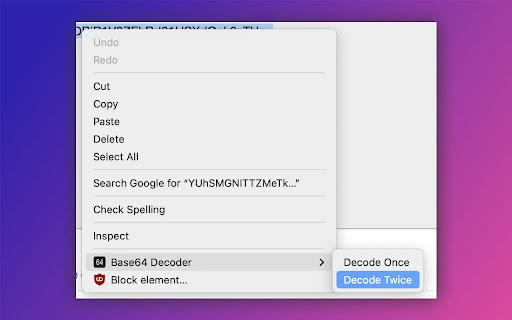
Decode a base64 URL (even encoded twice) and open it in the tab to the right.
This is an extension for a niche usage. It decodes a base64 encoded (once or twice) URL and opens the URL in the tab to the right (in background). That's it. No other extraneous functions. You probably don't need this!
Usage: Select a base64 url and right click to invoke the context menu. You will see 2 options: Decode Once & Decode Twice. Select the right option based on how many times the url was encoded. The extension will decode and open it in the right tab.
| 分类 | 📝工作流程与规划 |
| 插件标识 | dmjommdldlbamppffbonacmohmdlklmm |
| 平台 | Chrome |
| 评分 |
★★★★☆
4.3
|
| 评分人数 | 6 |
| 插件主页 | https://chromewebstore.google.com/detail/base64-url-decoder-opener/dmjommdldlbamppffbonacmohmdlklmm |
| 版本号 | 1.1.0 |
| 大小 | 8.82KiB |
| 官网下载次数 | 597 |
| 下载地址 | |
| 更新时间 | 2022-12-07 00:00:00 |
CRX扩展文件安装方法
第1步: 打开Chrome浏览器的扩展程序
第2步:
在地址栏输入: chrome://extensions/
第3步: 开启右上角的【开发者模式】
第4步: 重启Chrome浏览器 (重要操作)
第5步: 重新打开扩展程序管理界面
第6步: 将下载的crx文件直接拖入页面完成安装
注意:请确保使用最新版本的Chrome浏览器
同类插件推荐

Base 64 Decode
Add a right-click option to base64 decode textHave
Base64 URL Decoder & Opener
Decode a base64 URL (even encoded twice) and open

GotoBase64Link
Go to base64 encoded link by Right Click우클릭으로 간단하게

Clip64 Base64 Decoder
Decode Base64 to the clipboard.Clip64 decodes Base

Base64 Encoder/Decoder
Encodes and decodes media to and from Base64.Base6

Base64 Decoder
Decodes Base64 strings. Highlight the string and r

Base64 encode/decode selected text
A base64 encoder/decoder extensions for the chrome

Base64Coder
Base64Coder is a Chrome extension that allows you

원신 플로우
원신 맵스의 게임 속 맵핀 가져오기 및 원신 포럼 자동 출석 기능을 사용할 수 있어요!원신

클린디씨
쾌적한 갤질을 위해Hide annoying ads with layout correction

URL Decode/Encode
A nifty tool for decoding URLs that have been enco

Base64 Encoder and Decoder
Encode plain text to Base64, Decode Base64 text to

Get cookies.txt LOCALLY
Get cookies.txt, NEVER send information outside wi