
Varta Keyboard Chrome 插件, crx 扩展下载
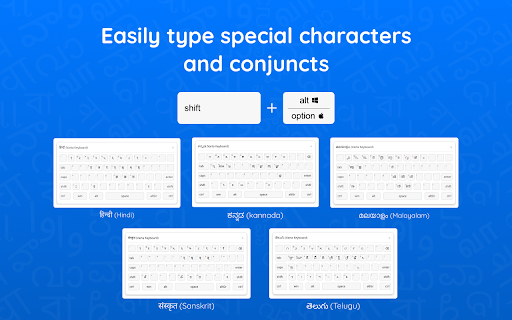
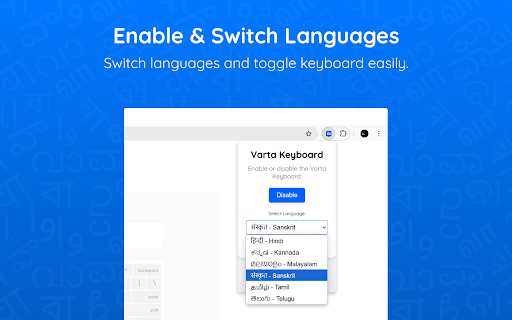
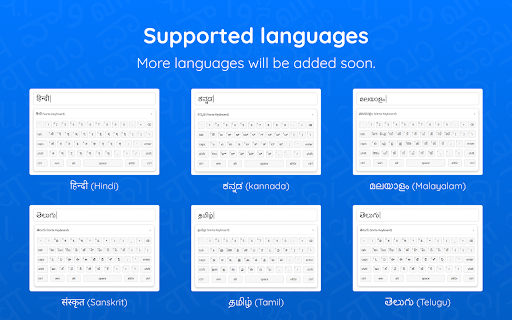
Varta Keyboard extension is a Multilingual, phonemic Keyboard for efficient typing; it currently supports HI, KN, ML, SA, TA & TE.
Varta Keyboard enables typing in multiple Indian languages directly from your browser using a standard QWERTY keyboard.
How to use Varta:
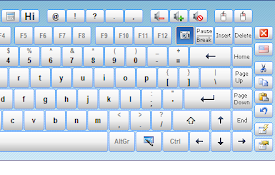
Varta Keyboard does not have separate keys for vowel signs or modifiers in Indian languages. Instead, it automatically generates the appropriate modifier based on the combination of consonants and vowels you type. The online virtual keyboard can be turned on to show on-screen key layout.
To use this extension, the system's keyboard language must be set to English.
For example, typing 'र्' and 'आ' would generate letter 'रा' in Hindi and Sanskrit. Similarly typing 'ವ್' and ' ಾ' would generate Kannada letter 'ವಾ', 'ക്' and 'ഉ' would generate Malayalam letter 'കു', typing 'க்' and 'ஓ' would generate Tamil letter 'கோ', typing 'ర ' and 'ఆ'would generate Telugu letter 'రా' .
In Malayalam, chillaksharams and some archiac characters can be accessed in 'Alt + Shift' (see a screenshot above). For example, to type a chillaksharam, press Alt and Shift together followed by the desired letter.
Currently supporting Hindi, Kannada, Malayalam, Sanskrit, Tamil and Telugu, Varta Keyboard will add more Indian languages in future updates.
| 分类 | 🛠️工具 |
| 插件标识 | efieebogipdgnfjpfkloplkjjbppmghk |
| 平台 | Chrome |
| 评分 |
★★★☆☆
3.7
|
| 评分人数 | 39 |
| 插件主页 | https://chromewebstore.google.com/detail/varta-keyboard/efieebogipdgnfjpfkloplkjjbppmghk |
| 版本号 | 4.3 |
| 大小 | 1.49MiB |
| 官网下载次数 | 77 |
| 下载地址 | |
| 更新时间 | 2025-02-03 00:00:00 |
CRX扩展文件安装方法
第1步: 打开Chrome浏览器的扩展程序
第2步:
在地址栏输入: chrome://extensions/
第3步: 开启右上角的【开发者模式】
第4步: 重启Chrome浏览器 (重要操作)
第5步: 重新打开扩展程序管理界面
第6步: 将下载的crx文件直接拖入页面完成安装
注意:请确保使用最新版本的Chrome浏览器
同类插件推荐
Aksharakuppy - അക്ഷരക്കുപ്പി
Easy Malayalam Typing Notepad , Manglish Notepad,M

Inscript keyboards
Indic language keyboards in InscriptThis extension
Swalekh Multilingual Typing
Enables typing in Odia, Hindi, Bengali(Bangla), Ma
Varta Keyboard
Varta Keyboard extension is a Multilingual, phonem

Type In Tamil
This extension will allow you to type in tamil in

Wikimedia Input Tools
Wikimedia Input Tools allows you to type in your n

Hi - My Hindi Translator
English to Hindi Translator Chrome Extension. Easy
Virtual Keyboard Plus
Fullscreen on-screen virtual keyboard for touch sc

International On-Screen Keyboard
International On-Screen Keyboard to type and searc

Chrome Simple Keyboard - A virtual keyboard
A native virtual keyboard based on the simple-keyb

Google Chrome™虚拟键盘
自由!用于触摸屏设备的全屏虚拟键盘是否想今天使用虚拟键盘输入外语字符? 立即开始使用此虚拟键盘。它
Comfort On-Screen Keyboard Pro Extension
Brings up the on-screen keyboard when entering tex
Hot Virtual Keyboard Extension
Brings up the virtual keyboard when entering text