
MONI Chrome 插件, crx 扩展下载
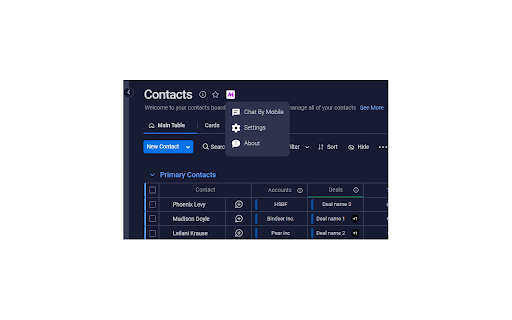

Connecting WhatsApp & monday.com
MONI is a JONI extension that creates a bridge between monday.com web app and WhatsApp Web
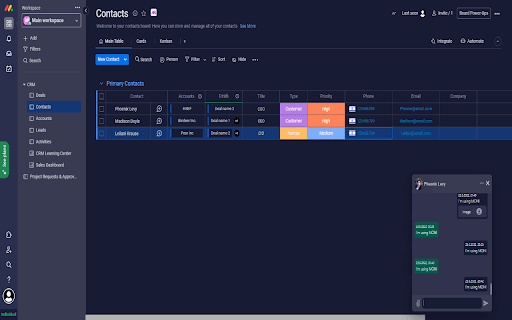
After you add JONI and MONI to chrome you can open WhatsApp chats, create item's and updates for them without leaving your monday.com tab
*Click To Chat
Open chat by clicking any phone field in your boards or by mobile number
*Open Contact's Item
Click chat's header to go to contact's item. If contact's item not found MONI will prompt you to create a new item for it
*Create Updates
Use 'Selection Mode' to create update with selected messages. If contact's item not found MONI will prompt you to create a new item for it
============================================================================
MONI is an independent software developed by pYrogss Ltd and does not have any business relations with WhatsApp nor monday.com
| 分类 | 📝工作流程与规划 |
| 插件标识 | egpclpldebajaofedakibgoocafliaol |
| 平台 | Chrome |
| 评分 |
★★★★☆
4.7
|
| 评分人数 | 15 |
| 插件主页 | https://chromewebstore.google.com/detail/moni/egpclpldebajaofedakibgoocafliaol |
| 版本号 | 1.0.32 |
| 大小 | 81.59KiB |
| 官网下载次数 | 1000 |
| 下载地址 | |
| 更新时间 | 2025-02-25 00:00:00 |
CRX扩展文件安装方法
第1步: 打开Chrome浏览器的扩展程序
第2步:
在地址栏输入: chrome://extensions/
第3步: 开启右上角的【开发者模式】
第4步: 重启Chrome浏览器 (重要操作)
第5步: 重新打开扩展程序管理界面
第6步: 将下载的crx文件直接拖入页面完成安装
注意:请确保使用最新版本的Chrome浏览器
同类插件推荐

בוטי - תוסף למשלוח הודעות בלי לשמור
עובד דרך האתר web.boti.botאתם יכולים לשלוח הודעות

SONI
Connecting WhatsApp & SalesforceSONI is a JONI
MONI
Connecting WhatsApp & monday.comMONI is a JONI

Offsite - Save to monday.com
monday.com Productivity and CRM ExtensionCapture a

Yomsheni.co.il RTL helper
Unlock the potential of your monday.com account fo

Handz - פשוט להשוות מחירים
השוואת מחירים בצורה נוחה וקלילה. כרגע עובד על יד2

JONI
Supertool For WhatsApp* Bulk Sender Send personal

timeOS: AI Meeting & Calendar Assistant
Automate note-taking for Google Meet, Zoom, Micros

TimelinesAI - universal integration
TimelinesAI Chrome Extension allows to start or co

Business Tools CRM
带您打开WhatsApp私域流量宝库,帮助您将WhatsApp营销、WhatsApp用户管理效率提高
WooNotif CRM
WooNotif CRM is an extension to turn your WhatsApp

2Slash
Your Prompt-Free AI Assistant, EverywhereSimplify