
Offsite - Save to monday.com Chrome 插件, crx 扩展下载
monday.com Productivity and CRM Extension
Capture and integrate the web into your monday.com workflows - Tasks, Screenshots, Gmail and LinkedIn prospects and leads and much more!
Offsite monday.com chrome extension let you access your monday.com work OS directly from your browser and helps you get things done faster and smarter. Create tasks, assign team members, upload files, and much more. Work effectively offsite, save time, never lose focus.
Features
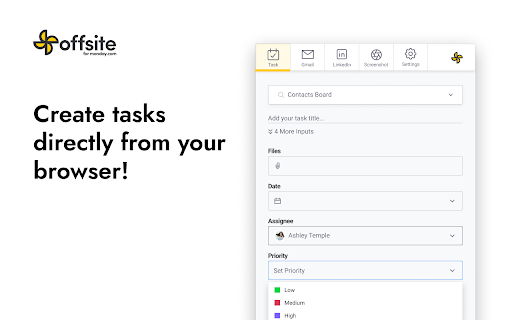
✔️ Create tasks directly from your browser
Access your monday.com work OS directly from any browser window to get things done faster and smarter. Create tasks, assign team members, upload files, and much more. Work effectively offsite, save time, never lose focus.
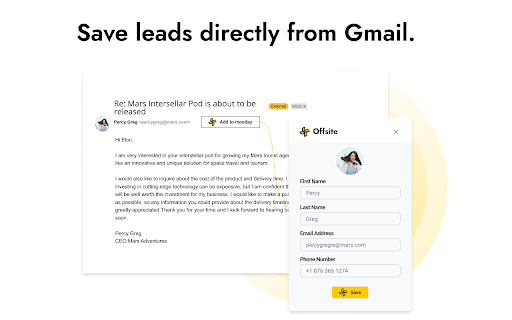
? Save leads from your Gmail. Streamline your work and automate your sales and marketing processes.
Effortlessly integrate your leads and contacts by one click saving leads from Gmail to monday.com CRM. Save time and effort and focus on closing deals and growing your business.
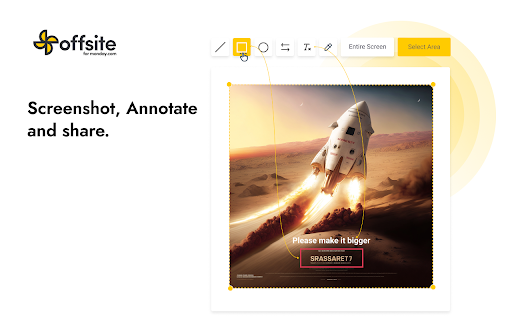
? Screenshot, Annotate and share for better communication and collaboration
Seamlessly provide feedback or instructions directly from your browser by creating and sharing a screenshot with your team members of clients.
? Coming Soon! Quickly collect prospects on LinkedIn without having to manually copy and paste information.
Enrich your monday.com CRM sales data, save time, collect accurate data and up-to-date information at scale, to ensure that your prospects are high-quality.
| 分类 | 📝工作流程与规划 |
| 插件标识 | mcnjnnkpahkmohlocmkfmkndnlcakfio |
| 平台 | Chrome |
| 评分 |
★★★☆☆
3.9
|
| 评分人数 | 18 |
| 插件主页 | https://chromewebstore.google.com/detail/offsite-save-to-mondaycom/mcnjnnkpahkmohlocmkfmkndnlcakfio |
| 版本号 | 3.5.2 |
| 大小 | 2.55MiB |
| 官网下载次数 | 2000 |
| 下载地址 | |
| 更新时间 | 2025-02-15 00:00:00 |
CRX扩展文件安装方法
第1步: 打开Chrome浏览器的扩展程序
第2步:
在地址栏输入: chrome://extensions/
第3步: 开启右上角的【开发者模式】
第4步: 重启Chrome浏览器 (重要操作)
第5步: 重新打开扩展程序管理界面
第6步: 将下载的crx文件直接拖入页面完成安装
注意:请确保使用最新版本的Chrome浏览器
同类插件推荐

DocuGen Lite for monday.com
Generate professional documents instantly from you

Linkmonday: Integration for monday CRM
Find verified contact info for your prospects on p

monday CRM
Add contacts, leads, and companies directly to you

Quick Access to monday.com
Transform web content into monday.com tasks with a

Better Notifications - monday.com
Makes monday.com's notification drawer usable!

monday
Fancy todolist with minimal UIv2.0 is a complete r

Glances - A Simplified Customer View
Unify your apps with a simplified customer viewThe

Monday.com: Enhanced Item ID Copy
Adds additional info to the text, copied by clicki

Offsite - Save to monday.com
monday.com Productivity and CRM ExtensionCapture a

AppCursor - All App Wigets inside CRM, Desk
Ulgebra - AppCursor - Any App Wigets for CRM, Desk

Copper CRM for Gmail
You live in Google Workspace™. So should your CRM.

Airtable web clipper
Clip web content to your Airtable bases.Clip text,

ClickUp: Tasks, Screenshots, Email, Time
ClickUp is a productivity platform that makes your