
SF Quick Links Chrome 插件, crx 扩展下载
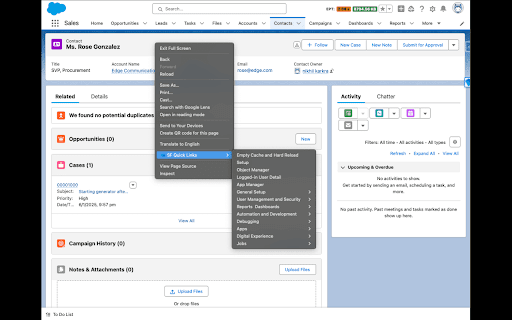
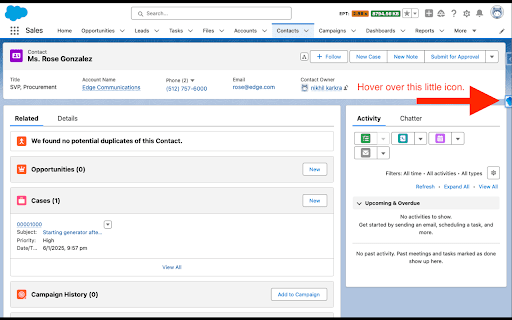
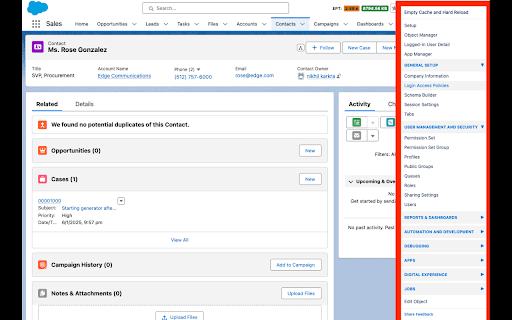
Quick access to essential Salesforce pages via a floating menu and right-click shortcuts.
SF Quick Links enhances your Salesforce workflow with instant access to frequently used pages:
Key Features:
- Floating menu panel for quick navigation
- Right-click context menu shortcuts
- Empty cache and hard reload option
- Grouped sections for easy access:
- Setup Essentials: Access key tools like Setup, Object Manager, and App Manager.
- User Management & Security: Manage Users, Profiles, Roles, Permission Sets, and Sharing
Settings.
- Reports & Dashboards: Quick navigation to Reports and Dashboards for data visualization and
insights.
- Automation & Development: Streamline processes with Flows, Apex Classes, Triggers, Custom
Metadata, and the Developer Console.
- Debugging Tools: Includes Debug Logs, Email Logs, Lightning Debug Mode, and Paused Flow
Interviews.
- Apps & Digital Experience: Manage Connected Apps, Installed Packages, and External Sites.
- Jobs Management: Monitor and manage Apex Jobs, Scheduled Jobs, and Bulk Data Load Jobs.
Perfect for:
- Salesforce Admins
- Developers
- Regular Salesforce users
- Anyone who frequently navigates between Salesforce pages
Compatible with:
- Lightning Experience
- Classic interface
- Visualforce pages
- Developer Console
- All Salesforce domains (.force.com, .salesforce.com, etc.)
Automatically detects your org's settings and adjusts links accordingly, such as Enhanced Profile Management URLs.
Save time and boost productivity by eliminating multiple clicks through the Salesforce menu structure.
Privacy Note: This extension only runs on Salesforce domains and requires minimal permissions to function. No data is collected or transmitted outside your Salesforce org.
Share feedback to help us improve: Access the feedback form through the floating menu.
Release 1.4.0
1) Floating Icon Introduction:
- A floating icon was introduced to enhance navigation and accessibility. This new feature allows
users to quickly access frequently used tools and settings with ease.
Release 1.5.0
We’ve implemented several key improvements and enhancements in this release to optimize the user experience:
1.Nested Content Menu:
- Introduced a structured and categorized content menu for better organization and faster
navigation.
- The menu is now divided into clear categories, making it easier to locate specific tools and
settings.
2. Floating Icon Position Change:
- The position of the floating icon has been adjusted to improve visibility and minimize obstruction
while working within the interface.
3. New Links and Enhanced Categorization:
- Added new links to frequently accessed areas such as Object Manager, App Manager, and
Logged-in User Detail.
- Enhanced the categorization of links, dividing them into intuitive groups
| 分类 | 💻开发者工具 |
| 插件标识 | eifpebkonkdgimgpclelnplicglafega |
| 平台 | Chrome |
| 评分 |
★★★★☆
4.9
|
| 评分人数 | 40 |
| 插件主页 | https://chromewebstore.google.com/detail/sf-quick-links/eifpebkonkdgimgpclelnplicglafega |
| 版本号 | 1.5.0 |
| 大小 | 12.32KiB |
| 官网下载次数 | 1000 |
| 下载地址 | |
| 更新时间 | 2025-01-29 00:00:00 |
CRX扩展文件安装方法
第1步: 打开Chrome浏览器的扩展程序
第2步:
在地址栏输入: chrome://extensions/
第3步: 开启右上角的【开发者模式】
第4步: 重启Chrome浏览器 (重要操作)
第5步: 重新打开扩展程序管理界面
第6步: 将下载的crx文件直接拖入页面完成安装
注意:请确保使用最新版本的Chrome浏览器
同类插件推荐

SFDark - Salesforce Dark Theme
Transform your Salesforce experience with an insta
SF Quick Links
Quick access to essential Salesforce pages via a f

Salesforce Test Executions
Salesforce developer and administrator tool to run

Lightning Studio
Build Salesforce LWC development easy and fastest.

Why Salesforce
Stuff that Salesforce should have added already...

Salesforce Change Set Helper
Enhances the Salesforce change set. Adds last chan

Apex Debugger
Debug Salesforce apex code with easeApex debugging

Salesforce Tool Suite
Compare Salesforce Metadata, Generate Metadata Exc

ORGanizer for Salesforce
ORGanizer - The best Salesforce Extension everThe

Salesforce advanced Code searcher
By using the advanced quick find you can get your

Salesforce Logins by Synebo
Easy access to credential storageKEY FEATURES – B

Salesforce inspector
Productivity tools for Salesforce administrators a

Salesforce Inspector Reloaded
Productivity tools for Salesforce administrators a