
Salesforce Test Executions Chrome 插件, crx 扩展下载


Salesforce developer and administrator tool to run Apex test classes and view code coverage from the Salesforce UI.
Salesforce developer and administrator tool to run Apex test classes and view code coverage from the Salesforce UI.
The Salesforce Test Executions extension is a productivity tool and with its help, you can:
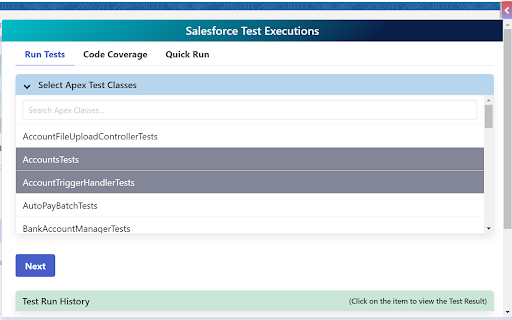
Apex Test Execution:
- Run multiple Apex test classes at the same time after Salesforce login
- Run selected Apex test methods or all test methods of multiple classes at once
- Display test results with pass/fail methods with error and stack trace information
- Allows you to search classes and methods to easily find classes & methods from the large list
- Maintain history of previous 5 test runs for each org
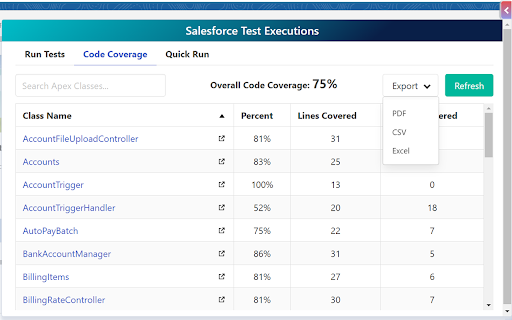
Code Coverage:
- View all Apex Classes coverage percentage with number of covered and uncovered lines
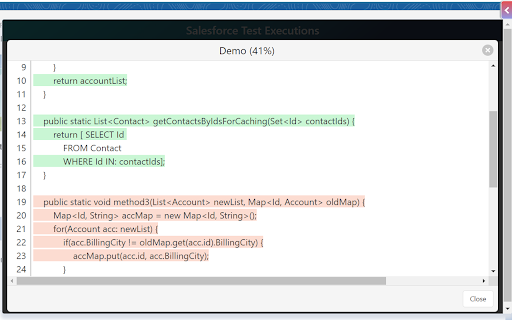
- View covered and uncovered lines of Apex classes
- View overall code coverage of the Org
- Export Code Coverage details in PDF, CSV, and Excel formats
- Allows you to sort all columns Class Name, Percent, Lines Covered, and Lines Uncovered in ascending or descending order
- Search class name from the list of classes
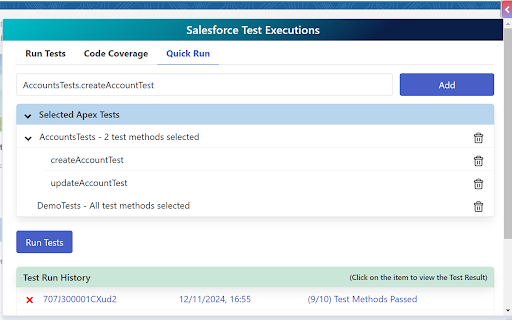
Quick Run:
- Quickly run Apex test classes and methods by eliminating wait times for queries and loading
- Manually add or remove Apex classes and methods execute
| 分类 | 💻开发者工具 |
| 插件标识 | eoncmkndnaiopjmchbinhejaobidnlah |
| 平台 | Chrome |
| 评分 |
★★★☆☆
3.8
|
| 评分人数 | 268 |
| 插件主页 | https://chromewebstore.google.com/detail/salesforce-test-execution/eoncmkndnaiopjmchbinhejaobidnlah |
| 版本号 | 1.0.7 |
| 大小 | 85.73KiB |
| 官网下载次数 | 1000 |
| 下载地址 | |
| 更新时间 | 2024-12-12 00:00:00 |
CRX扩展文件安装方法
第1步: 打开Chrome浏览器的扩展程序
第2步:
在地址栏输入: chrome://extensions/
第3步: 开启右上角的【开发者模式】
第4步: 重启Chrome浏览器 (重要操作)
第5步: 重新打开扩展程序管理界面
第6步: 将下载的crx文件直接拖入页面完成安装
注意:请确保使用最新版本的Chrome浏览器
同类插件推荐

SF Quick Links
Quick access to essential Salesforce pages via a f
Salesforce Test Executions
Salesforce developer and administrator tool to run

Lightning Studio
Build Salesforce LWC development easy and fastest.

Salesforce Show Api Name
Display Field & Object API Names on Detail Pag

Salesforce Change Set Helper
Enhances the Salesforce change set. Adds last chan

Apex Debugger
Debug Salesforce apex code with easeApex debugging

Salesforce Speedy Debugger
Easy way to check the Debug logsSalesforce Debugge

Salesforce Tool Suite
Compare Salesforce Metadata, Generate Metadata Exc

ORGanizer for Salesforce
ORGanizer - The best Salesforce Extension everThe

Salesforce advanced Code searcher
By using the advanced quick find you can get your

Salesforce Lightning Inspector
For inspecting Lightning appsThe Salesforce Lightn

Salesforce Logins by Synebo
Easy access to credential storageKEY FEATURES – B

Salesforce Inspector Reloaded
Productivity tools for Salesforce administrators a