
TransferNow for Chrome and Gmail Chrome 插件, crx 扩展下载
Fast, secure transfer of large files. Generate download links for large files directly from Chrome and Gmail.
Send any file of any size directly from your Chrome browser with Gmail!
With the TransferNow extension for Chrome, forget about size limits for your attachments in Gmail. Simplify file transfer without overloading your inbox or that of your recipients, while enhancing your image or that of your company.
Why choose the TransferNow extension for Chrome and Gmail?
– Send files of all types and sizes: Don't worry about Gmail's size restrictions.
– Stay informed about downloads: Receive notifications when your files are downloaded.
– Control the data you send: Manage access to your files with ease.
– Enhance your image: Personalize your transfers to suit your image!
How does the TransferNow extension for Chrome and Gmail work?
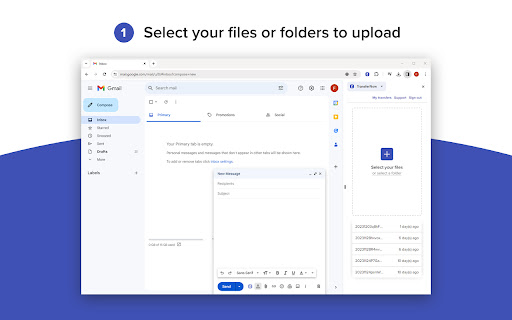
From your Chrome browser, click on the "TransferNow" button at the top right of your screen, or click directly on the "TransferNow" button available when you write a new message from Gmail.
The side panel opens, prompting you to log in to your account. Once logged in, select one or more files to send, or select a folder.
Customize your transfer: set a subject, create a personalized link, password-protect file access, enable download notifications, preview and stream files before uploading, and more.
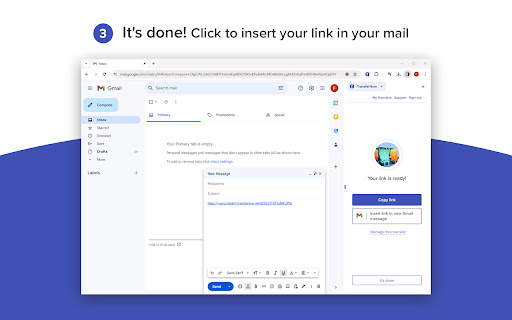
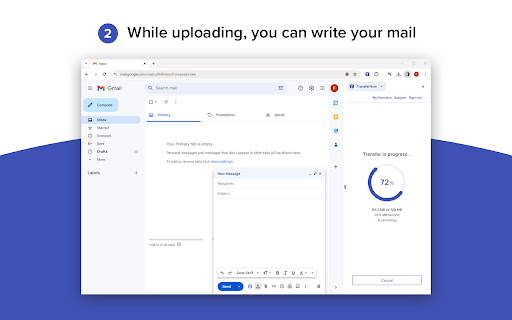
Click on "Transfer" to start sending your files. Once the transfer is complete and the security check has been carried out, you'll get a link to copy and paste or insert directly into your new Gmail message.
That's it! Send your email with your file download link ?
Compatibility : The TransferNow extension for Chrome is compatible with Gmail and can be used with any Gmail account. A TransferNow account is required to use this extension.
You can also create download links for your files outside Gmail.
If you don't have a TransferNow account yet, check out our offers here => https://www.transfernow.net/en/prices
| 分类 | 🛠️工具 |
| 插件标识 | ejaijeeblgpgldhdonlbleempkgpmjdb |
| 平台 | Chrome |
| 评分 |
★★★★☆
4.6
|
| 评分人数 | 1289 |
| 插件主页 | https://chromewebstore.google.com/detail/transfernow-for-chrome-an/ejaijeeblgpgldhdonlbleempkgpmjdb |
| 版本号 | 1.0.8 |
| 大小 | 7.06MiB |
| 官网下载次数 | 2000 |
| 下载地址 | |
| 更新时间 | 2024-10-21 00:00:00 |
CRX扩展文件安装方法
第1步: 打开Chrome浏览器的扩展程序
第2步:
在地址栏输入: chrome://extensions/
第3步: 开启右上角的【开发者模式】
第4步: 重启Chrome浏览器 (重要操作)
第5步: 重新打开扩展程序管理界面
第6步: 将下载的crx文件直接拖入页面完成安装
注意:请确保使用最新版本的Chrome浏览器
同类插件推荐

Send Anywhere For Gmail
Ad-free from any platform, powerful link managemen

TransferNow for Chrome and Gmail
Fast, secure transfer of large files. Generate dow

FlowCrypt: Encrypt Gmail with PGP
Simple end-to-end encryption to secure email and a

Chrome 和 Gmail 版 SendSafely 加密
为 Gmail 提供端到端加密的 Chrome 扩展程序。加密私密的电子邮件,安全地共享最大 10G