
HAWK EYES Chrome 插件, crx 扩展下载
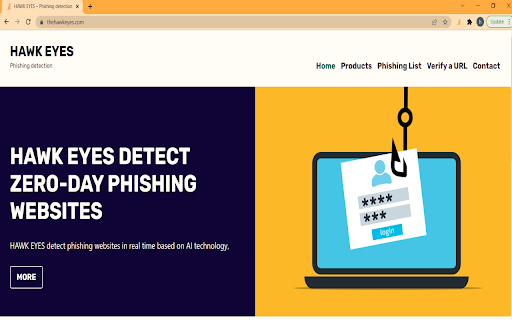
A browser extension powered by machine learning to detect zero-day phishing attacks in real-time.
**Overview**
Hawk Eyes is a lightweight browser extension that is easy to install. The core function of this plugin is to analyze URLs and page content on the fly and alert the user of possible phishing attacks. Detection services and datasets are deployed on the server-side. The machine learning-based model for predicting whether a website is a phishing website is also deployed on the server; the mode is trained off-line. Hawk Eyes URL prediction service combines blacklist blocking, whitelist filtering, heuristic methods and machine learning models.
**How it Works**
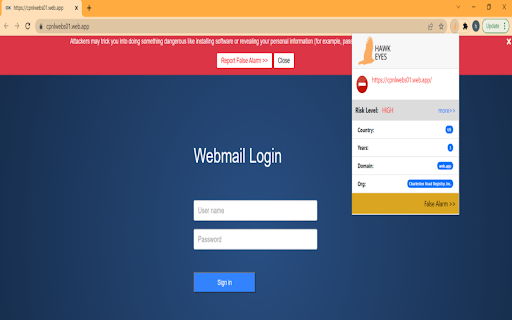
When the user opens a web page in the browser, the extension sends the current URL and part of the page HTML to the server but nothing is saved on the server-side except the URL and only if it is a phishing link. The core detection service is divided into three stages. First, the blacklist is compared. If it hits, the result will be a phishing link. Next, compare the whitelist, and if it hits, it will directly return to the normal link. Then, analyze page content and URL character content, and filter pages that do not require the submission of sensitive information. Finally, the machine learning model predicts whether there is a phishing risk. When the plugin receives the detection result, if there is a risk of phishing, a warning box with a red background will pop up on the page to notify the user.
**Key Features**
The extension will warn you when you visit phishing web pages.
When the user clicks the extension's icon, site information is presented, such as domain, organization, registration year. Other services include:
- Check whether a URL has phishing risk
- Report a suspicious URL
- Search detected phishing URLs
**Publications**
L. Tang and Q. H. Mahmoud, “A Survey of Machine Learning-Based Solutions for Phishing Website Detection,” Machine Learning and Knowledge Extraction, vol. 3, no. 3, pp. 672–694, Aug. 2021. Doi: https://doi.org/10.3390/make3030034.
L. Tang and Q. H. Mahmoud, "A Deep Learning-Based Framework for Phishing Website Detection," in IEEE Access, vol. 10, pp. 1509-1521, 2022. doi: 10.1109/ACCESS.2021.3137636.
| 分类 | 📚教育 |
| 插件标识 | ekobfalejalidceannlelkiombbfmgad |
| 平台 | Chrome |
| 评分 |
★★★★★
5
|
| 评分人数 | 2 |
| 插件主页 | https://chromewebstore.google.com/detail/hawk-eyes/ekobfalejalidceannlelkiombbfmgad |
| 版本号 | 1.0.1 |
| 大小 | 76.55KiB |
| 官网下载次数 | 43 |
| 下载地址 | |
| 更新时间 | 2022-04-19 00:00:00 |
CRX扩展文件安装方法
第1步: 打开Chrome浏览器的扩展程序
第2步:
在地址栏输入: chrome://extensions/
第3步: 开启右上角的【开发者模式】
第4步: 重启Chrome浏览器 (重要操作)
第5步: 重新打开扩展程序管理界面
第6步: 将下载的crx文件直接拖入页面完成安装
注意:请确保使用最新版本的Chrome浏览器
同类插件推荐

Phish Alert
A cyber security awareness, educator and monitorin

ZecOps Anti-Phishing Extension
Augment the web with indicators that help detect p

Anti-Phishing Certilane
Certilane vous protège contre le phishing en temps
Dot Phishing Protector
This extension protects yourself against punycode

inlyse Browser Security
The inlyse Browser Security extension provides mor

PhishDetector - True Phishing Detection
A Rule-Based phishing attack detector for Online-B

Phishing Boat
Phishing Boat helps prevent phishing attacks. If y
HAWK EYES
A browser extension powered by machine learning to

MyShows: TV Show tracker
Track and rate your favourite TV-showsThis extensi

Criminal IP: AI-based Phishing Link Checker
A web browsing guard against malicious, scam, or p
ProfStats UT Dallas
This extension offers a user-friendly interface fo

Phish jail
Identify and monitor enterprise password leaksShie

SafeToOpen Online Security
SafeToOpen Online Security 保护您免受诈骗、病毒和网络钓鱼网页的侵害。Sa