
Sharon Poshmark Chrome 插件, crx 扩展下载
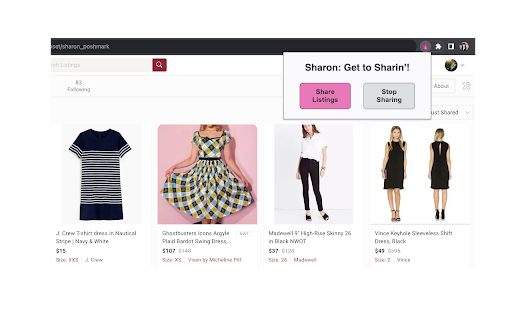

Use the Sharon extension to share listings on Poshmark!
After you install the extension, click the Extensions icon ("puzzle piece" icon) in your Chrome toolbar and select "Sharon Poshmark". To make it easier to access in the future, "pin" the extension!
To share listings, open the extension and click "Share Listings". Sharon automatically shares the available items on the page to your followers. When she's done, she starts the cycle over again. You can sit back, relax, and let Sharon do the work!
Done sharing? Open the extension and click "Stop Sharing".
Sharon shares listings about every 10 seconds, which avoids triggering CAPTCHAS. Slow and steady wins the race. Selling on Poshmark is a marathon, not a sprint.
Notes:
- You can run Sharon on any closet, party, or "brand" page.
- If you don't scroll down, Sharon shares the top 47 items on the page. For best results, scroll down as far as you want Sharon to share, and *then* click "Share Listings".
- This is a "no frills" extension. Sharon shares, but she doesn't follow, offer, solve CAPTCHAs, or any of that fancy stuff. At least not yet.
- Sharon is FREE...for now!
So what are you waiting for? Download Sharon and share on!
Disclaimer: The "Sharon Poshmark" extension and its creators are not affiliated with, endorsed by, sponsored by, or otherwise related to Poshmark, Inc. or any of its affiliates or subsidiaries. "Poshmark" is a trademark of Poshmark, Inc.
| 分类 | 🛍️购物 |
| 插件标识 | eodccgdhbjjbkkbmailnjbbhhcnclkhe |
| 平台 | Chrome |
| 评分 |
☆☆☆☆☆
0
|
| 评分人数 | 3 |
| 插件主页 | https://chromewebstore.google.com/detail/sharon-poshmark/eodccgdhbjjbkkbmailnjbbhhcnclkhe |
| 版本号 | 1.0.3 |
| 大小 | 2.24MiB |
| 官网下载次数 | 364 |
| 下载地址 | |
| 更新时间 | 2024-01-23 00:00:00 |
CRX扩展文件安装方法
第1步: 打开Chrome浏览器的扩展程序
第2步:
在地址栏输入: chrome://extensions/
第3步: 开启右上角的【开发者模式】
第4步: 重启Chrome浏览器 (重要操作)
第5步: 重新打开扩展程序管理界面
第6步: 将下载的crx文件直接拖入页面完成安装
注意:请确保使用最新版本的Chrome浏览器
同类插件推荐
Sharon Poshmark
Use the Sharon extension to share listings on Posh

Nosto
Connect Nosto to Chrome so you can quickly and eas

Poshmark Utility Belt
A Poshmark extension that provides utility functio

PoshGenie
Transform your closet into cash with AI-driven ins

Closet Pixie | Your Poshmark Bot
Your assistant to grow your Poshmark sales.? Hey y
Listifyx - Poshmark Bot
Poshmark bot that automates all of the boring Posh

Taplio for Twitter
Taplio for Twitter: Elevate your twitter influence

Levvy Password Manager
Levvy's password manager keeps your credential

Fextralife Fix
This little extension removes the twitch embed fro

Applitools Centra Screenshot Capture
Take a screenshot and save it to your system clipb

NETO POS Profit Margin Calculator
This extension will calculate real-time gross prof

FYBR
FYBR: clean inbox clean mindClean inbox. Clean min

Twitter Reaction Counter
This extension get list of Like/Retweet on a tweet