
SteamChecker Chrome 插件, crx 扩展下载
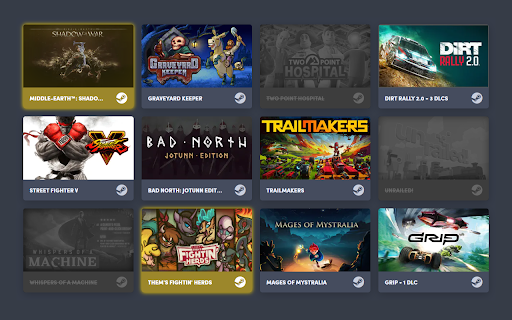

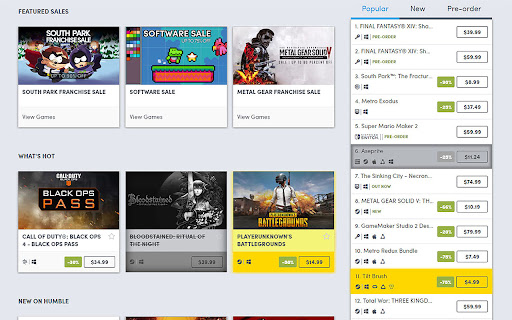
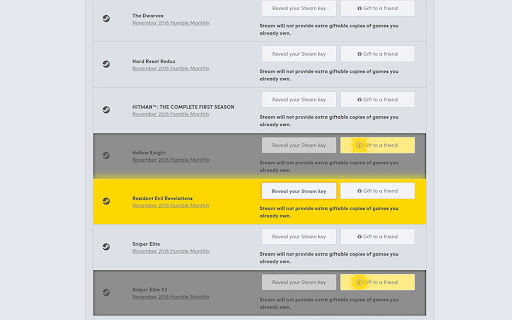
Grays-out & highlights owned/wishlisted Steam games on Humble Bundle
FEATURES:
Shows owned/wishlisted games:
* on the Humble Choice pages (https://www.humblebundle.com/membership/home)
* on the main game bundle pages
* in the Humble Bundle Store and Search pages
* keys in your Humble Bundle library (https://www.humblebundle.com/home/keys)
Besides looking through every one of your steam games, searching for a specific title to see if you own it or not, there is no way of determining if a bundle you're about to get on HumbleBundle.com has games in your Steam library. Although it may be cheap, spending money on a 10-game bundle where you already owned 9 of the games always makes me frustrated, so I created this extension! This will gray-out any game you own on Steam that is on any of the weekly bundles, store pages, and keys to let you know if you own the game or not. Additionally, it will highlight wishlisted games you may have forgotten about so you don't miss a great deal on a wanted game!
HOW TO USE:
There will be a new extension icon in Chrome. Click on that to input your 64bit SteamID or steam profile name (NOT nickname) if you have set your URL. Click "Save" and you're done! This information can be found in your profile URL "steamcommunity.com/id/XXXXXXXXXX/" or "steamcommunity.com/profiles/XXXXXXXXXXXXXXXXXX/"
NOTE:
Humble Bundle uses a different naming format than Steam does for some games, but I will try to keep the alias file as up to date as possible whenever new bundles come out or new games are added to a bundle. If you see that games aren't showing up in a bundle, don't hesitate to contact me! The extension currently doesn't support steam DLC collections (Season Pass, Master Collection, Collector's Edition, etc.).
VERSION 1.0 CHANGES:
* Manifest V3 update
* Changed how styles are applied for easier maintenance
VERSION 0.9 CHANGES:
* Added support for the Humble Choice subscription page
* Fixed game aliases not loading in some circumstances
VERSION 0.8 CHANGES:
* Added support for the Humble Bundle Store and Search pages
* Fixed for new Humble Bundle keys layout
* Fixed single quote in game title issues
CONTACT ME:
https://twitter.com/Zortrox
| 分类 | 📝工作流程与规划 |
| 插件标识 | eopegaefgepfdedhecfbclehhffiebpk |
| 平台 | Chrome |
| 评分 |
★★☆☆☆
2.3
|
| 评分人数 | 3 |
| 插件主页 | https://chromewebstore.google.com/detail/steamchecker/eopegaefgepfdedhecfbclehhffiebpk |
| 版本号 | 1.0.1.0 |
| 大小 | 29.91KiB |
| 官网下载次数 | 2000 |
| 下载地址 | |
| 更新时间 | 2024-09-27 00:00:00 |
CRX扩展文件安装方法
第1步: 打开Chrome浏览器的扩展程序
第2步:
在地址栏输入: chrome://extensions/
第3步: 开启右上角的【开发者模式】
第4步: 重启Chrome浏览器 (重要操作)
第5步: 重新打开扩展程序管理界面
第6步: 将下载的crx文件直接拖入页面完成安装
注意:请确保使用最新版本的Chrome浏览器
同类插件推荐

SteGOG
Display games owned on Steam in GOGDisplay games o

Steam Youtube Links
This extension adds links to Youtube reviews and l

Steam Snipe
Easily Search for cheaper prices on GOG, Amazon, G

Steam Context Menu
Search Steam using the context menuSearch for game

Steam Achievement Tools
Filter achievements on Steam's websiteA simple

SteamDB
在 Steam 商店和社区页面中添加 SteamDB 链接和新功能,可查阅游戏史低价格和在线统计数据

SteamChecker
Grays-out & highlights owned/wishlisted Steam

Humble Pal
Humble Pal extends the functionality of humble bun
Steam Activity Filter
Filter for friends' activity in Steam. Allows

Activate Steam Key from Context Menu
Use the right-click menu to activate selected stea

Steam cards getter
This extension allow you to automate cards getting

Steam Owned
Checks if you own a game on Steam on various websi
Steam Hover
Show Steam app details with mouse hover on a Steam