
Activate Steam Key from Context Menu Chrome 插件, crx 扩展下载
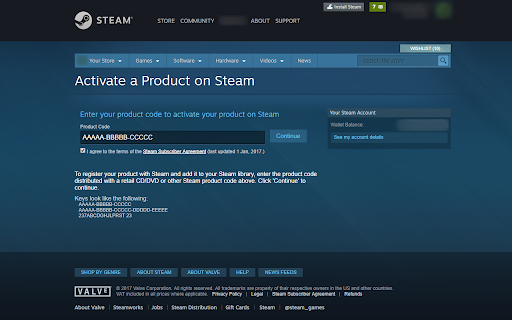
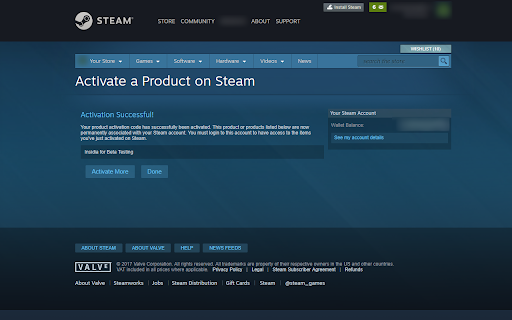
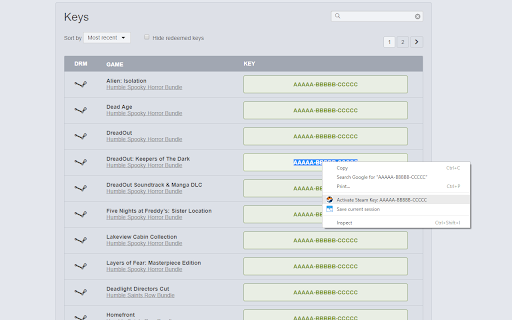
Use the right-click menu to activate selected steam key
Provides a simple and convenient way to activate Steam Keys by simply selecting/mark them and then activating them via Right-Click Context Menu.
The Extension uses the newly available Steam Key Web activation and is fully automated (SSA_Auto_Accept etc.).
Simply select/mark a Steam Key, Right-Click and click on 'Activate Steam Key' in the Context Menu.
Users already needs to be logged in on Steam Web Page to work properly.
Revisions:
v1.3
- Migrated to Mv3
- Fixed Extension Icon transparency
- Optimized everything to avoid any future timing issues
v1.2.2
- Changed the Auto SSA checkbox Method to be compatible with SteamDB Extension
- Added flexible fix for timing issues to Auto SSA checkbox Function
v1.2.1
- Removed permission for tabs because doesn't need to be requested to work
v1.2
- Selection(Key) is now URLencoded for binary safety
v1.1
- Added pattern check for Steam Key to allow users to manual correct certain keys
- Automatically remove all white spaces from key selection
v1.0
- Initial Release
| 分类 | 📝工作流程与规划 |
| 插件标识 | jfaclingjhpenmjnlcgiagihabfbilcb |
| 平台 | Chrome |
| 评分 |
★★★★☆
4.7
|
| 评分人数 | 18 |
| 插件主页 | https://chromewebstore.google.com/detail/activate-steam-key-from-c/jfaclingjhpenmjnlcgiagihabfbilcb |
| 版本号 | 1.3 |
| 大小 | 28.26KiB |
| 官网下载次数 | 1000 |
| 下载地址 | |
| 更新时间 | 2024-06-04 00:00:00 |
CRX扩展文件安装方法
第1步: 打开Chrome浏览器的扩展程序
第2步:
在地址栏输入: chrome://extensions/
第3步: 开启右上角的【开发者模式】
第4步: 重启Chrome浏览器 (重要操作)
第5步: 重新打开扩展程序管理界面
第6步: 将下载的crx文件直接拖入页面完成安装
注意:请确保使用最新版本的Chrome浏览器
同类插件推荐

Steam Context Menu
Search Steam using the context menuSearch for game

Steam Achievement Tools
Filter achievements on Steam's websiteA simple

Augmented Steam
Augments your Steam ExperienceAugmented Steam is a

SteamDB
在 Steam 商店和社区页面中添加 SteamDB 链接和新功能,可查阅游戏史低价格和在线统计数据

SteamChecker
Grays-out & highlights owned/wishlisted Steam

Givee.Club - Get games for free!
Givee.Club Checker - now you can complete GiveAway

Key Master
Key Master is an on page key price checker for the

Humble Pal
Humble Pal extends the functionality of humble bun

Steam-Buyer
Steam-Buyer is a simple application to make purcha
Steam Activity Filter
Filter for friends' activity in Steam. Allows
Activate Steam Key from Context Menu
Use the right-click menu to activate selected stea

Steam cards getter
This extension allow you to automate cards getting

Steam Owned
Checks if you own a game on Steam on various websi