
Zwift Charts Chrome 插件, crx 扩展下载
Demographic and performance charts for Zwift events
ZwiftCharts enriches Zwift-related sites with data visualizations for data-curious cyclists.
******************************
ZwiftPower.com
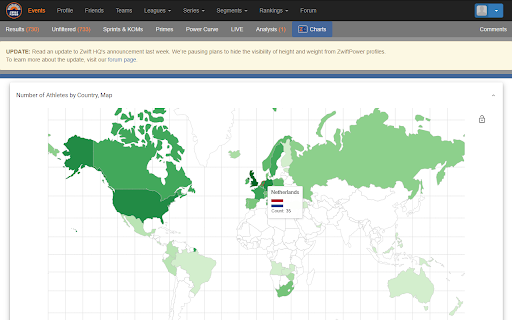
ZwiftCharts provides post-event analysis of demographic and performance.
Find or participate in a Zwift event and head over to ZwiftPower.com to explore:
• A global map highlighting the number of participants by country
• Gender distribution statistics per country
• Breakdowns of athletes by age and categories
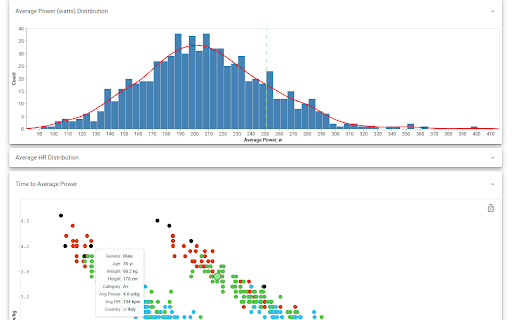
• Comprehensive charts for weight, height, power, and heart rate distributions
• Time vs. average power plots
• Average power vs. average heart rate graphs
• Weight vs. heart rate and power comparisons
With these charts, not only will you appreciate the dynamics of large Zwift events, but you'll also discover how you measure up against the Zwift community.
How to Use:
• Visit a completed event page on ZwiftPower.com
• Click the far-right menu item labeled "ZC Charts"
******************************
WhatsOnZwift.com
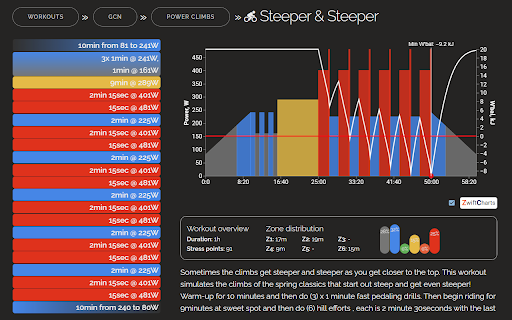
Dive deeper into workouts with visualization tool that:
• Replaces the default workout chart with an interactive one
• Overlays a W'bal chart
• Reveals the minimum W'bal value specific to each workout
Understanding W'bal data is crucial for estimating the feasibility of a workout (assuming your FTP is correctly set). While W'bal is a mathematical model and may not reflect your unique capabilities, familiarity with this metric can help you identify demanding workouts upfront, not when you hit the wall :)
How to Use:
• Open a specific workout page (Note: The feature is disabled on workout lists for performance reasons)
• Input your FTP if it's not set
• Check the checkbox at the right bottom corner of the workout chart
******************************
Whether you're a competitive cyclist or a recreational rider, ZwiftCharts offers a data-driven perspective on your virtual cycling endeavors.
| 分类 | 🎬娱乐 |
| 插件标识 | fbjmpdahncaglogfllpdongbkfaomdjc |
| 平台 | Chrome |
| 评分 |
★★★★☆
4
|
| 评分人数 | 4 |
| 插件主页 | https://chromewebstore.google.com/detail/zwift-charts/fbjmpdahncaglogfllpdongbkfaomdjc |
| 版本号 | 1.6.0 |
| 大小 | 564KiB |
| 官网下载次数 | 1000 |
| 下载地址 | |
| 更新时间 | 2023-09-26 00:00:00 |
CRX扩展文件安装方法
第1步: 打开Chrome浏览器的扩展程序
第2步:
在地址栏输入: chrome://extensions/
第3步: 开启右上角的【开发者模式】
第4步: 重启Chrome浏览器 (重要操作)
第5步: 重新打开扩展程序管理界面
第6步: 将下载的crx文件直接拖入页面完成安装
注意:请确保使用最新版本的Chrome浏览器
同类插件推荐

TrainerRoad Workout Exporter for Zwift
Provides support for exporting workouts into .zwo

StatsHunters
Show tiles on Strava route builderTo make it easie
Zwift Charts
Demographic and performance charts for Zwift event

Zwift Feed Scraper
Get a table of all your Zwift workout activityThe

Strava Auto Kudos
Automatically give kudos to your feedWhen you go t

ZwiftUp! Auto/Mass Ride on!
Ride On/Thumbs Up en masse!If your thumbs are sore

Strava, export gpx track
Export gpx-track from strava.com (c) Eugene Ivanov

ZwiftMap for Strava
Replace real-world maps with Zwift maps when visit

Strava Kudo All
Kudo All Strava automating the process of giving k

Strava Enhanced Experience
Adds multiple enhancements to the free Strava webs

VeloViewer Strava Plugin
Additions to Strava website to provide helpful lin

Sauce for Strava™
Additional functionality for your cycling and runn

Strava Helper
Some tweaks for Strava. Adds a "Give Kudos to