
PointOne Browser Extension Chrome 插件, crx 扩展下载
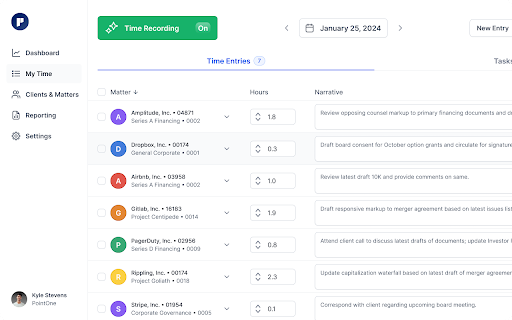
Browser extension for PointOne time tracking.
The PointOne Browser Extension is an integral part of the PointOne timekeeping product, designed to assist lawyers in tracking their time and creating accurate billable time entries.
Core Functionalities:
* Automated Data Collection: While using the Chrome browser, the extension automatically collects data related to work activities. This includes queries, emails, and other relevant online interactions that contribute to a lawyer's billable hours.
* Component of PointOne: The extension functions as a part of the broader PointOne system. The extension is not a standalone product, but a component that complements and enhances the overall functionality of the PointOne timekeeping product.
* Data Usage: The information gathered by the extension is utilized to assist in the generation of detailed and precise time entries within the PointOne system. This process aims to minimize the time spent on manual data entry and increase the accuracy of billable records.
* Privacy and Security Considerations: Recognizing the sensitive nature of legal work, the extension is developed with a focus on privacy and security. It adheres to strict standards to ensure that all collected data is handled responsibly.
* Review and Monitoring: Users have the ability to review and monitor the data collected by the extension, providing transparency and control over the information used for timekeeping purposes.
For additional details and insights into how the PointOne Browser Extension functions as part of the PointOne timekeeping system, please visit https://pointone.ai.
| 分类 | 🛠️工具 |
| 插件标识 | fekaahebjicdpoofanbhmjmhomelpifi |
| 平台 | Chrome |
| 评分 |
★★★★★
5
|
| 评分人数 | 4 |
| 插件主页 | https://chromewebstore.google.com/detail/pointone-browser-extensio/fekaahebjicdpoofanbhmjmhomelpifi |
| 版本号 | 0.0.5 |
| 大小 | 855KiB |
| 官网下载次数 | 211 |
| 下载地址 | |
| 更新时间 | 2024-05-05 00:00:00 |
CRX扩展文件安装方法
第1步: 打开Chrome浏览器的扩展程序
第2步:
在地址栏输入: chrome://extensions/
第3步: 开启右上角的【开发者模式】
第4步: 重启Chrome浏览器 (重要操作)
第5步: 重新打开扩展程序管理界面
第6步: 将下载的crx文件直接拖入页面完成安装
注意:请确保使用最新版本的Chrome浏览器
同类插件推荐
Case Status for Google Chrome
Access key Case Status features from the same wind

Chrometa Web Tools for Chrome
Extensions for making Chrome more Chrometa friendl
PointOne Browser Extension
Browser extension for PointOne time tracking.The P

NetDocuments
If you wish to remove the NetDocuments Extension,
Clockk
Gather productivity data for your Clockk automated

Timestamp My Page
The extension adds timestamp to all your pages. Th

PitchBook Extension for Google Chrome™
PitchBook Extension for Google Chrome™Access Pitch

ClockAssist
ClockAssist browser-extension for automatic time t

RingCentral App Connect
A RingCentral extension for CRM platformsDocumenta

RingCentral for Google
Seamlessly integrate your RingCentral communicatio

Highlight Emails in Gmail by cloudHQ
Highlight Email Rows in GmailColor code email rows