
Testudo++ Chrome 插件, crx 扩展下载
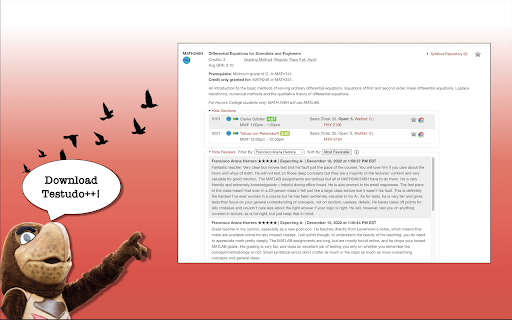


A streamlined process for reviewing course and professor evaluations integrated as a browser extension on https://testudo.umd.edu/.
This chrome extension helps UMD students better navigate the 'Schedule of Classes' on https://app.testudo.umd.edu/soc/. It allows users to make easier, faster, and better decisions based on data provided by PlanetTerp. Rather than navigating between tabs to properly vet prospective instructors based on their ratings and student reviews, you can conduct all of that natively within the webpage. With a sleek interface, matching design, and smooth transitions, Testudo++ feels like it's supposed to belong there. It's able to provide the additional information students value to determine whether they want to register for a specific course or professor.
Features:
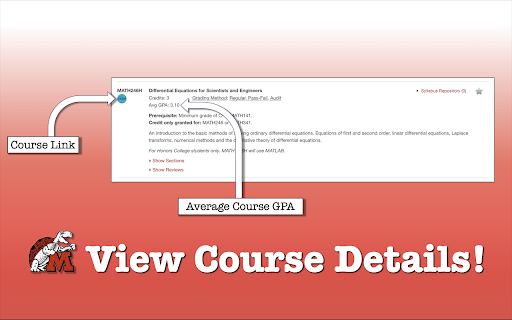
- Displays average course GPA
- Course link navigates you to the corresponding PlanetTerp course website
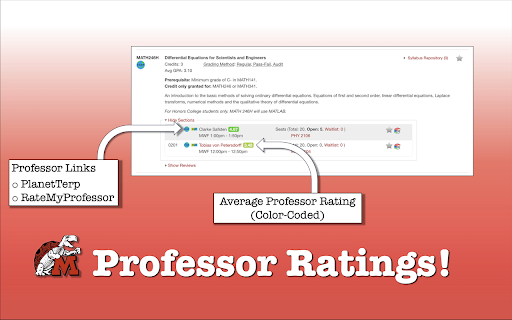
- Professor links
- PlanetTerp link navigates you to the corresponding PlanetTerp professor page
- RateMyProfessor link navigates you to the corresponding RateMyProfessor professor page
- Professor ratings show the average student ratings given to that professor
- Intuitive matching color gradient to indicate positive/negative scale (green, yellow, red)
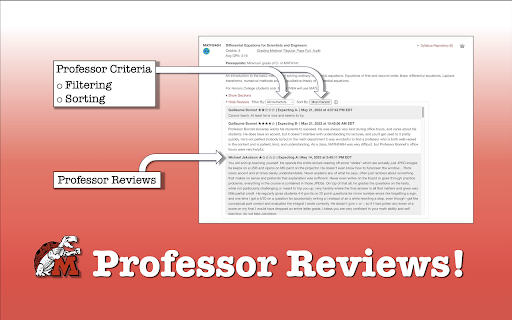
- Scrollable professor reviews window
- Able to filter by professor
- Organized by active/inactive instructor status
- View by grouping
- Sorted alphabetically
- Able to sort by 'Most Recent', 'Most Critical', and 'Most Favorable'
- Additional information popup window
v1.1 Update:
- Ability to sort course listing by GPA or Credit Count
- Button to share a clean link of specific courses
This project is open-source.
https://github.com/RocketSandwich/TestudoPlusPlus
| 分类 | 📚教育 |
| 插件标识 | fgjllkiccpfacobekfcnldelggcgnnic |
| 平台 | Chrome |
| 评分 |
★★★★★
5
|
| 评分人数 | 4 |
| 插件主页 | https://chromewebstore.google.com/detail/testudo++/fgjllkiccpfacobekfcnldelggcgnnic |
| 版本号 | 1.1.2 |
| 大小 | 2.88MiB |
| 官网下载次数 | 580 |
| 下载地址 | |
| 更新时间 | 2024-04-17 00:00:00 |
CRX扩展文件安装方法
第1步: 打开Chrome浏览器的扩展程序
第2步:
在地址栏输入: chrome://extensions/
第3步: 开启右上角的【开发者模式】
第4步: 重启Chrome浏览器 (重要操作)
第5步: 重新打开扩展程序管理界面
第6步: 将下载的crx文件直接拖入页面完成安装
注意:请确保使用最新版本的Chrome浏览器
同类插件推荐

Testudo++
A streamlined process for reviewing course and pro

TerpScheduleSync
Base Level ExtensionAutomatically import your cour

TerpCal
Sync up your UMD schedule with your Google Calenda

Better Testudo
Upgrades the Testudo class search system to make i

Blue Mark Removal
This extension removes any tweets on Twitter that

Reaction Free Extension
Add a youtube video reaction to your Streaming ser

Gify Weather
Knowing weather made attractive. Get the weather r

Yabbit
Yabbit CRM integrationYabbit is your crm integrati

Genea Ancestry Add To Tree Auto-Clicker
Automatically checks or unchecks all checkboxes wh

PulseHax
Hacking pulsus has never been so easyA collection

SustEarn
Reduce your carbon footprint. Earn rewards for sus

GitHub Minesweeper
Minesweeper game on GitHub profile page using cale

Verse Medical Orders
Conveniently submit orders to versemedical.com by