
Bulk MS Teams Message Removal Chrome 插件, crx 扩展下载
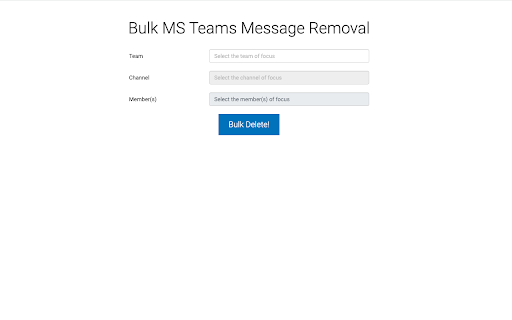

Delete Microsoft Teams messages in bulk. It supports removing messages in channels. (Caveat: it does NOT work for chats at the…
Delete Microsoft Teams messages in bulk. It supports removing messages in channels. (Caveat: it does NOT work for chats at the moment). To turn on the ability to delete others' messages as an admin, please follow the instructions here: https://github.com/polymorphic-labs/bulk-ms-teams-message-removal-extension#turn-on-admins-wider-message-deletion-capability
Also, it removes threaded messages.
ATTENTION:
There are 2 different types of licenses. You must be an admin in order to delete other people's messages.
Admin License - If you are a Teams admin, you should choose this license. It would allow you to remove other people's messages in channels. A non-admin license will let you remove your own messages only.
Non-admin License - You should choose this license if you are simply a member. Nothing prevents you from using an admin license, but you'll still only be allowed to remove your own messages.
Instructions
* Log in with your Teams login.
* Get a license via Lemonsqueezy and enter it in the extension popup.
* Select the target team, channel, etc..
* Select the message sender whose messages you would like to delete.
* Click on the Bulk Delete button.
For detailed instructions, please visit
https://github.com/polymorphic-labs/bulk-ms-teams-message-removal-extension
For support and feature requests: please ping me at https://twitter.com/noitcudni
| 分类 | 📝工作流程与规划 |
| 插件标识 | fhamjjibafmoganednmffppmhdbjedmp |
| 平台 | Chrome |
| 评分 |
☆☆☆☆☆
0
|
| 评分人数 | 1 |
| 插件主页 | https://chromewebstore.google.com/detail/bulk-ms-teams-message-rem/fhamjjibafmoganednmffppmhdbjedmp |
| 版本号 | 0.1.1 |
| 大小 | 881KiB |
| 官网下载次数 | 52 |
| 下载地址 | |
| 更新时间 | 2023-12-27 00:00:00 |
CRX扩展文件安装方法
第1步: 打开Chrome浏览器的扩展程序
第2步:
在地址栏输入: chrome://extensions/
第3步: 开启右上角的【开发者模式】
第4步: 重启Chrome浏览器 (重要操作)
第5步: 重新打开扩展程序管理界面
第6步: 将下载的crx文件直接拖入页面完成安装
注意:请确保使用最新版本的Chrome浏览器
同类插件推荐

mySpires
An unofficial assistant for INSPIRE, arXiv, and NA
Bulk MS Teams Message Removal
Delete Microsoft Teams messages in bulk. It suppor

Coupon Finder
A plain text descriptionThe Chrome extension finds

ViHN: Vim for Hacker News
Vi-style key bindings for browsing Hacker NewsVi-s

ChatGPT Soliloquy
ChatGPT-Soliloquy is a Chrome extension that allow

Graphlan Copilot
Help sync your contacts and connections data for G

Zixflow
Linkedin Connector for ZixflowMeet Zixflow—an effi

Jira View
Improves Jira Cloud (*.atlassian.net) views to mak
Twitter Long Text Editor
Twitter Long Text Editor converts the input Rich L

TIO Syntax Highlighter
Syntax highlighter for Try It Online (https://tio.

Kloser
Close all tabs and open default tabSimple extensio
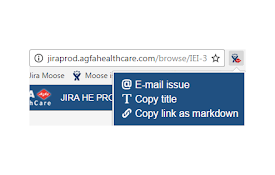
Agfa JIRA
Adds custom actions to JIRA issue pagesAgfa Jira i

Redense Clip
A companion to RedenseAI that lets you save links