
Current Track On Stream For OBS Chrome 插件, crx 扩展下载
Load current playing track from file to Scene (OBS, etc.) while streaming!
Load current playing track from file to Scene (OBS, etc.) while streaming!
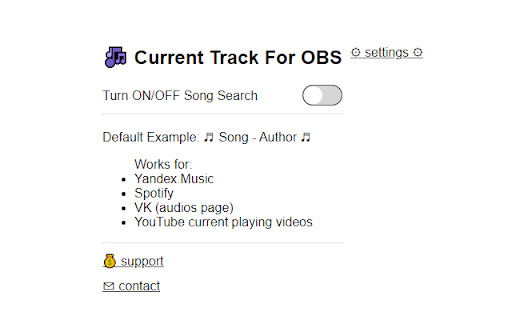
Works for:
- Yandex.Music
- Spotify
- VK (audios page)
- YouTube current playing videos
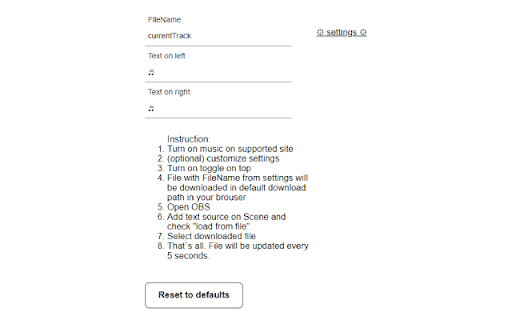
Instruction:
1 Turn on music on supported site
2 (optional) customize settings
3 Turn on toggle on top
4 File with FileName from settings will be downloaded in default download path in your brouser
5 Open OBS
6 Add text source on Scene and check "load from file"
7 Select downloaded file
8 That`s all. File will be updated every 5 seconds.
| 分类 | 🎉趣味休闲 |
| 插件标识 | fmdfloeaielhheocjapbdnliahodfaof |
| 平台 | Chrome |
| 评分 |
★★★★★
5
|
| 评分人数 | 2 |
| 插件主页 | https://chromewebstore.google.com/detail/current-track-on-stream-f/fmdfloeaielhheocjapbdnliahodfaof |
| 版本号 | 1.3 |
| 大小 | 394KiB |
| 官网下载次数 | 208 |
| 下载地址 | |
| 更新时间 | 2023-07-30 00:00:00 |
CRX扩展文件安装方法
第1步: 打开Chrome浏览器的扩展程序
第2步:
在地址栏输入: chrome://extensions/
第3步: 开启右上角的【开发者模式】
第4步: 重启Chrome浏览器 (重要操作)
第5步: 重新打开扩展程序管理界面
第6步: 将下载的crx文件直接拖入页面完成安装
注意:请确保使用最新版本的Chrome浏览器
同类插件推荐

Restream Studio Controls for Stream Deck
Unofficial extension that controls Restream Studio

Grobel - Send Screenshots to Discord
Send Screenshots to Discord with a Single Button!G

Twitch sub goal
Simple extension to customize your twitch sub goal

Music on Stream
Display your music on your streamThis extension al

Collapsed Mastodon
Collapses the main column of Mastodon for a cleane

OBS Copy
Easily copy posts in OBSBu eklentiyi kurduğunuzda
Current Track On Stream For OBS
Load current playing track from file to Scene (OBS

Now Playing - OBS
Client for OBS now playing widgetThis extension is

OBS Teleprompter
OBS Teleprompter Plugin connects to OBS StudioOBS

Chrome Virtual Camera
hook getUserMedia() / getUserMedia() を差し替え、時計や動画ファ

Steam Review Summarizer
Summarizes Steam reviews with the power of OpenAI&

Pop-up Videos
Open all videos in a tab as pop-up windows.Opens a

Youtube Chapter Progress
Chrome extension that modifies the youtube video p