
Song Lyrics Chrome 插件, crx 扩展下载
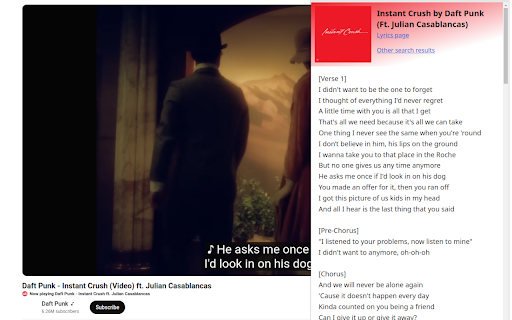
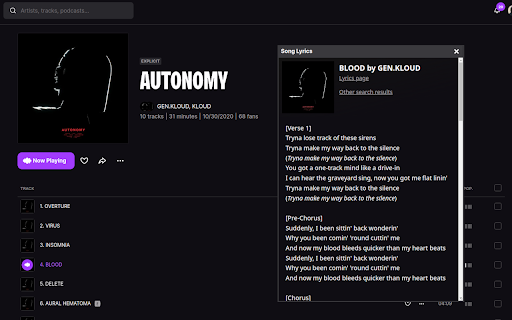
Display current song lyrics for music platforms, such as Spotify, Apple Music, Deezer, YouTube, etc.
Chrome Extension for displaying current song lyrics.
It supports a lot of music platforms, such as Spotify, Apple Music, Deezer, YouTube (with chapters), SoundCloud, etc.
You can check all platforms and other information on GitHub: https://github.com/AlexWayfer/song-lyrics?tab=readme-ov-file#song-lyrics
Right now it loads lyrics from Genius, other sources can be added in the future.
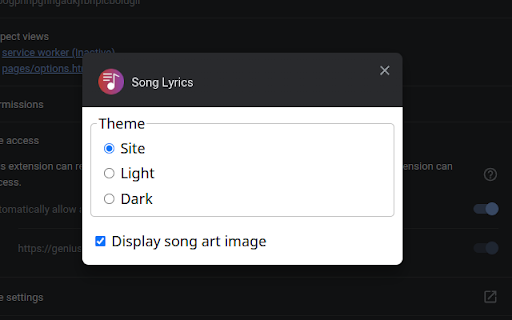
It also has options for displaying.
Changelog:
v5.1 (2024-06-26)
* Watch for parsed search query change.
You can resume watching by pressing "Refresh" button.
Works with "Remove (Mix)" checkbox correctly.
* Don't display "Remove (Mix)" checkbox when useless.
* Pin correctly with a custom search query.
* Fix parsing for YouTube.
* Fix parsing for Shazam.
* Fix border and background colors opacity for iframe popup.
* Add "Clear iframe settings" context menu.
When you've messed up with its position or size.
* Increase lyrics cache TTL from 24 hours to 7 days.
v5.0 (2024-06-20)
* Return regular popup, but add a pin button to display it as iframe.
Now you will always open the default popup window, but you can switch to iframe anytime.
* Add refresh button for re-parsing song title and artists from a site.
* Remake iframe moving actions, adopt it for zoomed pages.
* Remake CSS standard resize to a custom corner.
* Fix song art sizes.
* Allow song arts from AWS S3 (`/rapgenius`).
v4.0 (2024-06-05)
* Make popup window as iframe.
Resizable and movable.
Position and size are saving per site.
* Pass colors from popup iframe even when site is unsupported.
* Add music platforms for popup iframe on non-supported sites.
* Add query form for unsupported sites.
* Add an error notice when site doesn't work as expected.
With a link to contact the developer.
* Remove trash in square parentheses from YouTube requests.
The whole changelog: https://github.com/AlexWayfer/song-lyrics/blob/main/CHANGELOG.md
Icon: https://www.flaticon.com/free-icon/song-lyrics_6887372
| 分类 | 🎬娱乐 |
| 插件标识 | fnfipngolkdmolfocahlgjoipplhbmha |
| 平台 | Chrome |
| 评分 |
☆☆☆☆☆
0
|
| 评分人数 | 1 |
| 插件主页 | https://chromewebstore.google.com/detail/song-lyrics/fnfipngolkdmolfocahlgjoipplhbmha |
| 版本号 | 5.1 |
| 大小 | 146KiB |
| 官网下载次数 | 2000 |
| 下载地址 | |
| 更新时间 | 2024-06-26 00:00:00 |
CRX扩展文件安装方法
第1步: 打开Chrome浏览器的扩展程序
第2步:
在地址栏输入: chrome://extensions/
第3步: 开启右上角的【开发者模式】
第4步: 重启Chrome浏览器 (重要操作)
第5步: 重新打开扩展程序管理界面
第6步: 将下载的crx文件直接拖入页面完成安装
注意:请确保使用最新版本的Chrome浏览器
同类插件推荐

geniuspot
Use Spotify miniplayer on genius.com instead of Ap

Spotify Side Lyrics
Enjoy synchronized Spotify Lyrics in your side bar

SwagLyrics for Spotify
Get lyrics of currently playing Spotify song so yo

Lyrics Redux for Spotify
Romanize Spotify lyrics for easy singingEasily sin

LyricTuneYT
LyricTuneYT is a browser extension that enhances y

Lyrics Finder
Chrome Extension to easily pull up lyrics for any

Lyrics Fetcher
Fetching lyrics from youtube song being played!Fet
Lyrics Here by Rob W
Instant lyrics on YouTube, Spotify and other sites

Genius Lyrics for YouTube Music
Turn YouTube Music into a lyrical genius!Are you t

Better Lyrics (Lyrics for Youtube Music)
Enhance YouTube Music with beautiful time-synced l

Lyrics for YouTube Music
Search and show lyrics for YouTube Music, from Mel

Lyrics ( Youtube / Youtube Music )
Displays lyrics in a flexible panel at YouTube and
Song Lyrics
Display current song lyrics for music platforms, s