
Onion Browser Button Chrome 插件, crx 扩展下载
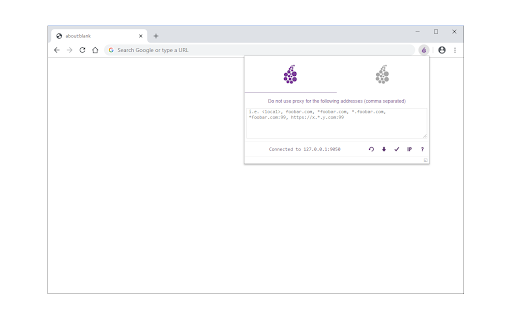
Easily browse the internet using TOR proxy with just one click!
Onion Browser Button is an extension that let you easily connect to TOR network in your browser (browse under TOR proxy).
Important note: this addon does NOT belong or relate to Tor® project and has NO affiliations with Tor® anonymity software or website at all. It is basically an unofficial extension that is developed and maintained independently by its author.
Before using the addon please make sure your computer (PC or MAC) is connected to TOR. If you do NOT know how to connect your PC or MAC to the TOR network please read the following. A separate patch is prepared, to help users easily connect to the TOR network. In order to get the patch please visit this (https://github.com/jeremy-jr-benthum/onion-browser-button/releases) GitHub repo and download (mac.zip) or (win.zip) files.
After downloading the patch to your computer, please follow the below steps to connect your machine to TOR network.
1. If you have Windows machine, please download and unzip "win.zip" file to your computer, and if you have Mac download and unzip "mac.zip".
2. For windows machine, please open downloaded "win" folder and run "run.bat" file within the folder. For Mac please open "win" folder and run "run.sh" file.
3. You will see the screen with 6 options. In order to start TOR connection on your computer, please press 1 on your keyboard, once "Tor is connected successfully!" message is displayed, you can use Tor Browser Button add-on to connect your browser to the TOR network. To stop TOR connection please press 2. In order to get a new TOR identity, please press 5 and to restart TOR connection, please press 6 on your keyboard.
Note: to report bugs, please visit addon's homepage (https://mybrowseraddon.com/tor-button.html) and fill the bug report form.
| 分类 | 🛠️工具 |
| 插件标识 | fockhhgebmfjljjmjhbdgibcmofjbpca |
| 平台 | Chrome |
| 评分 |
★★★☆☆
3.9
|
| 评分人数 | 7 |
| 插件主页 | https://chromewebstore.google.com/detail/onion-browser-button/fockhhgebmfjljjmjhbdgibcmofjbpca |
| 版本号 | 0.2.5 |
| 大小 | 98.28KiB |
| 官网下载次数 | 20000 |
| 下载地址 | |
| 更新时间 | 2024-09-22 00:00:00 |
CRX扩展文件安装方法
第1步: 打开Chrome浏览器的扩展程序
第2步:
在地址栏输入: chrome://extensions/
第3步: 开启右上角的【开发者模式】
第4步: 重启Chrome浏览器 (重要操作)
第5步: 重新打开扩展程序管理界面
第6步: 将下载的crx文件直接拖入页面完成安装
注意:请确保使用最新版本的Chrome浏览器
同类插件推荐

TOR Browser Extension
Tor for browsers, one click start.Quickly use the

Cupcake
Snowflake for ChromeCupcake empowers you to assist

Onion VPN with Speed Control
同时连接到多个Tor代理服务器,使用负载平衡来提高匿名性和速度。This extension off

Onion Browser Button
Easily browse the internet using TOR proxy with ju

Anonymous
Search anything with 100 % anonymity.Our privacy p
Proxy Client for Onion
通过Tor的SOCKS5代理服务器隧道你的网络请求,并隐藏你的IP地址。This extension

Browse with Onion
Easily browse desired websites with tor (onion) pr

Torry
Torry - Search Anonymously with TorTorry is a sear
Tor Browser
Visit '.onion' sites and unlock blocked si
Open in Onion Browser
Improve your privacy while visiting unknown links

FireX Proxy
FireX ProxyFireX Proxy allows you to change your I

Snowflake
利用你的网络连接,为遭受网络审查的用户提供访问 Tor 网络的方式。Snowflake allows

OWASP Penetration Testing Kit
OWASP Penetration Testing KitThe Penetration Testi