
Download with FlashGet™ Chrome 插件, crx 扩展下载
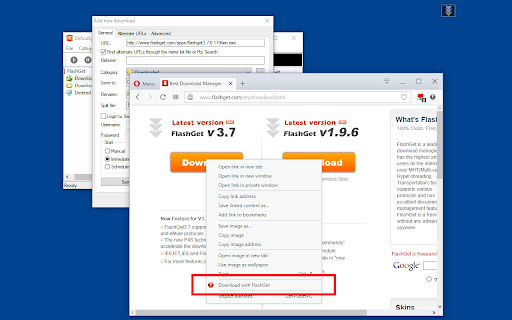
Optionally send your downloading jobs to the well-known FlashGet™ download manager
This extension adds a toolbar button to your browser which integrates the well-known FlashGet™ download manager to your browser. There are two modes of operation:
1. Right-click menu item to send links, images, and videos to FlashGet.
2. Interruption mode: in this mode, the extension interrupts the built-in download manager and send the downloading job to FlashGet download manager (you need to enable this mode by left-clicking the toolbar button first).
Notes:
1. For the extension to work you need to have FlashGet (1.X like v1.73, or v1.9.6.1073) installed.
2. FlashGet versions 3.x do not support command-line options and hence are not supported.
3. For the extension to be able to start FlashGet and communicate with it, a small native client is required. I am using the native integration by @belaviyo (https://github.com/belaviyo/native-client/releases). It is a simple NodeJS open-source native integrator.
--- Legal
FlashGet is a trademark of Trend Media Corporation Limited, registered in the U.S. and other countries. This extension is an independent project aims to ease the integration and has no relationship to the FlashGet or Trend Media Corporation Limited.
| 分类 | 📝工作流程与规划 |
| 插件标识 | gecfhmlaldelfoeahjahajoooenmnlnd |
| 平台 | Chrome |
| 评分 |
★★★★☆
4.3
|
| 评分人数 | 141 |
| 插件主页 | https://chromewebstore.google.com/detail/download-with-flashget/gecfhmlaldelfoeahjahajoooenmnlnd |
| 版本号 | 0.2.1 |
| 大小 | 82.52KiB |
| 官网下载次数 | 10000 |
| 下载地址 | |
| 更新时间 | 2023-05-08 00:00:00 |
CRX扩展文件安装方法
第1步: 打开Chrome浏览器的扩展程序
第2步:
在地址栏输入: chrome://extensions/
第3步: 开启右上角的【开发者模式】
第4步: 重启Chrome浏览器 (重要操作)
第5步: 重新打开扩展程序管理界面
第6步: 将下载的crx文件直接拖入页面完成安装
注意:请确保使用最新版本的Chrome浏览器
同类插件推荐

RPNet Helper
Download the selected links using RPNetRPNet Helpe

Bulk Media Downloader
Grab and download media (image and video) sources

Download with Download Accelerator Plus (DAP)
Send download links to the DAP download manager by

Download with Ant Download Manager
Download files with Ant Download Manager (AntDM)An

StreamMania extension
StreamMania download plugin for Google ChromeExten

Internet Download Accelerator
Intercept downloads for Internet Download Accelera

Download with FlashGet™
Optionally send your downloading jobs to the well-

Download with Free Download Manager (FDM)
Sends your downloading jobs to the Free Download M

Download with JDownloader
通过中断内置的下载管理器或从右键上下文菜单中,将浏览器与JDownloader整合起来。This e

Elite Download Manager
Easily manage all your downloads from toolbar popu

FlareGet Integration
FlareGet Browser Integration extension replaces de

Download Master - Free Download Manager
Download all files in one click. Free video downlo

DownThemAll!
适用您浏览器的批量下载工具DownThemAll will help you select, que