
Map Overlays Chrome 插件, crx 扩展下载
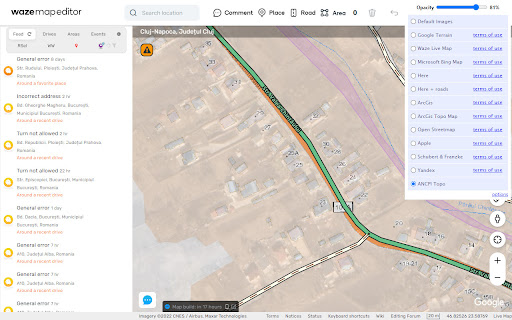
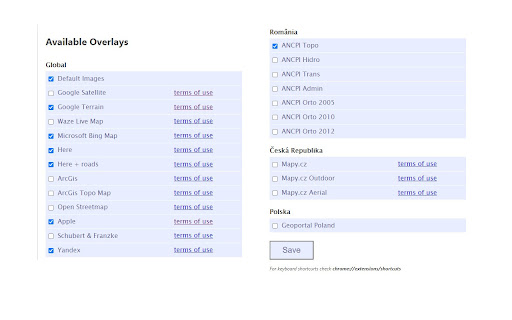
Change satellite images in mapping websites.
Provides an easy way to change the satellite images displayed in Google My Map and Waze Map Editor. There's several international maps available and some country specific (Romania, Poland, Check Republic).
Supported sites:
• waze.com/editor
• google.com/mymaps
After installing the extension, you'll need to pin it to your Chrome toolbar. This will make its icon appear at the top of your browser window. Once pinned, you can use the icon to interact with the layer selection menu and other extension features.
There is a shortcut, default Alt+L, to switch between the default layer and selected layer. You can change the keybinding in the chrome settings chrome://extensions/shortcuts
Do not use layers for editing the maps unless you comply with the terms of use specific to each layer provider.
| 分类 | 📝工作流程与规划 |
| 插件标识 | ggbadcghmcpofonkoeepddbabdkfbbia |
| 平台 | Chrome |
| 评分 |
★★★★☆
4.3
|
| 评分人数 | 7 |
| 插件主页 | https://chromewebstore.google.com/detail/map-overlays/ggbadcghmcpofonkoeepddbabdkfbbia |
| 版本号 | 4.2.0 |
| 大小 | 281KiB |
| 官网下载次数 | 3000 |
| 下载地址 | |
| 更新时间 | 2024-12-02 00:00:00 |
CRX扩展文件安装方法
第1步: 打开Chrome浏览器的扩展程序
第2步:
在地址栏输入: chrome://extensions/
第3步: 开启右上角的【开发者模式】
第4步: 重启Chrome浏览器 (重要操作)
第5步: 重新打开扩展程序管理界面
第6步: 将下载的crx文件直接拖入页面完成安装
注意:请确保使用最新版本的Chrome浏览器
同类插件推荐

WME OpenData
Provides access to certain OS OpenData products wi

WME UR FAST
Envia Texto de UR RapidamenteEasily insert informa

Find In Map...
This extension lets you query an ArcGIS Online web

WME-JunctionAngle
This extension adds junction angle information to

Map Maker Overlay
Overlay a circle, image, KML or Terrain on Google

UROverview
Adds a whole bunch of features to WME, which somed

Enhancer for Google Map Maker™
Спрощує життя пересічного картографаПокращи свою р

Map Replace
This extension will allow you to replace Google Ma
Map Overlays
Change satellite images in mapping websites.Provid

OpenSwitchMaps
Switch map services, and some useful links for Ope

Minimalistic tab with OpenStreetMap
Minimalistic New tab page that displays interestin

WME Toolbox
Adds many features to the Waze editorIMPORTANT NOT

Map Switcher
Switch between different map services. Convert coo