
Email Sender Icons by cloudHQ Chrome 插件, crx 扩展下载
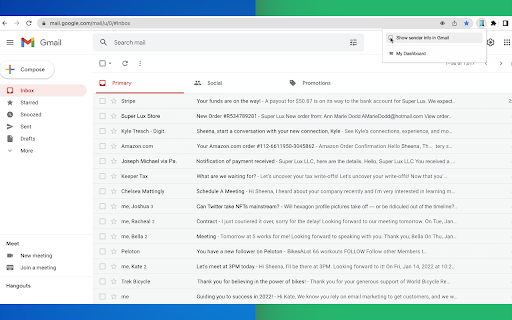
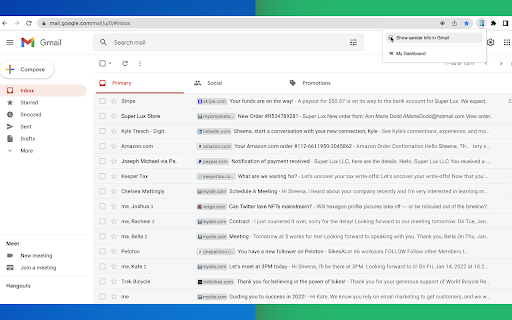

Identify Companies in Your Inbox.
It's no secret that companies have more purchasing power than individuals, so identifying them in your inbox can be helpful when you need to triage who you reply back to first.
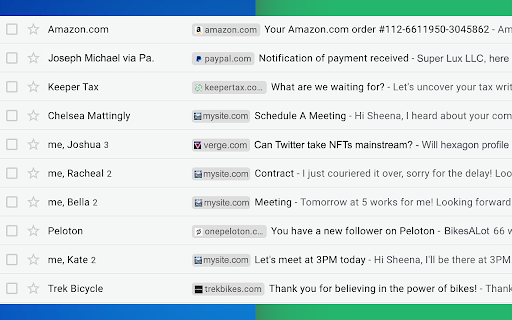
Email Sender Icons by cloudHQ does just that. It visually associates an official company logo (favicon) to someone who sends you an email, without having to open the email itself. It's like "caller id" for your email.
Now you can prioritize triaging your email response time to large companies first, instead of individuals with a free email account on platforms like Gmail™, Yahoo, Hotmail, etc.
Easily Identify:
- Companies in your inbox
- Invoices to pay (Paypal, Venmo, etc)
- Inter-office emails
- Purchase Orders
The icon (aka favicon) is determined by the sender's email domain address, and appears on the same line as your email preview.
For example, if you receive an email from [email protected], this Gmail™ extension will add the Tesla logo next to your message preview so that you can immediately identify that Elon is probably very important and you should return his message before others in your inbox.
A note on privacy and security:
All logo (favicon) processing is done locally within your browser, and no Gmail™ data is ever uploaded or shared anywhere.
cloudHQ. Helping your productivity, 1 click at a time.
cloudHQ Website: https://www.cloudhq.net/
App Website: https://www.email-sender-icons.com
Pricing: FREE
Support page: https://support.cloudhq.net
Blog: https://support.cloudhq.net/category/browser-extensions/email-sender-icons/
Gmail is a trademark of Google LLC. Use of this trademark is subject to Google Permissions.
| 分类 | 💬沟通 |
| 插件标识 | ggmjpbolghodajmlbemkmflffcnfjgeb |
| 平台 | Chrome |
| 评分 |
★★★★☆
4.5
|
| 评分人数 | 91 |
| 插件主页 | https://chromewebstore.google.com/detail/email-sender-icons-by-clo/ggmjpbolghodajmlbemkmflffcnfjgeb |
| 版本号 | 1.0.1.2 |
| 大小 | 582KiB |
| 官网下载次数 | 1000 |
| 下载地址 | |
| 更新时间 | 2024-04-01 00:00:00 |
CRX扩展文件安装方法
第1步: 打开Chrome浏览器的扩展程序
第2步:
在地址栏输入: chrome://extensions/
第3步: 开启右上角的【开发者模式】
第4步: 重启Chrome浏览器 (重要操作)
第5步: 重新打开扩展程序管理界面
第6步: 将下载的crx文件直接拖入页面完成安装
注意:请确保使用最新版本的Chrome浏览器
同类插件推荐

Email Sender Icons by cloudHQ
Identify Companies in Your Inbox.It's no secre

Highlight Emails in Gmail by cloudHQ
Highlight Email Rows in GmailColor code email rows

Notes for Gmail™ by cloudHQ
Add annotations on your emails to remember somethi

Email Zoom Text Reader by cloudHQ
为低视力用户量身定制的 Gmail 放大和阅读程序⚠️ Stop squinting! ⚠️ D

Gmail Tabs by cloudHQ
将 Gmail 标签或 Gmail 过滤器设置为标签Google automatically org
Email Signature Generator by cloudHQ
cloudHQ 提供的免费电子邮件签名生成器和签名模板Are you looking for an

Sort Gmail Inbox by cloudHQ
Find an email in seconds with free preset filtersF

Auto Label for Google Gmail™ by cloudHQ
Automatically create filters and labels for client
Email Reply Status
Stop wasting time sorting through emails: Instantl
Display Email Time by cloudHQ
在 Gmail 中显示电子邮件的完整日期和时间Gmail shows the date of an
Formatted Email Subject Lines by cloudHQ
Formatted email subject lines: underscore, bold, i

Copilot for Gmail™ by cloudHQ
Mini CRM for your GmailCopilot for Gmail™ is a min
Free Email Tracker by cloudHQ
实时了解您的电子邮件何时打开Now you can find out when your email