
Email Reply Status Chrome 插件, crx 扩展下载
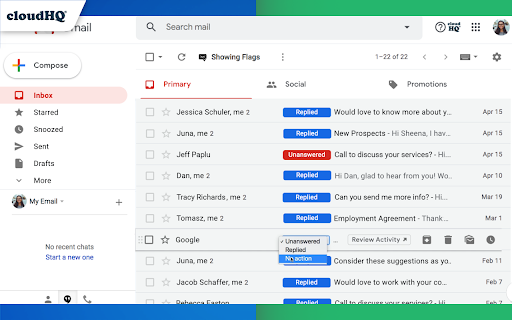
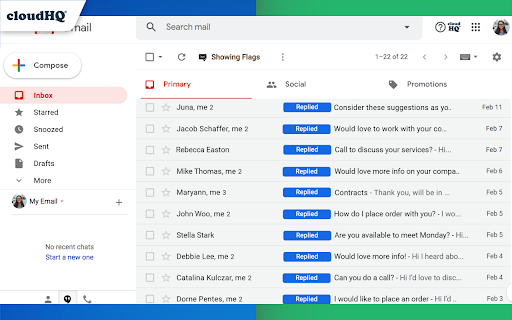

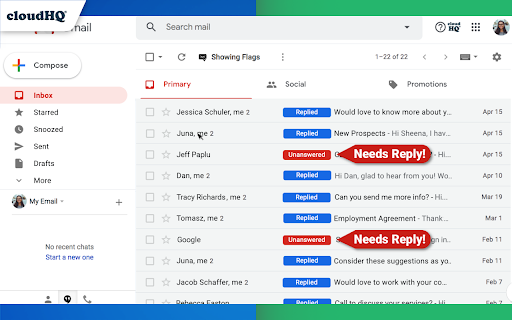
Stop wasting time sorting through emails: Instantly know which of your emails needs a reply back.
Never drop the ball again. Now you can know exactly which emails need a reply with Email Reply Status.
You'll have an inbox indicator that will tell you:
1. Which emails you need to reply to
2. The emails that you already replied to
3. Those that you don't need to reply to at all
*NOTE*: For best performances set Gmail page size to 50 emails or less.
It's a perfect tool for:
✅ Small business owners
✅ Sales people
✅ Business people who are just too busy to keep track of emails
✅ Customer service representatives
✅ Customer support personnel
With Email Reply Status, never miss another opportunity again!
cloudHQ. Helping your productivity, 1 click at a time.
cloudHQ website: https://www.cloudhq.net/
App website: https://www.email-reply-status.com/
Pricing: https://www.email-reply-status.com/pricing
Support page: https://support.cloudhq.net/category/browser-extensions/gmail-reply-status/
Blog: https://blog.cloudhq.net
| 分类 | 💬沟通 |
| 插件标识 | pjajkjcilhmhciekmbigpblaakjphkgl |
| 平台 | Chrome |
| 评分 |
★★★★☆
4.7
|
| 评分人数 | 54 |
| 插件主页 | https://chromewebstore.google.com/detail/email-reply-status/pjajkjcilhmhciekmbigpblaakjphkgl |
| 版本号 | 1.0.2.0 |
| 大小 | 618KiB |
| 官网下载次数 | 4000 |
| 下载地址 | |
| 更新时间 | 2024-04-24 00:00:00 |
CRX扩展文件安装方法
第1步: 打开Chrome浏览器的扩展程序
第2步:
在地址栏输入: chrome://extensions/
第3步: 开启右上角的【开发者模式】
第4步: 重启Chrome浏览器 (重要操作)
第5步: 重新打开扩展程序管理界面
第6步: 将下载的crx文件直接拖入页面完成安装
注意:请确保使用最新版本的Chrome浏览器
同类插件推荐
URL Link Previews for Gmail™ by cloudHQ
Automatically add full web URL link previews when

Gmail Tabs by cloudHQ
将 Gmail 标签或 Gmail 过滤器设置为标签Google automatically org
Time Tracker for Gmail™ by cloudHQ
Time logging service to help you track your readin

Auto Follow Up for Gmail™ by cloudHQ
Automated follow up emails and mail mergeAuto Foll

Sort Gmail Inbox by cloudHQ
Find an email in seconds with free preset filtersF
Auto Label for Google Gmail™ by cloudHQ
Automatically create filters and labels for client
Email List Builder by cloudHQ
Build a spreadsheet with all your Gmail contacts a
Email Reply Status
Stop wasting time sorting through emails: Instantl

Gmail Message Preview by cloudHQ
Preview emails in inbox.Do you want to be able to
Get My Receipts by cloudHQ
Extract digital receipts and invoices from your em
Formatted Email Subject Lines by cloudHQ
Formatted email subject lines: underscore, bold, i

Copilot for Gmail™ by cloudHQ
Mini CRM for your GmailCopilot for Gmail™ is a min
Free Email Tracker by cloudHQ
实时了解您的电子邮件何时打开Now you can find out when your email